





hellbhoy
Members
-
Joined
-
Last visited
-
i was able to setup windows 11 and install intel gpu driver using vnc. but everytime i tried to use the onboard graphics all i get is blank screen, but seems to boot up but no display and sound. i follow alot of guide but no luck. if i used dedicated graphics (nvidia p2000) everything work normal but of course jellyfin transcoding will not work not even start the jellyfin. can anyone help me on configuring vm using onboard graphics and sounds thanks!
-
I cant use this configuration. All my new download used the cache drive. The thing i dont get and i cant find out is some of my old tv show folder that i have in array still appearing on my cache drive 😟. When i try to move it will be moved and will be gone on my cache then will appear again, i dont know if its few hours, days, or minutes. Next time ill check it will be showing again in cache drive.
-
I wonder it only happened on certain tv show. My movie and other media file that is under the share folder Works fine.
-
I will try it later. Thanks for help
-
Yes i used cache but once i moved it to array. It will be gone in cache drive but after few days folder will appeared again on my cache drive but empty, only the main title show folder. I have screen shots of my cache drive. All the tv show is on the array already and keeps going back to cache drive.

-
Attached diagnostic r5-diagnostics-20250103-0846.zip
-
My shared media folder uses cache to array but after i moved it to array some of the tv show folder is showing back in the cache drive but its empty folder. I dont know if its a sonarr / unraid issue. Need help figuring out. Thanks
-
what is the fastest and safest way to replace two data drive? i have 2 parity drive and 8 data drive. i already moved the content of my disk 3 and 4 (failing drive with reported uncorrect) using unbalanced. what should be the next step shall i take and how? should i be more concern and replace the drive right away? i attached a copy of smart report but i don't know which item i should be looking at and tell myself alright change the drive. on the new drive can i pre clear it using different unraid system? thanks in advance! ST8000DM004-2CX188_ZCT0C8RB-20241126-0402.txt ST8000DM004-2CX188_ZCT38HSW-20241126-0404.txt
-
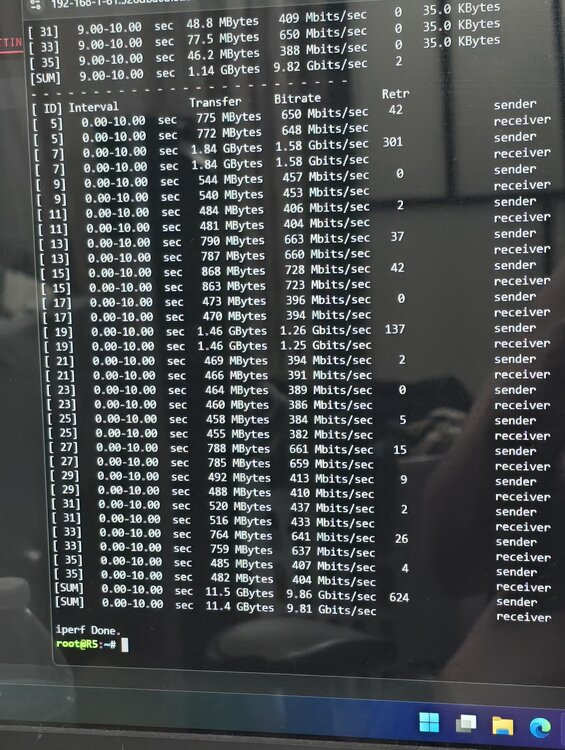
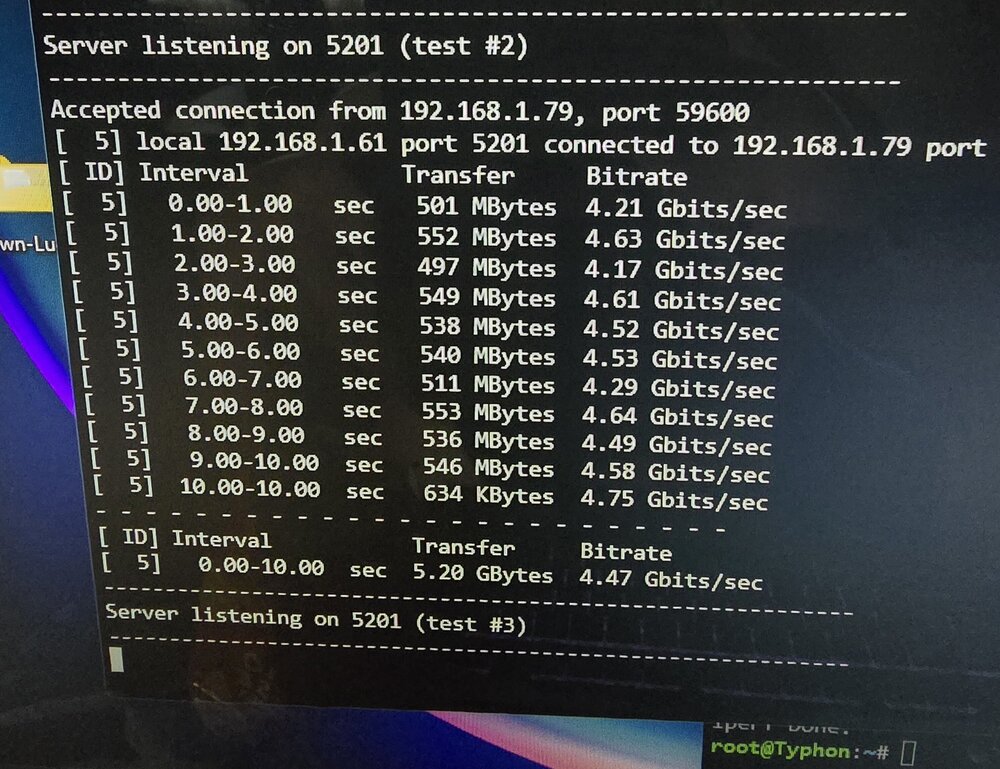
I tried iperf3 parallel connections see results on the photo. I also disable flow control on the UDMSe but enable it on both unraid. ( disabling it on unraid side doesnt get any improvement). MTU both on 9014. Tried different TxRx buffer size not much different. Tried Nic offload on and off not much different. If i run iperf3 single it only giving me 5Gbps.
-
Is this normal for 10gbe speed transfer for 2 unraid server both have 10gbe nic connected to udmse using dac sfp+? It show interface is 10000 Mbps but transfer rate on iperf3 is half.
-
I think deleting those cfg fixed my issue thank you again
-
i deleted disk.cfg and media.cfg on my flash drive and reboot the system. created new media share folder and start the copy, so far it is writing now on the 4th disk. i will give update after i finished all the copy. is the split level differ from the old version of unraid? I remember when i setup both my main and backup server, setting it on level 3 with no issue at all. Thanks for fast replies JorgeB 😊
-
I did tried to set it but still doing the same. I also tried renamed my old media share to media 1 and created new media share with new split level to automatic and high water. Copy all the content from media 1 to media, and fill up those 3 disk again and give me like no more space error.
-
hello i need help on my media share folder i deleted all of my content on my media share and try to load all back my media from my other unraid server backup. i disabled my two parity just to increased the write rate. i have 8 disk in array excluding the two parity. but when i try to write the files back it only writes on disk 1, 5 and 8 leaving disk 5 almost full. tried creating new media share and still the same scenario. what, where i did wrong? please advise. thank you my media share setting is high-water and include all disk. r5-diagnostics-20241031-0015.zip
-
I will replace the flash drive later and give update. Thanks


