





Cyong
Members
-
Joined
-
Last visited
-
Small update. I followed the instructions to remove the disk from the array, and then start, stop, re-add, let the rebuild occur. However a few hours later the rebuild 'paused' around 12% (interestingly, that would be about 1.8TB...) and the disk was disabled again. I have installed a new hard drive yesterday and it has been building into the array very somethly and should complete sometime later today. I am guessing after it completes I should perform a zfs scrub on that disk, make note of any uncorrectable files, delete them and restore from backup?
-
Ok, its a replaceable file from backup. What next?
-
hmmm, ok... So what is the path forward then for a disabled disk in the array and the zfs errors on the disk? pool: disk11 state: ONLINE status: One or more devices has experienced an error resulting in data corruption. Applications may be affected. action: Restore the file in question if possible. Otherwise restore the entire pool from backup. see: https://openzfs.github.io/openzfs-docs/msg/ZFS-8000-8A scan: scrub canceled on Mon Jan 27 08:50:20 2025 config: NAME STATE READ WRITE CKSUM disk11 ONLINE 0 0 0 /dev/mapper/md11p1 ONLINE 0 0 0 errors: 1 data errors, use '-v' for a list
-
Ok, I have ensured the HBA is seated fully. (Didnt feel like it moved) Could that be due to the zfs scrub i cancelled when i was confused why it was using the entire array?
-
Ok, I have ensured the cable are seated. Its a 20tb drive but should have about 17.9 TB of data (according to the Unraid UI) What steps should I take to repair the zpool status and restore the array health? run parity check then zfs clear/scrub or reverse?
-
unraid-diagnostics-20250127-1443.zip
-
My current thoughts are to replace the drive, let the rebuild occur, then perform a scrub, and use whatever the output is of zpool status -v to identify specific files to delete/restore from backup
-
This morning I was informed of an unclean shutdown, I looked at the array (all zfs formatted) and all seemed fine, so i started the array. I went to get coffee an came back to hundreds of thousands of errors corrected during parity sync. One of my drives showed as "Device Disabled, contents emulated". I examined the zpool status and (my mistake) issued a scrub cause I thought the drive was online but just needed a scrub to clear errors. a few minutes later I figured out it was using the entire array emulation to 'scrub' the disk which didnt make sense to me, and cancelled that... At this point I decided to stop and seek advice. Specific steps to restore the array with as little loss as possible. I have a new hard drive arriving tommorow. But I am curious the 'order of operations' of steps I should be taking to get back on track.
-
Small update (mostly in case someone in future comes across this thread), issues remained following scrub. I have put another NVME in the pool to mirror. (Might remove the older drive since I am now suspect of it. But will let it be for a few weeks so I can monitor.
-
Just finished an extended SMART test. Seems fine... === START OF SMART DATA SECTION === SMART overall-health self-assessment test result: PASSED SMART/Health Information (NVMe Log 0x02) Critical Warning: 0x00 Temperature: 50 Celsius Available Spare: 100% Available Spare Threshold: 10% Percentage Used: 1% Data Units Read: 46,218,571 [23.6 TB] Data Units Written: 116,839,170 [59.8 TB] Host Read Commands: 674,662,771 Host Write Commands: 1,289,118,304 Controller Busy Time: 8,746 Power Cycles: 133 Power On Hours: 6,984 Unsafe Shutdowns: 66 Media and Data Integrity Errors: 0 Error Information Log Entries: 116 Warning Comp. Temperature Time: 0 Critical Comp. Temperature Time: 0 Temperature Sensor 1: 50 Celsius Temperature Sensor 2: 48 Celsius Error Information (NVMe Log 0x01, 16 of 64 entries) Num ErrCount SQId CmdId Status PELoc LBA NSID VS Message 0 116 0 0xc00d 0x4004 - 0 0 - Invalid Field in Command Self-test Log (NVMe Log 0x06) Self-test status: No self-test in progress Num Test_Description Status Power_on_Hours Failing_LBA NSID Seg SCT Code 0 Extended Completed without error 6984 - - - - - 1 Short Completed without error 6984 - - - - -
-
I issued a zfs scrub (last one was on the 28th as part of routine schedule), and it finished in about 10 minutes with the status "scrub repaired 0B in 00:08:51 with 0 errors on Sat Jan 11 12:35:36 2025"
-
It is possible that at the time it occurred most recently, that sonarr had just finished adding a new series to the cache pool (seperate drive)... So plex might have been in the middle of doing its video preview thumbnails, and thus writing to the appdata folder on the apps pool?
-
Setup OS - I am running Unraid 7 (now), but this behavior started under 7-RC2, and the ZFS pool in question was created on Unraid 6.12.x and upgraded in 7-RC2. Hardware - Samsung NVME 970 Evo Plus m.2 2TB Pool - Currently I have a separate pool called 'apps' with a single NVME SSD formatted with zfs (encrypted) Shares - Single user share called _Docker that is set to only use the 'apps' pool for all its content. The docker setup itself is set to use a directory on the disk writing natively. Problem I find that my dockers become un-responsive, and while trying to go to the dockers tab the UI itself starts to become unresponsive. I ultimately would restart the server and everything would be fine. Frequency I was at first noticing this every week to two weeks, but is starting to become a more frequent. (Daily? Every other day? ) Research Well, i got lucky and the most recent occurence happened when i actually had time to dig into it. I managed to see the following errors in the log.. Jan 11 11:56:32 UnRaid kernel: nvme0n1: I/O Cmd(0x2) @ LBA 2333508352, 8 blocks, I/O Error (sct 0x3 / sc 0x71) Jan 11 11:56:32 UnRaid kernel: I/O error, dev nvme0n1, sector 2333508352 op 0x0:(READ) flags 0x100 phys_seg 1 prio class 2 Jan 11 11:56:32 UnRaid kernel: zio pool=apps vdev=/dev/mapper/nvme0n1p1 error=5 type=1 offset=1194738450432 size=4096 flags=1572992 Jan 11 11:56:32 UnRaid kernel: nvme0n1: I/O Cmd(0x1) @ LBA 3725170904, 24 blocks, I/O Error (sct 0x3 / sc 0x71) Jan 11 11:56:32 UnRaid kernel: I/O error, dev nvme0n1, sector 3725170904 op 0x1:(WRITE) flags 0x100 phys_seg 2 prio class 0 Jan 11 11:56:32 UnRaid kernel: zio pool=apps vdev=/dev/mapper/nvme0n1p1 error=5 type=2 offset=1907269677056 size=12288 flags=1572992 Jan 11 11:56:32 UnRaid kernel: nvme nvme0: Abort status: 0x371 Jan 11 11:56:32 UnRaid kernel: nvme nvme0: Abort status: 0x371 Jan 11 11:57:02 UnRaid kernel: nvme nvme0: Device not ready; aborting reset, CSTS=0x1 Jan 11 11:57:02 UnRaid kernel: nvme nvme0: Disabling device after reset failure: -19 Jan 11 11:57:02 UnRaid kernel: zio pool=apps vdev=/dev/mapper/nvme0n1p1 error=5 type=2 offset=1907269689344 size=12288 flags=1572992 Jan 11 11:57:02 UnRaid kernel: zio pool=apps vdev=/dev/mapper/nvme0n1p1 error=5 type=1 offset=1656869781504 size=4096 flags=1572992 Jan 11 11:57:02 UnRaid kernel: zio pool=apps vdev=/dev/mapper/nvme0n1p1 error=5 type=1 offset=1194876846080 size=4096 flags=1572992 Jan 11 11:57:02 UnRaid kernel: zio pool=apps vdev=/dev/mapper/nvme0n1p1 error=5 type=1 offset=144180969472 size=102400 flags=1572992 Jan 11 11:57:02 UnRaid kernel: zio pool=apps vdev=/dev/mapper/nvme0n1p1 error=5 type=1 offset=1638384283648 size=69632 flags=1573248 Jan 11 11:57:02 UnRaid kernel: zio pool=apps vdev=/dev/mapper/nvme0n1p1 error=5 type=1 offset=1788073746432 size=4096 flags=1572992 Jan 11 11:57:02 UnRaid kernel: zio pool=apps vdev=/dev/mapper/nvme0n1p1 error=5 type=1 offset=1638389989376 size=69632 flags=1573248 Jan 11 11:57:02 UnRaid kernel: zio pool=apps vdev=/dev/mapper/nvme0n1p1 error=5 type=1 offset=270336 size=8192 flags=721089 Jan 11 11:57:02 UnRaid kernel: zio pool=apps vdev=/dev/mapper/nvme0n1p1 error=5 type=1 offset=2000380502016 size=8192 flags=721089 Jan 11 11:57:02 UnRaid kernel: zio pool=apps vdev=/dev/mapper/nvme0n1p1 error=5 type=1 offset=2000380764160 size=8192 flags=721089 Jan 11 11:57:02 UnRaid kernel: WARNING: Pool 'apps' has encountered an uncorrectable I/O failure and has been suspended. Ahh ok, so this device is an m.2 directly connected on the motherboard and hasnt been touched since installation a few years ago. (I did add an Nvidia Quadro card in the past month or so, but I dont think it would affect it.) So thinking the connection is fine I tried to issue "zpool clear apps" and was finding it hanging for 5+ minutes. During which I looked at the... zfs pool status pool: apps state: SUSPENDED status: One or more devices are faulted in response to IO failures. action: Make sure the affected devices are connected, then run 'zpool clear'. see: https://openzfs.github.io/openzfs-docs/msg/ZFS-8000-HC scan: scrub repaired 0B in 00:13:45 with 0 errors on Wed Jan 1 03:13:46 2025 config: NAME STATE READ WRITE CKSUM apps ONLINE 0 0 0 /dev/mapper/nvme0n1p1 ONLINE 10 4 0 errors: 16 data errors, use '-v' for a list zfs pool information AME SIZE ALLOC FREE CKPOINT EXPANDSZ FRAG CAP DEDUP HEALTH ALTROOT apps 1.81T 942G 914G - - 16% 50% 1.00x SUSPENDED - nvme0n1p1 1.82T 942G 914G - - 16% 50.8% - ONLINE I waited a little bit longer, before ultimately, once again, restarting the server. Once the server came back up, everything looks fine. I issued a zfs scrub (last one was on the 28th as part of routine schedule), and it finished in about 10 minutes with the status "scrub repaired 0B in 00:08:51 with 0 errors on Sat Jan 11 12:35:36 2025" Question / Help So at this point I am a bit lost as to what the issue is that is causing the zfs pool to get suspended, and require manual intervention on my behalf to restore functionality. My only working idea is that the SSD is starting to go bad. But if anyone has any thoughts on other issues, items to check, I would love to hear it
-
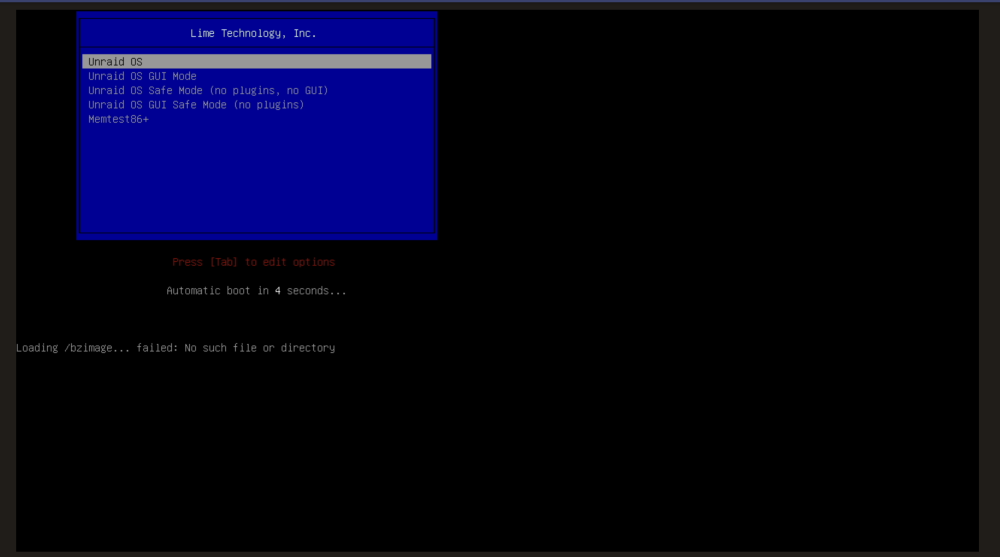
Greetings, So, I think that my upgrade from 6.12.3 to 6.12.4 went sideways. Following clicking the reboot button via the unraid GUI. I find the system unable to boot, and gives the message "Loading /bzimage... Failed: No such file or Directory" when i attempt to use the safe mode, i get the same error. Any thoughts? Or should I grab my backup and restore? (that is 3 weeks old cause I forgot to do a backup right before upgrading, I have gotten to used to unraid 'just working', my mistake.) Kind Regards,
-
So as it stands today I have all my array data drives formatted as xfs - encrypted. Also I have 4 pools as follows Apps (xfs) for Docker/VM -Single NVME Cache (btrfs) for writing to Array - Single SATA SSD Aux (btrfs) for user shares of things I want served fast - 2xNVME Scratch (xfs) for SMB general purpose temporary - Single SATA SSD I am aware of the benefits of zfs with things like TrueNAS, and making performant zpools for an enterprise. I am already planning to format the Apps to zfs for checkpoints. But what about the array data disks, and the other pools ? What benefits would zfs bring, and when should it be considered over the other filesystems?

