jderby6119
Members
-
Joined
-
Last visited
-
I i tried using your app but after i go to the super admin panel and change the password and user name nothing happens. I logout after the notification banner says its been updated but when i try to login with new credentials i just reverts back to the superadmin account.
-
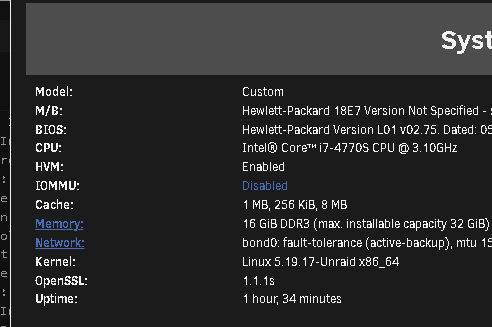
Looks like it dont have Vt-d or IOMMU enabled should I load the enable in the host bios?
-
is this what your looking for?
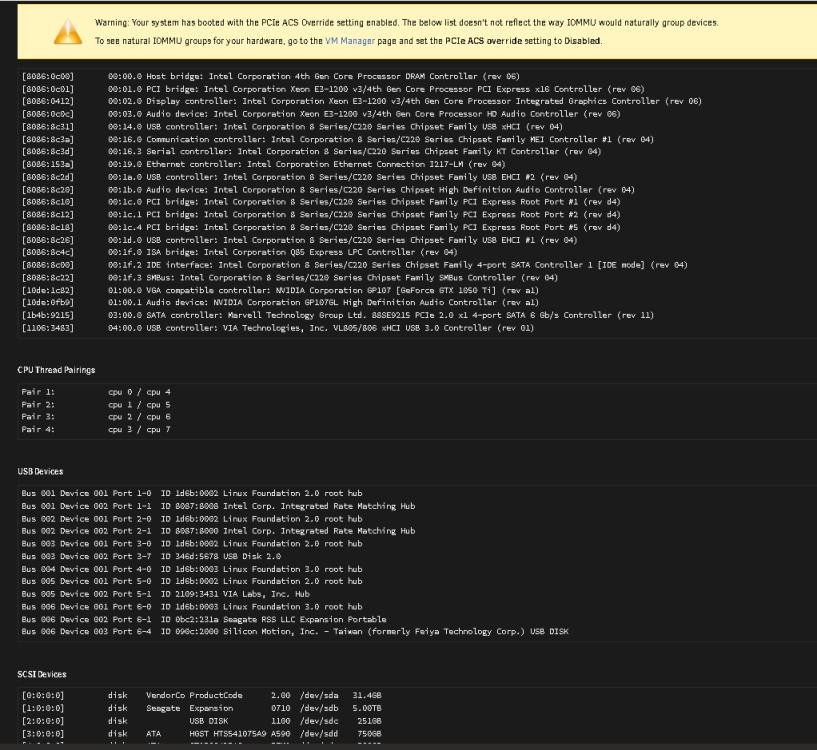
-
OUTPUT OF lspci -m -nn: 00:00.0 "Host bridge [0600]" "Intel Corporation [8086]" "4th Gen Core Processor DRAM Controller [0c00]" -r06 -p00 "Hewlett-Packard Company [103c]" "4th Gen Core Processor DRAM Controller [18e7]" 00:01.0 "PCI bridge [0604]" "Intel Corporation [8086]" "Xeon E3-1200 v3/4th Gen Core Processor PCI Express x16 Controller [0c01]" -r06 -p00 "Hewlett-Packard Company [103c]" "Xeon E3-1200 v3/4th Gen Core Processor PCI Express x16 Controller [18e7]" 00:02.0 "Display controller [0380]" "Intel Corporation [8086]" "Xeon E3-1200 v3/4th Gen Core Processor Integrated Graphics Controller [0412]" -r06 -p00 "Hewlett-Packard Company [103c]" "Xeon E3-1200 v3/4th Gen Core Processor Integrated Graphics Controller [18e7]" 00:03.0 "Audio device [0403]" "Intel Corporation [8086]" "Xeon E3-1200 v3/4th Gen Core Processor HD Audio Controller [0c0c]" -r06 -p00 "Hewlett-Packard Company [103c]" "Xeon E3-1200 v3/4th Gen Core Processor HD Audio Controller [18e7]" 00:14.0 "USB controller [0c03]" "Intel Corporation [8086]" "8 Series/C220 Series Chipset Family USB xHCI [8c31]" -r04 -p30 "Hewlett-Packard Company [103c]" "8 Series/C220 Series Chipset Family USB xHCI [18e7]" 00:16.0 "Communication controller [0780]" "Intel Corporation [8086]" "8 Series/C220 Series Chipset Family MEI Controller #1 [8c3a]" -r04 -p00 "Hewlett-Packard Company [103c]" "8 Series/C220 Series Chipset Family MEI Controller [18e7]" 00:16.3 "Serial controller [0700]" "Intel Corporation [8086]" "8 Series/C220 Series Chipset Family KT Controller [8c3d]" -r04 -p02 "Hewlett-Packard Company [103c]" "8 Series/C220 Series Chipset Family KT Controller [18e7]" 00:19.0 "Ethernet controller [0200]" "Intel Corporation [8086]" "Ethernet Connection I217-LM [153a]" -r04 -p00 "Hewlett-Packard Company [103c]" "Ethernet Connection I217-LM [18e7]" 00:1a.0 "USB controller [0c03]" "Intel Corporation [8086]" "8 Series/C220 Series Chipset Family USB EHCI #2 [8c2d]" -r04 -p20 "Hewlett-Packard Company [103c]" "8 Series/C220 Series Chipset Family USB EHCI [18e7]" 00:1b.0 "Audio device [0403]" "Intel Corporation [8086]" "8 Series/C220 Series Chipset High Definition Audio Controller [8c20]" -r04 -p00 "Hewlett-Packard Company [103c]" "8 Series/C220 Series Chipset High Definition Audio Controller [18e7]" 00:1c.0 "PCI bridge [0604]" "Intel Corporation [8086]" "8 Series/C220 Series Chipset Family PCI Express Root Port #1 [8c10]" -rd4 -p00 "Hewlett-Packard Company [103c]" "8 Series/C220 Series Chipset Family PCI Express Root Port [18e7]" 00:1c.1 "PCI bridge [0604]" "Intel Corporation [8086]" "8 Series/C220 Series Chipset Family PCI Express Root Port #2 [8c12]" -rd4 -p00 "Hewlett-Packard Company [103c]" "8 Series/C220 Series Chipset Family PCI Express Root Port [18e7]" 00:1c.4 "PCI bridge [0604]" "Intel Corporation [8086]" "8 Series/C220 Series Chipset Family PCI Express Root Port #5 [8c18]" -rd4 -p00 "Hewlett-Packard Company [103c]" "8 Series/C220 Series Chipset Family PCI Express Root Port [18e7]" 00:1d.0 "USB controller [0c03]" "Intel Corporation [8086]" "8 Series/C220 Series Chipset Family USB EHCI #1 [8c26]" -r04 -p20 "Hewlett-Packard Company [103c]" "8 Series/C220 Series Chipset Family USB EHCI [18e7]" 00:1f.0 "ISA bridge [0601]" "Intel Corporation [8086]" "Q85 Express LPC Controller [8c4c]" -r04 -p00 "Hewlett-Packard Company [103c]" "Q85 Express LPC Controller [18e7]" 00:1f.2 "IDE interface [0101]" "Intel Corporation [8086]" "8 Series/C220 Series Chipset Family 4-port SATA Controller 1 [IDE mode] [8c00]" -r04 -p8f "Hewlett-Packard Company [103c]" "8 Series/C220 Series Chipset Family 4-port SATA Controller 1 [IDE mode] [18e7]" 00:1f.3 "SMBus [0c05]" "Intel Corporation [8086]" "8 Series/C220 Series Chipset Family SMBus Controller [8c22]" -r04 -p00 "Hewlett-Packard Company [103c]" "8 Series/C220 Series Chipset Family SMBus Controller [18e7]" 01:00.0 "VGA compatible controller [0300]" "NVIDIA Corporation [10de]" "GP107 [GeForce GTX 1050 Ti] [1c82]" -ra1 -p00 "ZOTAC International (MCO) Ltd. [19da]" "GP107 [GeForce GTX 1050 Ti] [2454]" 01:00.1 "Audio device [0403]" "NVIDIA Corporation [10de]" "GP107GL High Definition Audio Controller [0fb9]" -ra1 -p00 "ZOTAC International (MCO) Ltd. [19da]" "GP107GL High Definition Audio Controller [2454]" 03:00.0 "SATA controller [0106]" "Marvell Technology Group Ltd. [1b4b]" "88SE9215 PCIe 2.0 x1 4-port SATA 6 Gb/s Controller [9215]" -r11 -p01 "Marvell Technology Group Ltd. [1b4b]" "88SE9215 PCIe 2.0 x1 4-port SATA 6 Gb/s Controller [9215]" 04:00.0 "USB controller [0c03]" "VIA Technologies, Inc. [1106]" "VL805/806 xHCI USB 3.0 Controller [3483]" -r01 -p30 "VIA Technologies, Inc. [1106]" "VL805/806 xHCI USB 3.0 Controller [3483]"
-
Not sure why but file transfers seem to better after changing a few settings:
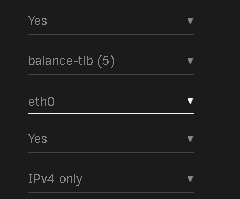

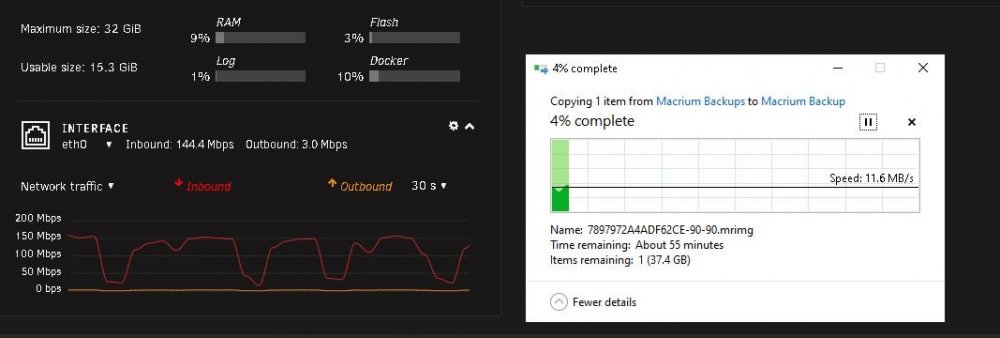
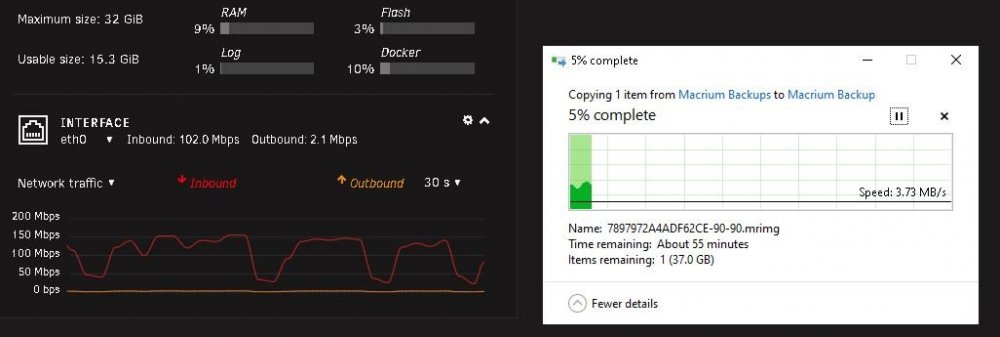
 yea unfortunately theres no viable sitatuion where i can get my router and desktop to ethernet without have some wire running across my floor. I get good up/down speeds when im on the internet on my desktop especially when doing downloads but when traferring files in my local network between desktop and unraid box does this weird up and down and gives me nothing near the speeds like when im downloading something off the internet.What happens when you stop/pause the inbound transfer? >>Same thing happen. Start up hits 150Mbs then dips to then goes up again in same pattern during transfer Where is that incoming traffic coming from? >>Its a single 30gb back file from may desktop in my office to sharedrive on unraid server in garage. Both are connected to same router Desktop via wifi and Unraid via ethernet Are you using a cache drive/array for the inbound traffic? >>No Cache drive What are you writing to on the Windows computer? >>Im moving a backup file from my computer to the unraid share drive server You should also attach a diagnostics file while this transfer is going on. Be sure to indicate the approximate time interval when it is happening. thundrshare-diagnostics-20220617-1929.zipI can figure out why if network interface of the router and server are both 1000Mbps and the transfer is all internal to local network 16 GiB DDR3 (max. installable capacity 32 GiB) Network: bond0: transmit load balancing, mtu 9000 eth0: 1000 Mbps, full duplex, mtu 9000 Kernel: Linux 5.15.46-Unraid x86_64