





eoun
Members
-
Joined
-
Last visited
Everything posted by eoun
-
Can this be a sign of failing drives or is this "normal"?
-
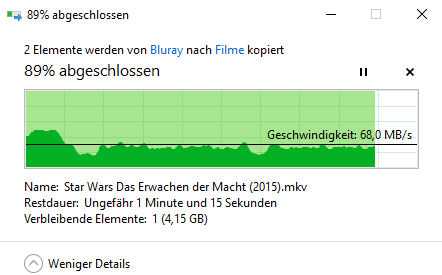
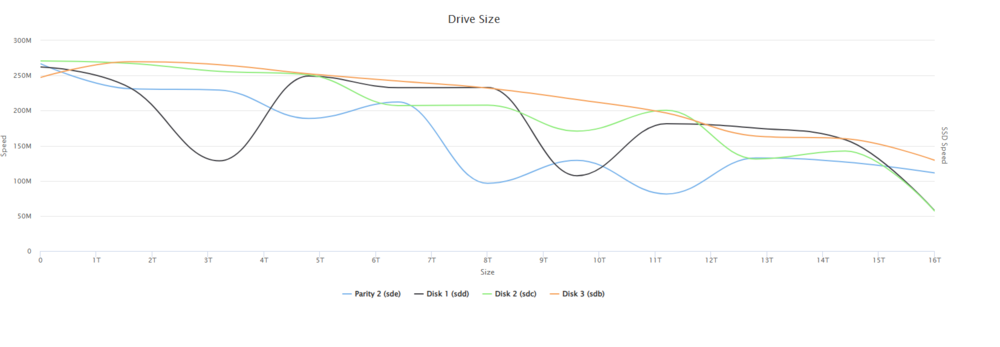
The Windows graph ist without. It is a lot better with reconstruct write enabled. The Drive are not new. I had used them bevor for a diverent projekt, and there were unused for about 1-2 years.
-
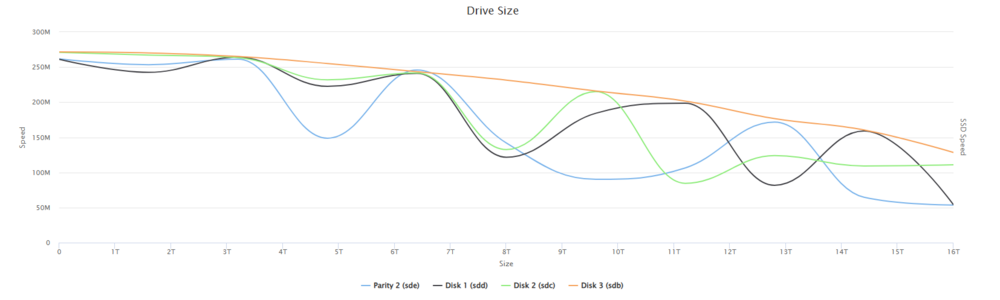
Hoi everyone! I have recently upgraded my HDDs in my server: (AMD Ryzen 5 2600X, B450M PRO-M2, 16GB RAM, 256gb Cache SSD). I have upgrade from 3x 2TB WD reds to 4x16tb Thosiba Enterprise Capacity My Transfers to my Plex share are slow and inconsistent (see picture 1) If I test the speed I got the following results (see picture 2 and 3. 3 was with "reconstruction write" on in the seetings) I don’t know why this is so inconsistent I have tried using “Auto Turbo Write Mode” and setting reconstruction write in the Settings. The parity is done and valid. For the Plex I don’t use the cache Drive. I have also noticed that the disk do not spin down at night, however I have set the spin down time to 30min Has anyone a Idea why this is behaving that way? If you need more Information please just ask. (I am not so familiar in that topic so don’t know what is required)
-
I have switch to a different location with a different provider. And everything worked fine. In Short: When I use the LTE Connection nothing is working. If I switch to a wired connection (different provider and different modem) everything is working fine. I have not tried switching LTE provider or switching LTE Modem. Because this would involve some not so small investment.
-
OK Thank you very much. I have moved the computer to a diverent location. With a wirded connection. This place has the same rouder. And there it works (at least the fist test) I will make more test to see if erverythink is working. I think ther is some problem with the lte connection. But I have no Idea what. In both of the setups the modem is in brige mode and a external rouder is used. The modem in brige mode cant block anythink right?
-
Sorry for the long waiting time. I have talk to my carier. It was not easy. They said that I have a public ip. No it is not static. The Ip adress from the terminal and from the router is the same. Can I check if cgnat is active?
-
I have reinstalled everything and I got a little bit closer to the Problem. I have followed this guide: https://www.youtube.com/watch?v=vPvuqR20tO4&t=15s To problem what I have is that I can not create an SSL certificate. This is not possible (I think) because I cannot access this webpage through my external ip address. When I typ in my external IP address (see Video 2:08) I should come to nigx webpage. This works only in the internal lan. But when I try to reach my external ip address in from the outside, the page cannot load. Somehow my external ip address “is not working” what could be the problem?
-
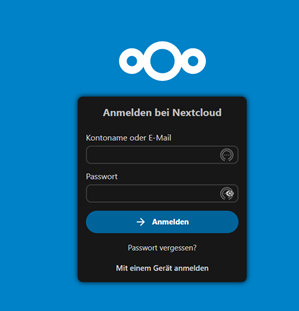
Hello I have just installed Nextcloud in Unraid. But I cant login. I have installed Nextcloud and then I created a admin user. When I click create the page loads and I get an error. After I refresh the page I come to the login page. But regardless of what I typ in I come back to this exact page. No error even if I typ in a wrong password. I have tried installing it multiple times. I even uninstalled unraid and formatted all disks. Has someone an Idea? I think it is a problem with the new nextcloud version. I have followed this guide:
-
Thanks for the response. Unfortional, I have found another problem. I can access my server from the internal network. This works via the ip andress as well as the xxx.duckdns.org address. (for both nextcloud and hassio) But when I want to access the server via an external connection it is not working. All the ports should be set up correctly (port forwarding). I have also asked my LTE provider and they are not blocking any ports. I also have my own external ip. I have no idea what can cause this behavior. My setup. I am using a Huawei b525s in bridge mode and an netgear ax40v2. I have an ax40 in my old setup and there it is working fine. (but there a wired internet connection). Edit: I have checked all the ports (https://canyouseeme.org/) but they are closed. So I think somehow my portforwarding does not work correctly.
-
I have found the problem. The solution was quite simple. I just forgot the port when entering the external address. For all who are looking for the solution here some more detail on how I configured it: In Unraid: Configure only nextcloud and the Nginx Proxy Manager. Set the port forwarding accordingly. In Hassio: I have just configured the duckdns addon. (no Nginx Proxy Manager, etc) In the configuration.yaml enable ssl. Set the port forwarding accordingly (to the ip address of the vm, not the unraid server) (in my case port 8123) When using the external address typ: https://xxx.duckdns.org:yyyy/ (xxx ist your domain, yyyy ist the port) Two more hints: Your rouder need to support Nat loopback. And if you are using a Wireless (LTE) connection you need to apply for an own public ip (at least for my provider).
-
Hello I have my Hassio (home assistant) running on a VM in Unraid (Hassio has a own IP). This works fine. On Unraid I also have installed Nextcloud. To Access the Nextcloud I am using duckdns and Nginx Proxy Manager. This works fine as well. But now I want to use duckdns to access hassio. But this makes problems. I have installed the duckdns addon in Hassio. But when I want to access hassio via duckdns (I have created a own domain for hassio) I only come to the Nginx Proxy Manager welcome screen. I have tried to configure Nginx but without luck. (I have tried settings in unraid and in hassio but nothing has worked). I have no idea how I should set up this construct. Has someone an idea? Thanks
-
Thanks for the input. Now it just worked. I have no idee what I did different.
-
Hello Unfortunately I have a problem with Unraid. When I want to log into the server, the GUI just doesn't work. To the history: I had already been running an Unraid server for years, which I have now upgraded. In the process, I wanted to redo the configuration. AKA start from scratch. I did that with success. Everything worked. Now I wanted to connect Nextcloud to the internet with duckdns like before. However, this simply did not work. You have to know that I have redone the whole thing on an extra network because the system also got a change of location. To find out if the problems were caused by the new router/network, I wanted to connect the NAS to the old network again. I also thought that I would start the config from scratch to rule out any errors. I have made the complete USB stick again and started the server. Everything is OK so far. I enter the root password and want to log in with it. Unfortunately no success. (see video). I have also tried to load directly into the GUI (directly on the PC) but there is only a flashing bar. I have also loaded the USB stick with version 6.10 (instead of 6.11) but this has unfortunately brought no success. Does anyone have an idea what I can do? Thanks a lot 2022-10-09 19-40-24.mkv



