pro_info
Members
-
Joined
-
Last visited
-
Hi, You tried to do this procedure directly with sqlite https://support.plex.tv/articles/201100678-repair-a-corrupt-database ?
-
Ok, but it's ok with nfs sharing it works (and it's more logical from linux to linux by the way) Problem solved
-
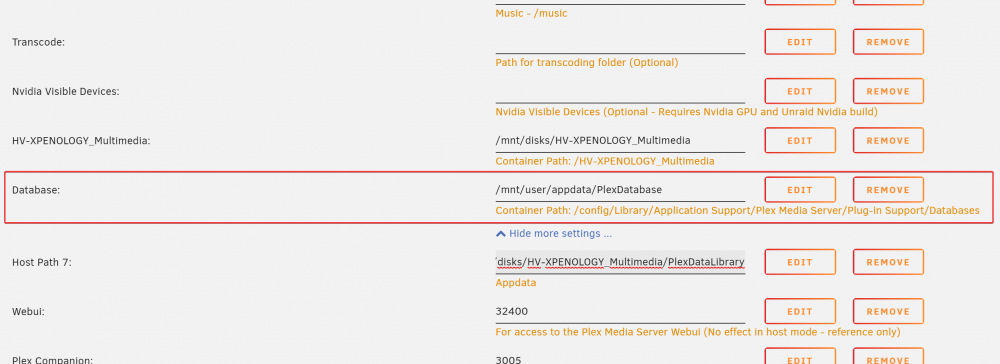
Hi Guys, I have a problem when I try to use plex database (sqlite files) from shared folder. The Plex Media Scanner.log file says this : Apr 26, 2020 12:37:07.320 [0x149258f88700] INFO - Plex Media Scanner v1.19.2.2702-776106bc6 - Docker Docker Container (LinuxServer.io) x86_64 - build: linux-x86_64 - GMT 02:00 Apr 26, 2020 12:37:07.321 [0x149258f88700] INFO - Linux version: 4.19.107-Unraid, language: en-US Apr 26, 2020 12:37:07.321 [0x149258f88700] INFO - Processor Intel(R) Core(TM) i7-9700K CPU @ 3.60GHz Apr 26, 2020 12:37:07.321 [0x149258f88700] INFO - /usr/lib/plexmediaserver/Plex Media Scanner --scan --refresh --section 1 --activity 85cf03a2-9a9b-44cf-b9fe-91d32acc6f64 Apr 26, 2020 12:37:07.028 [0x149260f722c0] DEBUG - Opening 20 database sessions to library (com.plexapp.plugins.library), SQLite 3.26.0, threadsafe=1 Apr 26, 2020 12:37:28.400 [0x149260f722c0] ERROR - SQLITE3:(nil), 4106, os_unix.c:36721: (5) close(/config/Library/Application Support/Plex Media Server/Plug-in Support/Databases/com.plexapp.plugins.library.db) - Input/output error Apr 26, 2020 12:37:58.355 [0x149260f722c0] ERROR - SQLITE3:(nil), 4106, os_unix.c:36721: (5) close(/config/Library/Application Support/Plex Media Server/Plug-in Support/Databases/com.plexapp.plugins.library.db) - Input/output error Apr 26, 2020 12:38:28.413 [0x149260f722c0] ERROR - SQLITE3:(nil), 4106, os_unix.c:36721: (5) close(/config/Library/Application Support/Plex Media Server/Plug-in Support/Databases/com.plexapp.plugins.library.db) - Input/output error My config folder is in R/W slave and the permissions are set correctly on my synology. (The sharing is, of course, mounted via unraid with Unassigned Devices.) Everything runs perfectly when you have done this: So all the Plex folder with the plugins and the cache is on synology, except the Database folder which is on the unraid array. So my question is, how do I get everything on the synology, including the database folder? Thanks a lot (I'm new on unraid since 1 week ^^) (and not English)