hysel
Members
-
Joined
-
Last visited
-
It was the CPU, got a new 5900x today and everything works now thanks everyone for the support and help
-
I now think that this was the CPU all along 😔 I have a personal computer with 5600x in it. I switched CPUs, and everything started working! Before I go and try to replace it with the same CPU, should I expect a problem running a 5900x with my setup (see above)? are there enough PCI-E lanes? will a 5950x will be a better choice here? I also saw some posts about changing the EDC and curve optimizer to try to "fix" this issue thanks Itamar
-
Yep, I think I going to rip everything out from the case and start from scratch. Just to make sure it is not a short-circuit.
-
Thank you, I'll wait for your response
-
The saga continues PSU arrived today. I plugged it in, Same problem. 😓 Ok then, let's switch gears. I thought maybe the fact that my SAS 9300-8I controller "doesn't like" the fact that both HDD and SSD drives so I decided to disconnect only the SSD drives. It workd! I tried connecting and disconnecting the SSD drives just to verify and as long as I didn't connect the SSD drives to the SAS controller, I was able to boot unRaid. Next, I connected my SSD drives to the on-board controller. Still works! At this point, I was happy as a clam and decided to fully install the PSU including cable management etc. I turned the PC on again, fully expecting to put this to rest and... It failed again 🤣🙃😭 I am at a lost here. Some more information about the SAS controller. I am running Firmware version 16.0.12.0 Anyone else has any other ideas? Itamar
-
Thanks for the explanation. I ordered a 1000W PSU which looks like having more SATA rails available in it: EVGA Supernova 1000 P6, 80 Plus Platinum https://www.amazon.com/dp/B09CRLRPBD/ref=cm_sw_r_apan_glt_i_A60Y0JAG02KPA4MND298 Should be here first thing in the morning so I will be able to test again.
-
Update On an hunch, I tired to replace my PSU with another 750W i had in the house. I was able to make some progress in terms of having unRaid load with all my PCI-E cards but... I have 6 x Seagate 6TB HDD, 2 Samsung 512 SSD and 1 Kingstone 256 SSD. As-soon-as I connect the 4 of the HDD drivers, everything works great, I add the other 2 HDD, same problem... 🤨. It is not a specific drive, I can choose which 4 HDD I want to connect and they will work fantastic. So.... does a 750W PSU not enough for this setup? Thanks Itamar
-
Tried to put the "Power Supply Typical Idle" to both Typical and Low but the problem still persist
-
I am running the latest BIOS (4004) I will look for the Power Supply settings (I am not familiar with them)
-
I already did, that is the first thing I disable
-
Another observation I disconnected everything from MB except for a GPU and my 2XM2 drives and I still got the same situation Given that I replaced the MB and RAM already, could it be that I encountered a bad CPU as well? I can successfully install ESX 7, TrueNAS and TrusNAS scale. I do get some restart issues when trying to run a VM but I am starting to wounder what else I can do here? Is there a way to perform a CPU text like memtestx86? (I can google but would love to hear some suggestions) Thanks in advance Itamar
-
Tried that but it didn't work.. I noticed that the memory kit was not on the ASUS compatability list. I ordered a new one just in case. Will update soon..
-
Update I don't think it was the Motherboard. I replaced it with Asus Crosshair VIII Hero wifi and I got the same error.... The next thing I did was to replace the RAM, I had a 2666Mhz kit which I replaced with a 3600MHz one. The interesting part is this, when I had all 4 DIMMS installed, the problem happened again. I removed 2 DIMMS and it worked. I re-installed the 2 other 2 DIMMS and the system worked 🤨. One interesting observation is the Motherboard is showing up post code FF even when unRaid starts... Ok... I tried adding my other storage devices, the system didn't boot up. I upgraded to the latest BIOS version (3801-->4004), didn't work. The FF code was not good, so I tried to troubleshoot, I disconnected the CPU 2nd 4 pin power connector, didn't work. I put it back, system boot up but I still see code FF. I am at a lost at the moment, I don't think FF is a good sign to have on a motherboard. Any suggestions?
-
Update It looks like the motherboard is busted. I ordered a new one and will update soon Itamar
-
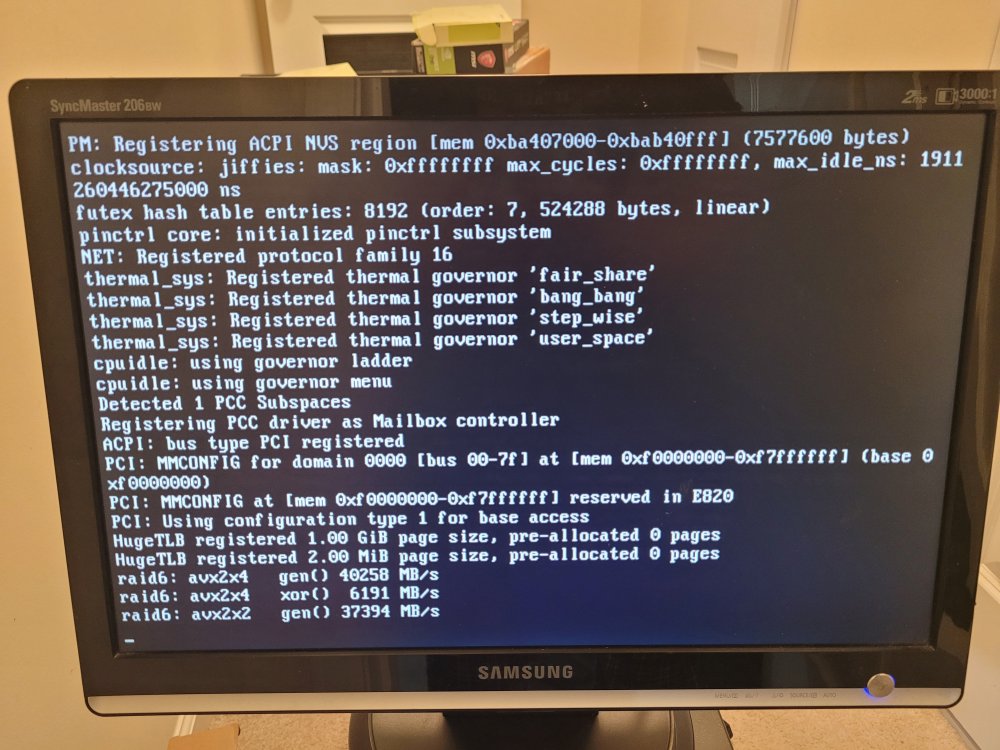
Thanks for the quick reply Switching to legacy "helped" a little I can now see more of the loading script but the PC still crashes. I was able to take a picture on what was the last message on the screen before the PC restarted