ScoopGP
Members
-
Joined
-
Last visited
Everything posted by ScoopGP
-
Thanks! Should I go to the effort of removing the BIOS on the card, or just set this option to "Do not launch" and be done with it? EDIT: I bought the card flashed to "IT mode" if that matters.
-
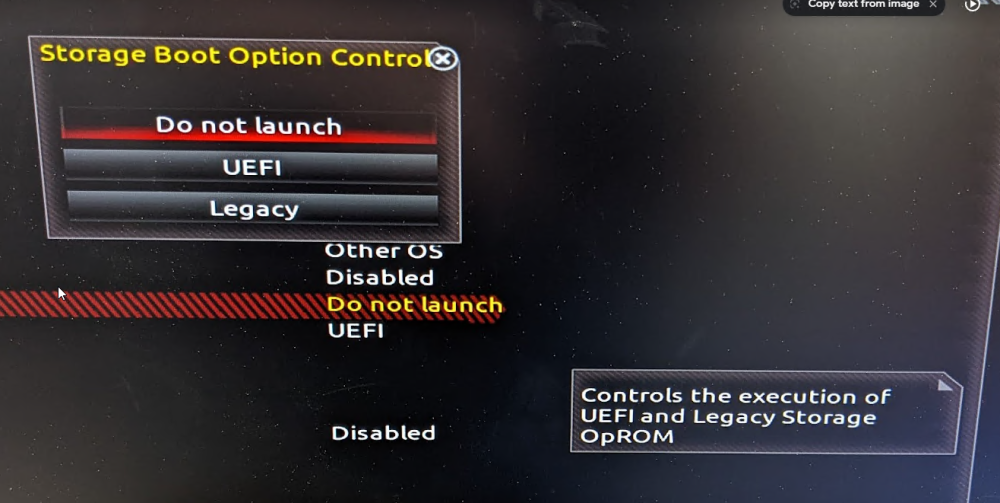
Hello, I'm using a LSI 9201-8i card with a Gigabyte ga-z170x-gaming 6 motherboard. The moterboard UEFI settings have an option called "Storage Option Boot Control" with a description of "Controls the execuation of UEFI and Legacy Storage OpROM. I figured out that it's controlling whether to execute the UEFI or legacy BIOS of the LSI card itself and I noticed the following behavior. "Legacy" - After the motherboard's splash screen, the BIOS screen for the LSI card flashes by and I get a prompt to hit "CTRL-C" to change settings. "UEFI" - the motherboard's splash screen stays on the screen longer in lieu of the LSI card's BIOS screen. In addition, settings for the LSI card show up in the motherboard's UEFI settings. "Do not launch" - No BIOS screens for the card presents itself. The Unraid boot selection screen appears very quicky, which I like. Options for the LSI card do not show up in the motherboards UEFI settings. The drives show up in Unraid regardless of which of these three options I choose, but I wanted to check with folks here to see if there was a best practice and to avoid any potential issues down the road. I'm leaning towards the "Do not launch" settings because of the quicker boot time. Will this cause any performance issues, or does it just keep me from adjusting settings in the card's firmware? Thanks very much for your help advice!
-
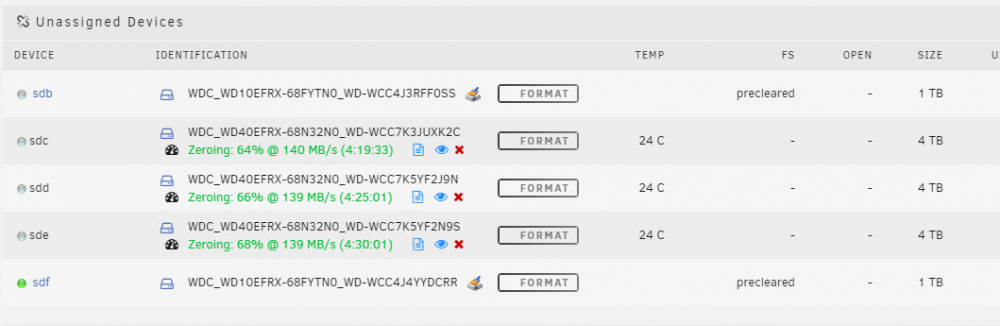
Hi guys, Noob here, but could anyone tell me what the green dot means in this context? I'm preclearing my drives before setting up an array. The two 1tb drives have already been precleared. I started the preclear process on the 3 4tb drives, and one of the 1tb drives lights up green. What do the indicators mean in this context. I don't think there's necessarily a problem, but I don't understand what it's telling me here. Thanks!