





acurunner79
Members
-
Joined
-
Last visited
Everything posted by acurunner79
-
Appreciate the help @Squid!
-
@SquidI just tried that but still same results, it just gets stuck in this infinite Updating state as soon as I hit "Update".
-
Hello, I'm currently trying to create a second vDisk by I want to use an NVME on my motherboard. It's listed as an SCSI device so I've tried selecting both SATA and SCSI for the vDisk bus but when I try to update the template it just locks up and does nothing. I'm currently running unRaid version 6.9.2 Here's how I'm configuring it: 2nd vDisk Location: Manual /mnt/disks/SPCC_M.2_PCIe_SSD_29770703151401295374/ 2nd vDisk Size: "I leave this empty but I've also tried using a specific size" 2nd vDisk Type: raw 2nd vDisk Bus: SATA or SCSI The only thing I haven't tried was changing the type to "qcow2" Any help would be greatly appreciated! Thanks!
-
Hello, Has anyone here successfully installed PopOs? As I'm going thru the process of installing, it just shuts down right when I'm done setting up my account info. I can never get passed the actual install. I'm currently running 6.10.0 rc1. Thanks in advance!
-
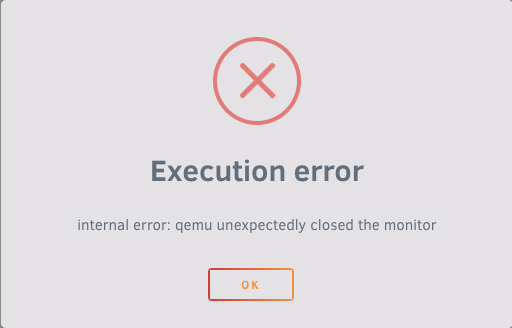
I'm having an issue when attempting to passthrough my gpu. When I attempt to run my vm using the gpu I get the error above "Execution error" internal error: qemu unexpectedly closed the monitor. This issue only started occurring when I removed my system libvirt.img to fix another issue had in where the vms would not update the settings. I was able to run my vm in VNC so it does work. I've read that some others are having a similar issue but none that I can see are a fix for my issue. I'm currently running 6.9.2. Again, any help would be greatly appreciated! Here's my xml for my Windows vm: <domain type='kvm'> <name>Windows 10</name> <uuid>67c3670b-1ad9-6852-f823-724a9af413a9</uuid> <metadata> <vmtemplate xmlns="unraid" name="Windows 10" icon="windows.png" os="windows10"/> </metadata> <memory unit='KiB'>15204352</memory> <currentMemory unit='KiB'>15204352</currentMemory> <memoryBacking> <nosharepages/> </memoryBacking> <vcpu placement='static'>16</vcpu> <cputune> <vcpupin vcpu='0' cpuset='0'/> <vcpupin vcpu='1' cpuset='8'/> <vcpupin vcpu='2' cpuset='1'/> <vcpupin vcpu='3' cpuset='9'/> <vcpupin vcpu='4' cpuset='2'/> <vcpupin vcpu='5' cpuset='10'/> <vcpupin vcpu='6' cpuset='3'/> <vcpupin vcpu='7' cpuset='11'/> <vcpupin vcpu='8' cpuset='4'/> <vcpupin vcpu='9' cpuset='12'/> <vcpupin vcpu='10' cpuset='5'/> <vcpupin vcpu='11' cpuset='13'/> <vcpupin vcpu='12' cpuset='6'/> <vcpupin vcpu='13' cpuset='14'/> <vcpupin vcpu='14' cpuset='7'/> <vcpupin vcpu='15' cpuset='15'/> </cputune> <os> <type arch='x86_64' machine='pc-i440fx-5.1'>hvm</type> <loader readonly='yes' type='pflash'>/usr/share/qemu/ovmf-x64/OVMF_CODE-pure-efi.fd</loader> <nvram>/etc/libvirt/qemu/nvram/67c3670b-1ad9-6852-f823-724a9af413a9_VARS-pure-efi.fd</nvram> </os> <features> <acpi/> <apic/> <hyperv> <relaxed state='on'/> <vapic state='on'/> <spinlocks state='on' retries='8191'/> <vendor_id state='on' value='none'/> </hyperv> </features> <cpu mode='host-passthrough' check='none' migratable='on'> <topology sockets='1' dies='1' cores='8' threads='2'/> <cache mode='passthrough'/> <feature policy='require' name='topoext'/> </cpu> <clock offset='localtime'> <timer name='hypervclock' present='yes'/> <timer name='hpet' present='no'/> </clock> <on_poweroff>destroy</on_poweroff> <on_reboot>restart</on_reboot> <on_crash>restart</on_crash> <devices> <emulator>/usr/local/sbin/qemu</emulator> <disk type='file' device='disk'> <driver name='qemu' type='raw' cache='writeback'/> <source file='/mnt/user/domains/Windows 10/vdisk1.img'/> <target dev='hdc' bus='virtio'/> <boot order='1'/> <address type='pci' domain='0x0000' bus='0x00' slot='0x04' function='0x0'/> </disk> <disk type='file' device='cdrom'> <driver name='qemu' type='raw'/> <source file='/mnt/user/isos/Windows/Win10_20H2_v2_English_x64.iso'/> <target dev='hda' bus='ide'/> <readonly/> <boot order='2'/> <address type='drive' controller='0' bus='0' target='0' unit='0'/> </disk> <disk type='file' device='cdrom'> <driver name='qemu' type='raw'/> <source file='/mnt/user/isos/virtio-win-0.1.173-2.iso'/> <target dev='hdb' bus='ide'/> <readonly/> <address type='drive' controller='0' bus='0' target='0' unit='1'/> </disk> <controller type='usb' index='0' model='ich9-ehci1'> <address type='pci' domain='0x0000' bus='0x00' slot='0x07' function='0x7'/> </controller> <controller type='usb' index='0' model='ich9-uhci1'> <master startport='0'/> <address type='pci' domain='0x0000' bus='0x00' slot='0x07' function='0x0' multifunction='on'/> </controller> <controller type='usb' index='0' model='ich9-uhci2'> <master startport='2'/> <address type='pci' domain='0x0000' bus='0x00' slot='0x07' function='0x1'/> </controller> <controller type='usb' index='0' model='ich9-uhci3'> <master startport='4'/> <address type='pci' domain='0x0000' bus='0x00' slot='0x07' function='0x2'/> </controller> <controller type='pci' index='0' model='pci-root'/> <controller type='ide' index='0'> <address type='pci' domain='0x0000' bus='0x00' slot='0x01' function='0x1'/> </controller> <controller type='virtio-serial' index='0'> <address type='pci' domain='0x0000' bus='0x00' slot='0x03' function='0x0'/> </controller> <interface type='bridge'> <mac address='52:54:00:ad:ea:42'/> <source bridge='br0'/> <model type='virtio-net'/> <address type='pci' domain='0x0000' bus='0x00' slot='0x02' function='0x0'/> </interface> <serial type='pty'> <target type='isa-serial' port='0'> <model name='isa-serial'/> </target> </serial> <console type='pty'> <target type='serial' port='0'/> </console> <channel type='unix'> <target type='virtio' name='org.qemu.guest_agent.0'/> <address type='virtio-serial' controller='0' bus='0' port='1'/> </channel> <input type='tablet' bus='usb'> <address type='usb' bus='0' port='1'/> </input> <input type='mouse' bus='ps2'/> <input type='keyboard' bus='ps2'/> <hostdev mode='subsystem' type='pci' managed='yes'> <driver name='vfio'/> <source> <address domain='0x0000' bus='0x0b' slot='0x00' function='0x0'/> </source> <rom file='/mnt/user/isos/vbios/gtx1070ti.rom'/> <address type='pci' domain='0x0000' bus='0x00' slot='0x05' function='0x0'/> </hostdev> <hostdev mode='subsystem' type='pci' managed='yes'> <driver name='vfio'/> <source> <address domain='0x0000' bus='0x0b' slot='0x00' function='0x1'/> </source> <address type='pci' domain='0x0000' bus='0x00' slot='0x06' function='0x0'/> </hostdev> <hostdev mode='subsystem' type='usb' managed='no'> <source> <vendor id='0x046d'/> <product id='0x085e'/> </source> <address type='usb' bus='0' port='2'/> </hostdev> <hostdev mode='subsystem' type='usb' managed='no'> <source> <vendor id='0x054c'/> <product id='0x05c4'/> </source> <address type='usb' bus='0' port='3'/> </hostdev> <hostdev mode='subsystem' type='usb' managed='no'> <source> <vendor id='0x1b1c'/> <product id='0x0a51'/> </source> <address type='usb' bus='0' port='4'/> </hostdev> <hostdev mode='subsystem' type='usb' managed='no'> <source> <vendor id='0x1b1c'/> <product id='0x1b55'/> </source> <address type='usb' bus='0' port='5'/> </hostdev> <hostdev mode='subsystem' type='usb' managed='no'> <source> <vendor id='0x8087'/> <product id='0x0029'/> </source> <address type='usb' bus='0' port='6'/> </hostdev> <memballoon model='none'/> </devices> </domain>
-
UPDATE: The above steps fixed my original issue. Thanks, @alturismo!
-
@alturismo Thank you for the help! I've done the steps above, I can now create a vm and the setting do save. After doing so, my vm will not allow vnc to open. It starts up and then the vnc connect disconnects. I also tried tried using my gpu which seems to saves but when I try to run my vm I get an error "internal error: qemu unexpectedly closed the monitor"
-
Attempt to move this up... After 3 months I still cannot find any solutions to this problem. ANY help would greatly appreciated.
-
It's been weeks and I still have the same problem! I'm starting to lose faith in this forum and makes me want to look into an alternative to UnRAID.
-
Hello, I'm having an issue where I cannot change any of the settings in my VM template unless I manually update the XML itself. I even tried creating a new VM and it won't accept my inputs, it only goes to the default settings. I'm running UnRAID 6.9.2. Anyone else having this issue? any input would be appreciated! I haven't had the best of luck with these forums and I'm attempting to give this another shot here. Thanks!

