





soysauce10
Members
-
Joined
-
Last visited
Everything posted by soysauce10
-
Restored! I appreciate the help!!
-
I think the connectivity issues are resolved. I spent the last day or so testing all the RAM and slots and letting parity sync back up. When I used unbalance to move data from disk to disk, it left empty folders in those appdata and share names, which is why it appears domains folder is in cache and other pools. No, it is not intentional. If you could point me in the right direction for the restore, that would be great. I'll start researching more on what the process is as well. Thanks for the help!
-
I swapped the cable before exporting the diags. Yeah, I can still see the errors on the server. Does recreating the image mean losing all settings on the containers? Is there a way to restore?
-
Sorry about that. I started the array and it started a parity sync and then I exported logs. I just swapped out the sata cable to troubleshoot. Thank you both for your help! wmlunraid-diagnostics-20220811-1239.zip
-
I exported more logs if it helps. wmlunraid-diagnostics-20220811-1225.zip
-
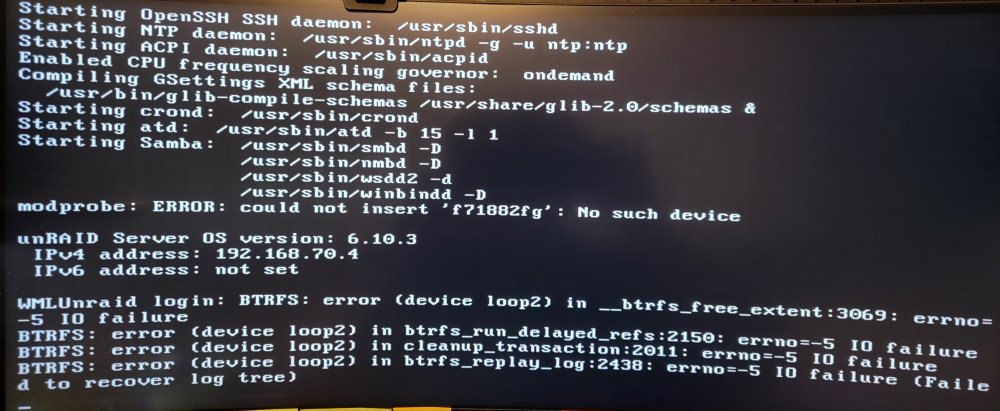
On the server, I'm seeing these disk errors. See the attached picture. Quick search on these forums look like it's an issue with the Docker image or the cache disk full. I think the docker image is at the max 40GB but the cache disk is not full. But it does correlate to the issue of the cache disk dropping out like JorgeB said.
-
I think I sort of ignored parity part of it and removed the disks after using Unbalance to move files because I wasn't worried about the disks failing on me right then and there.
-
Got it. I should have done that. Yeah, I understood where I went wrong before I posted this topic. Thank you.
-
Do you mean add the three new drives and move the data onto the new ones then rebuild? The server is already maxed out on drives, so that's why I didn't add the new drives and move data before removing.
-
Interesting. Okay, I'll work on that. Thanks.
-
Sorry for not providing them earlier. I had used Unbalance to move all data on those previous 3 disks out and onto the other disks in the array before I swapped in the 3 new drives. wmlunraid-diagnostics-20220811-1107.zip
-
I think I made a huge mistake in replacing 3 drives at once from an array of 6 disks and 1 parity drive. Here are the following steps I took: took screenshot of disks in functioning array used Unbalance to move data out of 3 disks that are to be replaced powered down array and server replaced 3 disks in array powered on server new config which wiped out parity disk assigned the 3 new disks started array and it started rebuilding the parity but server crashes I wanted to get some advice on next steps. Based on some research on these forums and reddit, I think my next steps are to unassign the 3 new drives and let the parity rebuild. While parity is rebuilding, prepare new disks by preclearing them. When parity and preclear is complete, add and assign new drives. Is that right?
