KooKoo102
Members
-
Joined
-
Last visited
-
If this is potentially CPU related, I am done with 14th gen. will go core ultra (Yea I know... another intel lol) Mainly looking to stay with intel for the efficiency of transcoding for plex. I dont want to add an intel gpu to cover that use as I need the PCI slots for HBA.
-
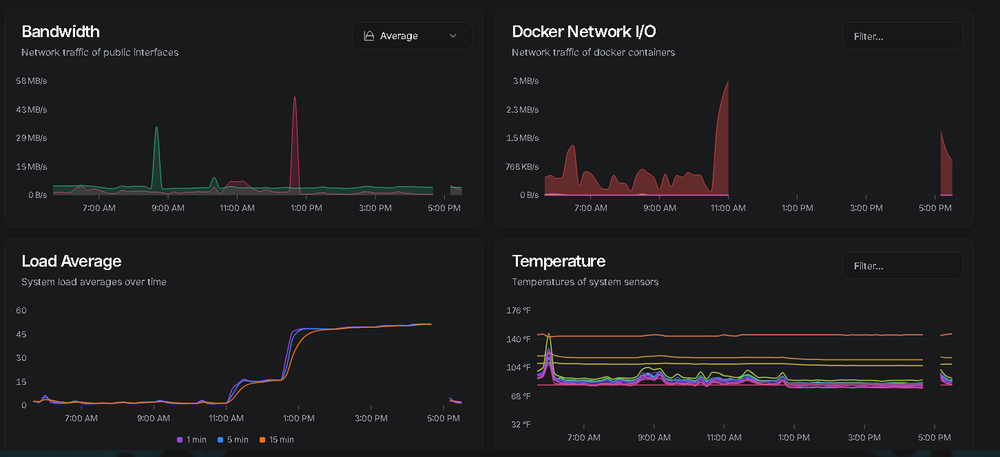
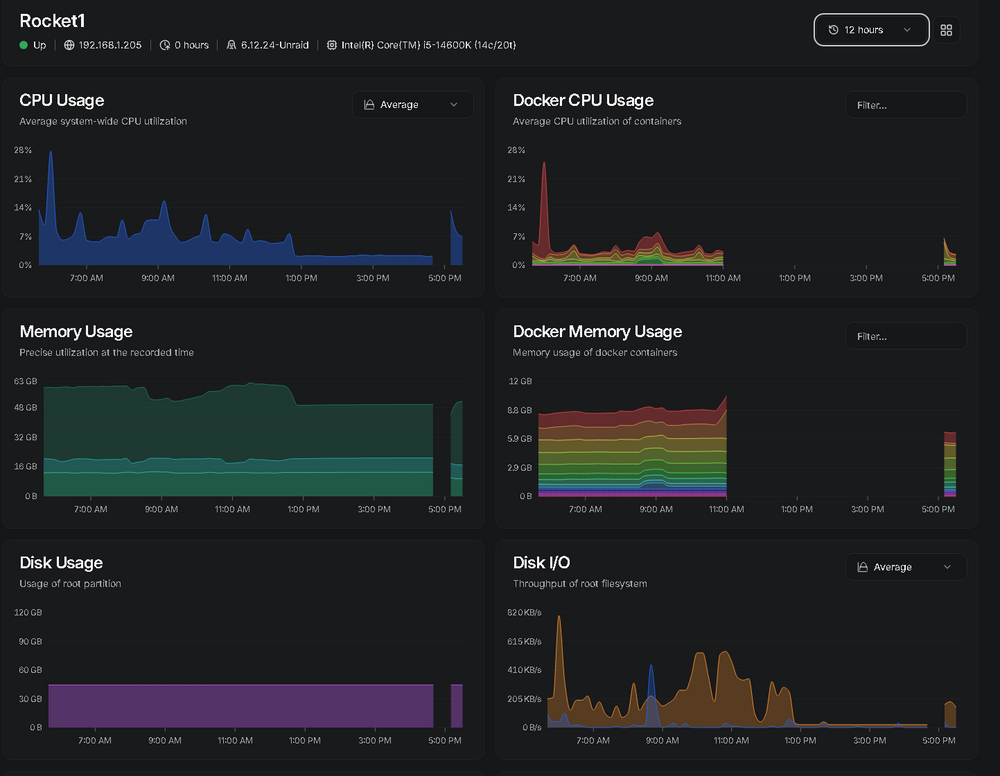
odd enough, it looks like the system was up to some capacity, pulled this from my Bezel log of the last 12hrs. Not everything was reporting though.
-
Hello, Recently had a docker container issue that was taking the server down, figured that out and the system was stable for about a month... now a new issue. was looking to see what this means? got this from the syslog: Aug 6 10:59:06 Rocket1 kernel: mce_notify_irq: 4 callbacks suppressed Aug 6 10:59:06 Rocket1 kernel: mce: [Hardware Error]: Machine check events logged Thats the last 2 entries before it locked up and was not responsive. odd enough, my Home Assistant VM was still up and running and was still able to be accessed. but the unraid UI was not, dockers were not either. System was running a 14900k, but that CPU failed so I sold it back to intel. Now on 14600k on asus pro art z790 with 64GB DDR5 ram, Unraid version 7.1.4 Is this a CPU related issue? I am on the newest motherboard firmware, so would assume everything should be good. I did not think the intel processor issue effected the 14600k. Thanks!
-
Awesome, Done... system has been up for 2.5 days so far, however new stable version is out... might just wait till it dumps docker again and then I run the update. so another 2.5+ days and should hopefully have more logs. TY!
-
Sigh... well what is up with that? LOL is that normal?
-
Oh ok, I understand now. I never had it setup as a folder, only as an image. I have seen information on that, but never seen the Need to do so. either way... its in the "normal" setup in that regard. I believe it was right about 9pm. it happened and I rebooted within 5 min of noticing it was down, then pulled the log about 10 min after it rebooted.
-
Really odd nothing is showing in the log. Not sure what you mean by use a docker folder? Do you mean before it locked up and the docker system "turned off"? if thats what you are asking, no... i was actually playing a game on my PC... not doing anything with my Unraid server. only found out because I got a notification on my phone that lead me to check and sure enough, Docker was "off"
-
this is after reboot... rocket1-diagnostics-20250509-2309.zip
-
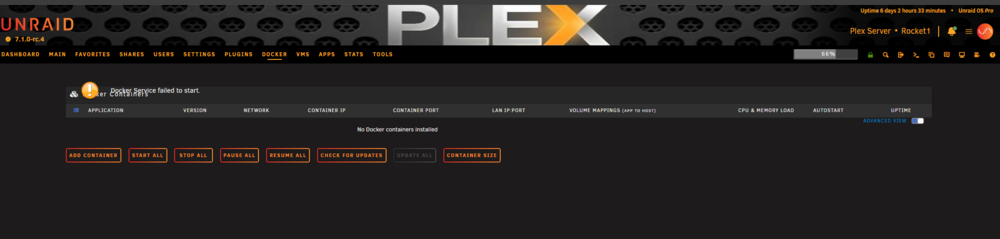
Well... just happened... rebooted and waiting for diag data to download...
-
The event was before I pulled the logs. I just dont remember if I pulled logs then rebooted, or rebooted first then pulled logs. but the event was before the log was generated. I will update when it happens again with a new log the next time. I will grab some screen shots of what I see too. TY!
-
By chance anyone have any other ideas?
-
Because I was running Ollama and a couple other large images that needed the space, I never reclaimed it. figured to just leave it be. I do not have any apps writing any data there. I will have to double check to see if one is setup that way... checking...
-
Odd issue has started to become a reoccurring one... every f or so days my docker apps stoip responding. Some docker apps seems to keep running while most stop. The docker page only shows "docker is not running" and none of the apps showing. I end up having to reboot to fix. not sure what could have caused this. Currently on unraid 7.0 (however just updated to RC4 and rebooting as I am typing this) intel 14600k 64gbram (will be swapping in my 96GB kit back in tonight or tomorrow) Asus Pro Art Z790 motherboard HBA with bunch off HDD and m.2 Please let me know if there is any other info needed. Thank you diag.zip
-
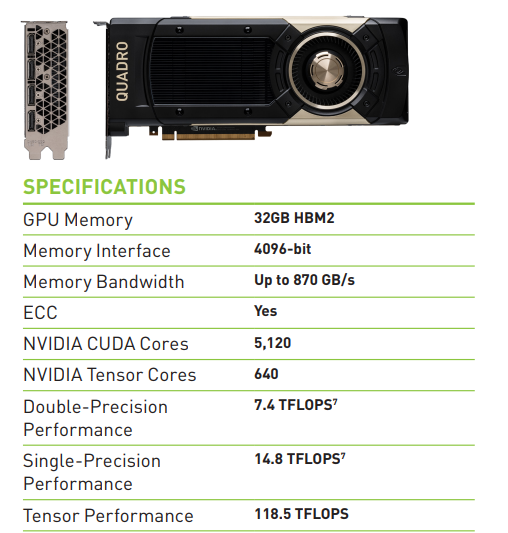
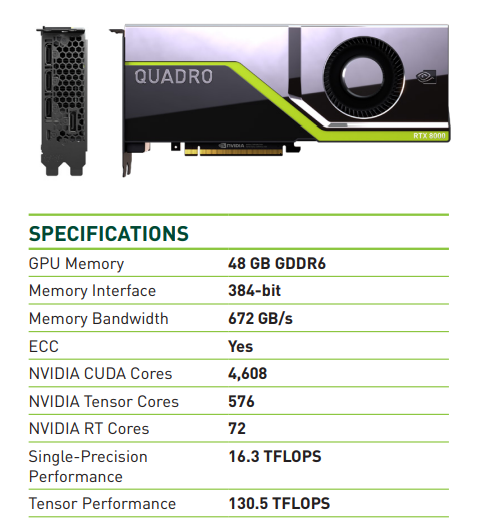
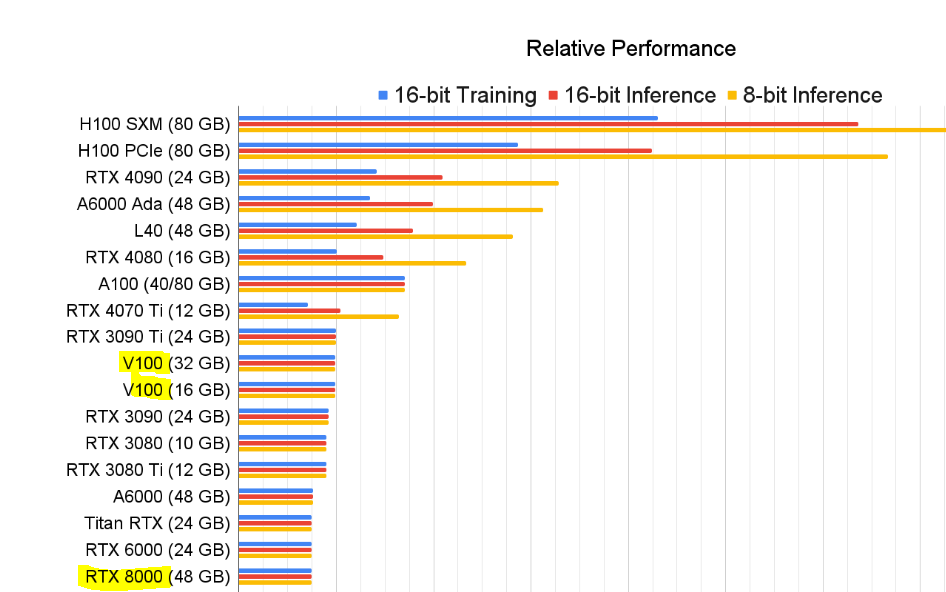
I have come across that post in the past... there is a lot of technical talk that is above my head (and I thought I had decent understanding of things) So I take it the GV100 would be the "better" direction to go? As far as general performance due to having higher Tensor + Cuda core count? I understand due to how fast the Tensor cores are they are usually "idle" waiting on memory, so assumption would be a card with faster / better memory would be more efficient. Correct assumption? On the performance chart they have on the site, they show the V100 vs the RTX 8000... looks like the V100 is shown to have an edge. (basically the same as the GV100 if they are referring the the PCIe version of the V100)
-
I have asked this not too long ago, however my budget has changed... so my GPU selection has changed. Due to the pricing being "close-ish" I am looking at the Quadro GV100 and the RTX 8000 GV100: 32GB Ram (HBM) RTX 8000 48GB RAM So I am looking at 2 things, Yes, I know the RTX 8000 has 16 GB more ram.. and that alone is almost a reason to go that direction. However, for AI workloads, does the HBM on the GV100 give benefit having a higher bandwidth and MUCH larger interface bus? Also the GV100 does have more Cuda and Tensor cores... I understand they are technically a generation older... not sure how much that matters. So put aside the memory size, what would be the "better" card to go with? I do plan to get a 2nd one eventually no matter what card I go with... so down the road I will have 64GB or 96GB of Vram...either way will be plenty. Would I assume correctly that the RTX 8000 would be the better card, or does the HBM give the edge to the GV100? Thanks!