Ronald Brinkerink
Members
-
Joined
-
Last visited
-
brains-diagnostics-20250421-1142.zip
-
This is the exact error from the docker-compose : Error response from daemon: failed to create task for container: failed to create shim task: OCI runtime create failed: runc create failed: unable to start container process: unable to apply cgroup configuration: mkdir /sys/fs/cgroup/docker/6564f46da2f9fc2e2f802ace1dacc6cde5f8ba6fcaf2a1a542f852a042c728aa: no space left on device: unknown
-
Well I don't know what ellse to do. I followed your instructions. Enabled the mover logging. Than ran the mover. After it finished I created the diags. The log spam is from an invalid driver for a 10gb nic. Cannot get that resolved but the nic is not used so i didnt think that woould matter. Is there other spam you can see? The other messages about SSH are from remote vscode sessions that connect to remote docker containers, the containers are running on the unraid machine. To be able to run move Docker needs to be down so that is when the server gets spammed with ssh connection requests from the vscode clients that want to connect to the docker containers.
-
Have done that. Fix common problems gives same error. Here are the diags. brains-diagnostics-20240619-1700.zip
-
Ok, the mover has finished after i shut down Docker. (I dont use vm's and that is not enabled) Unfortunately the plugin still logs the same errors. (thank you for looking into this :-))
-
I thought I had done that but will try again now.
-
@JorgeB I have recreated my entire docker setup and for a while it ran ok, but now more often I get the same error. It cannot create any container, so it is not the config of a container. In the log of the docker-compose it says that Docker could not mkdir because lack of diskspace. I have taken the following actions: 1. Changed the docker networking form macvlan to ipvlan as was advised 2. Changed appdata share from cache->array to cache only 3. Changed system share from cache->array to cache only 4. Upgraded to release 6.12.10 5. Recreated all docker containers in a new /mnt/user/system/docker/docker/ folderafter removing the old one first I still get errors in the Fix common problems plugin: Share appdata set to cache-only, but files / folders exist on the arrayYou should change the shares settings appropriately or use the dolphin / krusader docker applications to move the offending files accordingly. Note that there are some valid use cases for a set up like this. In particular: THIS More Information Share system set to cache-only, but files / folders exist on the arrayYou should change the shares settings appropriately or use the dolphin / krusader docker applications to move the offending files accordingly. Note that there are some valid use cases for a set up like this. In particular: THIS More Information The mover has run several times but i cannot get rid of these 2 errors. Would it be possible to tell docker to use a folder directly on a disk and not via the system share but use an unassigned ssd device? I have to restart the entire server and the error is no longer there but that is only temporary as i could not determine the real problem. Any help would be greatly appreciated. brains-diagnostics-20240619-1514.zip
-
Just removed this as it was not an unraid problem.
-
Yes i did, might be some firewall issue maybe? localhost, 127.0.0.1 nor the real fixed ip given by the router seems to work. I understand if this is tough to answer without having access to the machine. Thank you again, for your effort
-
Thank you for your help. I will check these 2 issues you pointed to. I noticed that when trying to get the unraid log persisted on disk, the log share does not contain any logs. Any idea why that is nog working?
-
Filesystem Size Used Avail Use% Mounted on rootfs 504G 1.4G 503G 1% / tmpfs 32M 2.5M 30M 8% /run /dev/sda1 7.5G 1.2G 6.3G 16% /boot overlay 504G 1.4G 503G 1% /lib overlay 504G 1.4G 503G 1% /usr devtmpfs 8.0M 0 8.0M 0% /dev tmpfs 504G 2.9G 502G 1% /dev/shm tmpfs 128M 4.1M 124M 4% /var/log tmpfs 1.0M 0 1.0M 0% /mnt/disks tmpfs 1.0M 0 1.0M 0% /mnt/remotes tmpfs 1.0M 0 1.0M 0% /mnt/addons tmpfs 1.0M 0 1.0M 0% /mnt/rootshare /dev/md1p1 11T 5.5T 5.5T 51% /mnt/disk1 /dev/md2p1 11T 5.5T 5.5T 51% /mnt/disk2 /dev/md3p1 11T 5.5T 5.5T 51% /mnt/disk3 /dev/md4p1 11T 5.5T 5.5T 51% /mnt/disk4 /dev/md5p1 11T 5.5T 5.5T 51% /mnt/disk5 /dev/md6p1 11T 2.2T 8.8T 20% /mnt/disk6 /dev/md7p1 11T 78G 11T 1% /mnt/disk7 /dev/nvme0n1p1 1.8T 332G 1.5T 19% /mnt/cache shfs 77T 30T 47T 39% /mnt/user0 shfs 77T 30T 47T 39% /mnt/user /dev/sdb1 223G 1.6G 221G 1% /mnt/disks/backup /dev/sdg1 9.1T 8.8T 340G 97% /mnt/disks/unshared tmpfs 101G 0 101G 0% /run/user/0 this is df -h
-
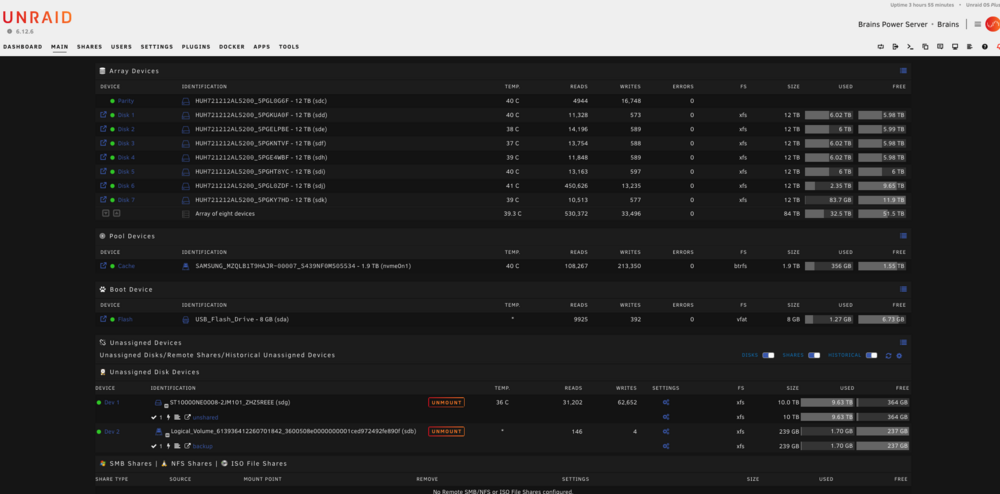
Yes i know about the firmware error, cannot get rid of it, it is a 10gb ethernetport and i cant find either how to disable it or get the proper hw driver for it. Is there an easy way to get rid of this error? Anyway, here is the screenshot of main:
-
Thank you for your attention. Hereby the new diagnostics after reboot. The df -i gives the same result Filesystem Inodes IUsed IFree IUse% Mounted on rootfs 132082647 7198 132075449 1% / tmpfs 132086838 1454 132085384 1% /run /dev/sda1 0 0 0 - /boot overlay 132082647 7198 132075449 1% /lib overlay 132082647 7198 132075449 1% /usr devtmpfs 132082648 1256 132081392 1% /dev tmpfs 132086838 3810 132083028 1% /dev/shm tmpfs 132086838 80 132086758 1% /var/log tmpfs 132086838 3 132086835 1% /mnt/disks tmpfs 132086838 1 132086837 1% /mnt/remotes tmpfs 132086838 1 132086837 1% /mnt/addons tmpfs 132086838 1 132086837 1% /mnt/rootshare /dev/md1p1 1171888512 1821 1171886691 1% /mnt/disk1 /dev/md2p1 1171888512 9735 1171878777 1% /mnt/disk2 /dev/md3p1 1171888512 15120 1171873392 1% /mnt/disk3 /dev/md4p1 1171888512 5423 1171883089 1% /mnt/disk4 /dev/md5p1 1171888512 13836 1171874676 1% /mnt/disk5 /dev/md6p1 1171888512 4013736 1167874776 1% /mnt/disk6 /dev/md7p1 1171888512 3 1171888509 1% /mnt/disk7 /dev/nvme0n1p1 0 0 0 - /mnt/cache shfs 8203219584 4059674 8199159910 1% /mnt/user0 shfs 8203219584 4059674 8199159910 1% /mnt/user /dev/sdb1 116699072 3 116699069 1% /mnt/disks/backup /dev/sdg1 720527208 40079 720487129 1% /mnt/disks/unshared tmpfs 26417367 1 26417366 1% /run/user/0 brains-diagnostics-20240516-1403.zip
-
When starting containers using a docker-compose.yaml I encounter the following issue during creation of a container when during execution of a a Dockerfile running apt-get -y upgrade: RUN apt-get -y upgrade: 0.103 runc run failed: unable to start container process: unable to apply cgroup configuration: mkdir /sys/fs/cgroup/docker/buildkit/tdm5u4tnkwmzlg3pwmxmlzunj: no space left on device The error has nothing to do with the apt-get coimmand, it is just that at that point the system cannot create a directory for a cgroup configuration. I do not use a docker image but a folder to store the images, containers and folders so it is not the size of that image as i do not use an image but a folder. The filesystem gives me plenty space in the /var/lib/docker folder root@Brains:/sys/fs/cgroup/docker/buildkit# df /var/lib/docker Filesystem 1K-blocks Used Available Use% Mounted on /dev/nvme0n1p1 1875374392 334645716 1531418444 18% /var/lib/docker According to chatgpt there might be a problem with allocating inodes but the output of df -i shows no problems root@Brains:/sys/fs/cgroup/docker/buildkit# df -i Filesystem Inodes IUsed IFree IUse% Mounted on rootfs 132082647 7384 132075263 1% / tmpfs 132086838 1436 132085402 1% /run /dev/sda1 0 0 0 - /boot overlay 132082647 7384 132075263 1% /lib overlay 132082647 7384 132075263 1% /usr devtmpfs 132082648 1256 132081392 1% /dev tmpfs 132086838 225534 131861304 1% /dev/shm tmpfs 132086838 87 132086751 1% /var/log tmpfs 132086838 3 132086835 1% /mnt/disks tmpfs 132086838 1 132086837 1% /mnt/remotes tmpfs 132086838 1 132086837 1% /mnt/addons tmpfs 132086838 1 132086837 1% /mnt/rootshare /dev/md1p1 1171888512 1821 1171886691 1% /mnt/disk1 /dev/md2p1 1171888512 9735 1171878777 1% /mnt/disk2 /dev/md3p1 1171888512 15120 1171873392 1% /mnt/disk3 /dev/md4p1 1171888512 5423 1171883089 1% /mnt/disk4 /dev/md5p1 1171888512 13836 1171874676 1% /mnt/disk5 /dev/md6p1 1171888512 4015195 1167873317 1% /mnt/disk6 /dev/md7p1 1171888512 3 1171888509 1% /mnt/disk7 /dev/nvme0n1p1 0 0 0 - /mnt/cache shfs 8203219584 4061133 8199158451 1% /mnt/user0 shfs 8203219584 4061133 8199158451 1% /mnt/user /dev/sdb1 116699072 3 116699069 1% /mnt/disks/backup /dev/sdg1 720895464 40102 720855362 1% /mnt/disks/unshared When rebooting unnraid the problem goes away but after some time it resurfaces. That indicates that it is some kind of cache problem but unclear for me. Any help would be appreciated. I run unraid 6.12.6 brains-diagnostics-20240516-1110.zip
-
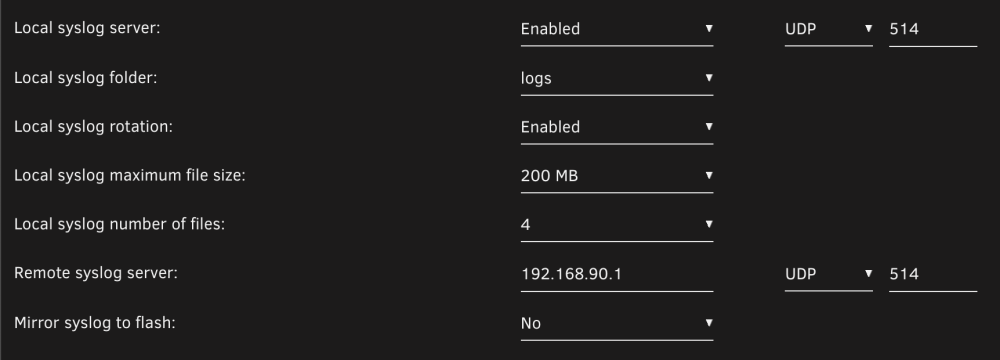
@itimpi, I have applied these settings but there is nothing being logged on the logs share. Should the ip address be 127.0.0.1 or the external address given by the router as in these settings? Is the mirror to flash mandatory? Am i missing something regarding the ports? Is there a simple way to test if the syslog server responds to messages? I have tried this: ``` nc -w0 -u 192.168.90.1 514 <<< "testing again from my home machine" ``` But no logs appear. Thanks for your effort