





I am gRoot
Members
-
Joined
-
Last visited
-
Thanks for you explanation! I will try and see if it helps! Although I do not fully understand, because I set Unraids Web UI to Port 180... Is there another reason it does not work with Port 80/443 on NPM in Bridge mode? Edit: I also noticed, that I can open the URLs from my own Network (Nextcloud is still giving me that Error 400, but other Dockers I testet as well as the Unraid UI on Port 180 are okay)
-
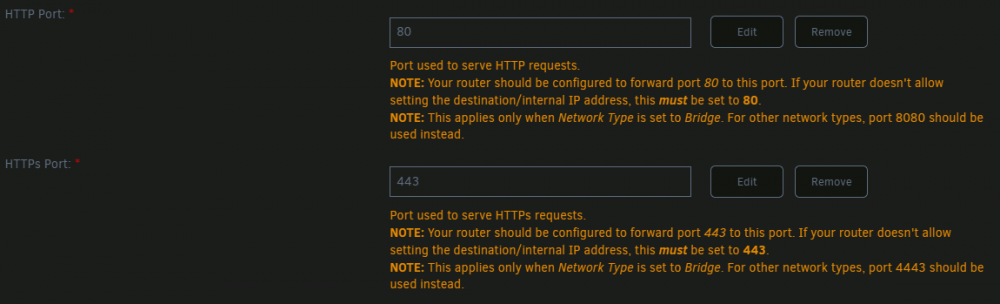
Oh, I wasnt aware that NPM doesnt support Ports 80/443 because I am able to set Its Ports in the Dockers Config:
-
Yes I dont have a valid certificate on there, because my plan was to create one with NPM... If I try Port 80 I can not connect due to a SSL Protocol Error, do I have to change nextclouds config somewhere? Additionally I wanted to Use Port 80 for the NPM itself since I cant forward IPv6 to another port...
-
Ok so i have to make nextcloud to accept http instead of https? As far as I know it doesnt do that.. And If I use "https://cloud.xxx.com" it should work, shouldnt it? Because I still get my empty-response-error...
-
Well If i switch to http i get an error 400 because i cannot use ssl without a certificate on NPM. How should I use SSL then? Sorry If I got something terribly wrong here...
-
Sorry if that was'nt clear: Checked it once again to be sure: cloud.xxx.com -> "ERR_EMPTY_RESPONSE" http://cloud.xxx.com -> "ERR_EMPTY_RESPONSE" https://cloud.xxx.com/login -> "ERR_EMPTY_RESPONSE" http://cloud.xxx.com/login -> works fine, but no login possible My log just says something like "Challenge Failed". I dont know if there is a more detailed log... A thing i forgot to mention is, that if i type cloud.xxx.com into my searchbar, it automatically adds /login, so if i reload the page again it works.

-
Hej, first off all, thats a really nice container, worked perfectly for tha last year Right now (after reinstalling my unraid server) I am facing a Problem i can't really solve: I got CGNat from my Provider, so I cant access my router via IPv4 (i'm fine with IPv6 only though). My URL has a CNAME-Record to a 'myfritz' adress and my server is set as exposed in my Fritzbox. With standard settings on Unraid I'm able to get on the Unraid Login-Page using my URL, since it is available on port 80. I changed this, so NPM is using port 80/443 right now, and it looks like I am redirected to the Proxy (if I am visiting non-exisiting pages I am redirected to the Congratulations-Page). The destination for my NPM is a Nextcloud Docker so far and i am getting results i cannot really interpret well: I always get "ERR_Empty_Response" in Chrome when opening "myurl.com" , but if i try "https://myurl.com" the site does show up (login is not possible tho, i guess its because it isnt encrypted yet. If I try to create an SSL certificate I get an "internal error" (obviously). I hope i havent forgotten anything really dumb... Thanks for your help!

