GhoulishPaladin
Members
-
Joined
-
Last visited
-
Now, I'd check your browser console (usually F12) and see if there is a error being thrown when you attempt to log in. This was the point that I hit and couldn't move past. Maybe there is an underlying bug somewhere?
-
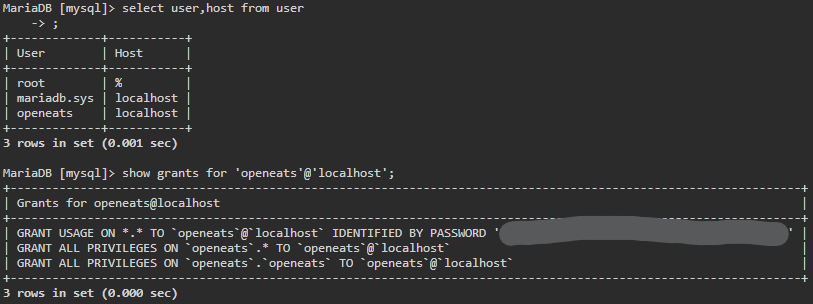
Your issue is with your USER in your MariaDB instance. Instead of granting it all permissions on 'localhost', it needs to be granted all permissions on all connections. MariaDB does this with '%'. I had this same issue a while back. Please let me know if you ever get into the admin panel. I had everything set up but could never log in.
-
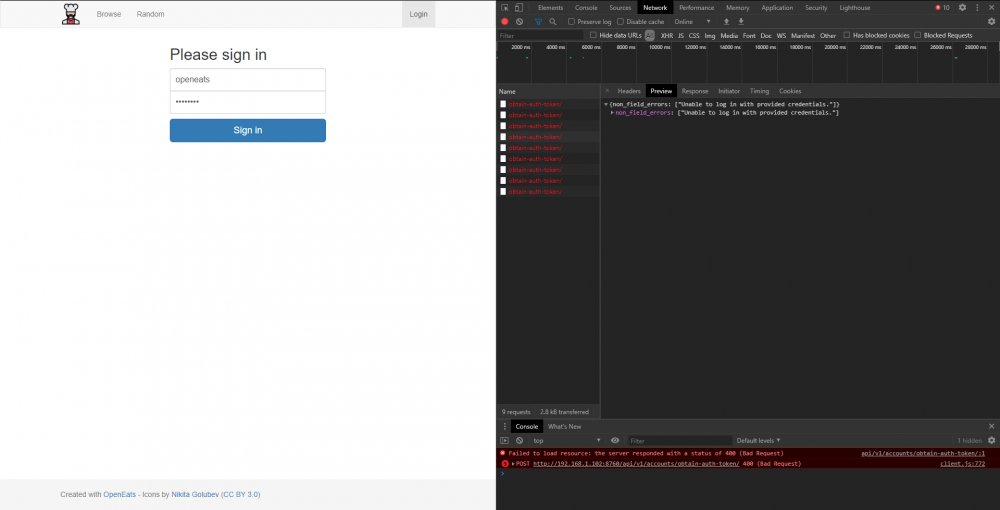
I've got my user working now. I had to modify the host connections in the database itself. I don't think the issue is on the mariadb side, as the tables have been created and the openeats docker starts up fine and seems to communicate with it. When debugging through the browser, I noticed that I AM getting a 400 error code that says "Unable to log in with provided credentials."
-
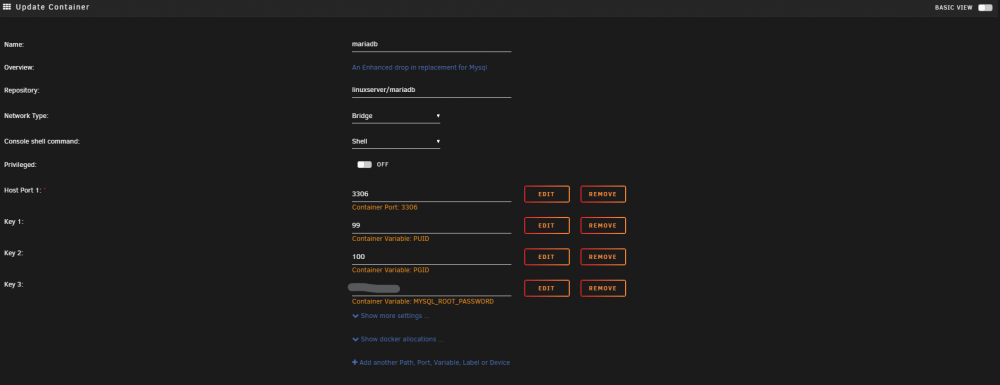
Here is the docker settings page for mariadb.
-
I'm accessing it from my local network, so no reverse proxy issues. I've tried all of these suggestions, and the same outcome every time: no error message, and no login. Each time it logs with what I'm assuming is a 400 error code. This is what I get when I use anything but the root user: django.db.utils.OperationalError: (1045, "Access denied for user 'openeats'@'172.17.0.1' (using password: *******)") My permissions for my openeats user is as follows: At this point, I've nuked everything from orbit and started over about 5 times, with the same results every time. Either I'm overlooking a fundamental step, or something is royally broken somewhere that I can't seem to track down.
-
I just noticed something in the logs. Anytime I attempt to login, I'm met with this line: 192.168.1.158 - - [10/Jun/2020:14:59:47 -0500] "POST /api/v1/accounts/obtain-auth-token/ HTTP/1.1" 400 68 "http://192.168.1.102:8760/login" "Mozilla/5.0 (Windows NT 10.0; Win64; x64) AppleWebKit/537.36 (KHTML, like Gecko) Chrome/83.0.4103.97 Safari/537.36" "-" I highlighted the 400 for effect, and it indicates to me that there is an issue with the login. I see 200 codes in other places, like when navigating to the main page: 192.168.1.158 - - [10/Jun/2020:14:59:33 -0500] "GET /api/v1/recipe/mini-browse/?limit=4 HTTP/1.1" 200 52 "http://192.168.1.102:8760/" "Mozilla/5.0 (Windows NT 10.0; Win64; x64) AppleWebKit/537.36 (KHTML, like Gecko) Chrome/83.0.4103.97 Safari/537.36" "-"
-
I blew up the openeats database, deleted the docker and appdata folder, and recreated everything from scratch. Still no dice on signing in. Another issue I noticed as I was getting it set back up is that I cannot successfully connect to the db with an alternate user that I have set up for this. I have to use the root db user or django kicks me back an error that it can't connect.
-
No. I'm given the option to login, which doesn't work.
-
I see the same thing when querying that table.

-
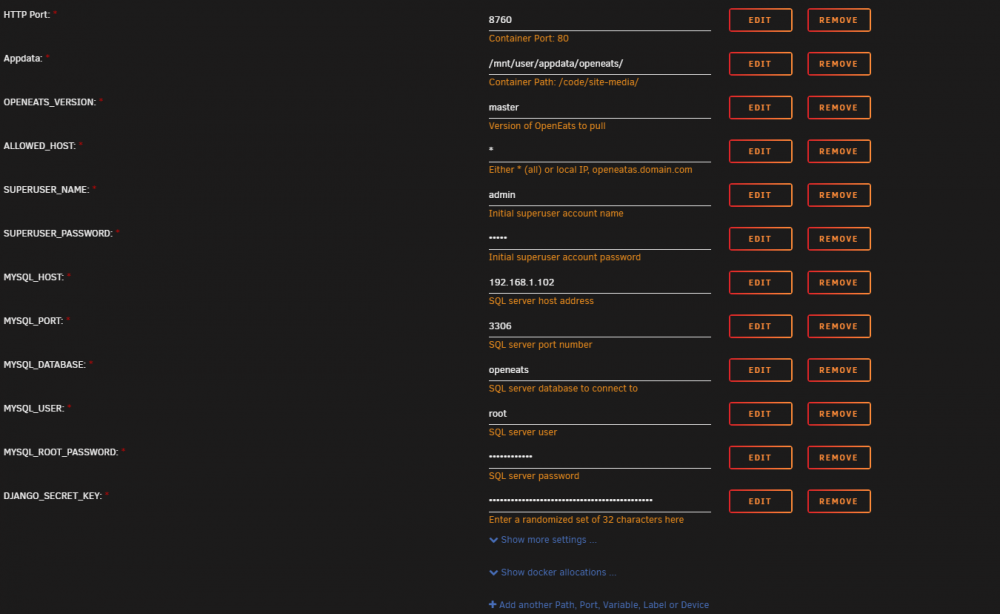
Hey guys, I'm new around here, and have been struggling to get this container up and running for about a month now, on and off. I was finally able to get it up, get the tables created in the database correctly, etc. However, I now cannot log in to the admin panel to do anything. No error message, no failed login attempt, just nothing. My ALLOWED_HOST is set to * (all), and everything else seems to track right along with how it should work. My logs show, as far as I can tell, nothing out of the ordinary... Any insight? Logs: https://pastebin.com/ffA2siN4