





SPOautos
Members
-
Joined
-
Last visited
-
I'll start off saying, I am NOT very knowledgeable about how everything really works. I mostly get by using how to's and such. That said, this had been working for a couple years and it stopped working at some point and I cant seem to figure out what is wrong and how to get it back going again. I have Duck DNS set up and it points to my public IP, I also have a custom domain with subs like nextcloud.mycustomdomain.com and they have cnames that point to the Duck DNS url. If I go to DNS checker and type in nextcloud.mycustomdomain.com it shows the CNAME with the DuckDNS domain, and if I search the A record it shows my public IP address. So it seems like everything is pointing to my public IP correctly. But its not getting into the server. I also have SWAG setup and while it APPEARS to be set up right, there must be something set up wrong between SWAG and my home router since these are getting to my public IP then ending there but I cant remember how to set it up where the router to SWAG to let me through....I may need to reconfigure a port in the router or something but I'm not sure how to do that. Can anyone give me any advice? I'd put up some screen shots or something but I'm not even sure what to screen shot, if you want to see something just let me know....or if someone can just point me in the right direction of what to check that would be good too, because I don't really want to display much publicly anyway. Any direction you guys can give is GREATLY appreciated!
-
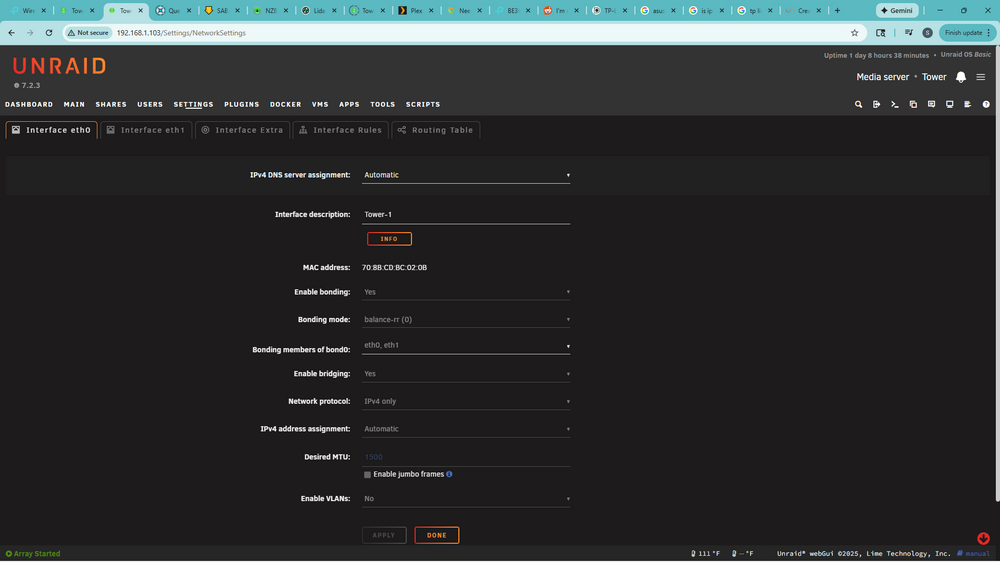
To add info, through some googling I found out that while in Unraid for link aggregation its set to Balanced - RR (0) which is round robin, my router settings have mode "Static LAG" and hash algorithm "SRC MAC+DST MAC" and Google says the router needs balanced xor (as opposed to round robin), which Google say is "mode 2" in Unraid....where the Balanced RR I have it on now is mode 4. So given that, who knows if I even have link aggregation working properly. All that said, its all grayed out and wont let me see options to change anything. I turned off VM but apparently i also have to turn off Docker Service before I can edit these settings. Before turning off Docker Service, I'd prefer someone to give me some advice about all this so I don't just go in messing with stuff and screw it all up by not knowing what I'm doing. I know JUST enough to screw it all up hahaha.
-
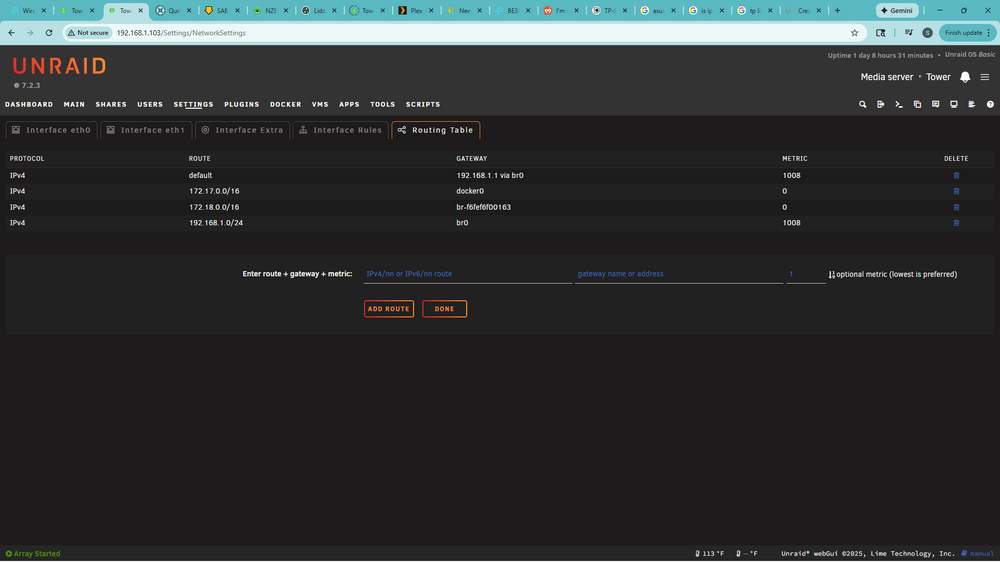
I don't know much at all about networking so I'm sure my thoughts wont make any sense to you experts lol. In the past (several years ago), I kept ipv6 turned off on my router and Unraid because I read that Unraid can have issues with it and I just wanted to make sure everything had good compatibility so I kept the router and Unraid on 1pv4 just in case 6 might cause a issue. Researching it a little more today, it looks like if I enable ipv6 on the router it will start using both 4 and 6 so I suppose I can do that and keep Unraid on ipv4. However, if I change the router can I change Unraid to either both or ipv6 without any issues? My motherboard has dual Lan's that I have link aggregated and bonded together in Unraid and the ports in the router aggregated. In Network Settings ---> Routing Tables (seen below) I have everything showing only IPv4. Honestly I'm not even sure if all of this is set up correctly, I dont know what all 4 of those lines are for or if they are correct or all necessary. I did it years ago and I was just trying to figure my way though it, but it seems to work good and is stable. I should probably just leave everything alone since its working, but I think ipv6 works better with gaming and I have 3 people in my house who are gaming, often at the same time. I guess I could turn ipv6 on at the router but leave Unraid on 4, however, if you guys think it would be a benefit for me to change to 6 in Unraid then I'd like to do so. I just need a little guidance to make sure I don't mess it all up. Thanks for any info you can provide! Much appreciated
-
Its br0 but I think I have it figured out, I changed some Win 10 network settings to give full access to anything on the network and in my router I gave it "high priority" and it seems to have stabilized. My router doesn't seem to like that it has "Random MAC address detected" but I'm not sure what to do about that....I think in Win 10 I can create it a MAC address, I'll have to look into that. Also, after rebooting a few times it looks like Win 10 has automatically started seeing the ethernet even though I didn't pass it through and even shows that its a 10GB connection. I passed through the audio card and even installed the original Asus driver for it and set its audio out to high resolution direct output to the optical port and its passing through 192/24 resolution to my stereo perfectly. So it looks like I have a good HIFI streaming setup to my stereo now using PlexAmp and I can control it all from my phone PlexAmp app to select music, playlists, and control volume! It's working great! It looks like everything is running great at the moment lol
-
I had a break through!!! That bios line for VT-d that didn't have the ability to enable/disable, welllllll I changed the pci speed of the slot my video card is in from Auto to Gen 3 and then it changed the VT-d and allowed me to enable/disable it. Now I have it enabled and I now show IOMMU groups in Unraid!!! Now I have audio passing through my VM....BUT quick question....how can I get it showing up on the network and stable? I need to keep another device connected to it over the network but i cant seem to get the VM to show up on the network, or at least it did a few times but then goes away, its not stable. I am able to see other devices on the network and access internet, however other devices cant see the VM. I only have one network adapter so I don't guess I will be able to pass it through because then my Unraid would loose it.
-
@bmartino1 @Veah What I've read online is that in these early versions of the Intel Virtualization Tech that the VT-d comes on automatically with the "Intel Virtualization Technology" setting, you cant turn it on or off separately, it just activated with the other setting. I searched through every menu to make sure, but it makes sense since it actually has settings related to VT-d but no enable/disable box. I read that the enable/disable of it by itself came in the next version of the virtualization technology, at this earlier stage it apparently was automatic. I've found some real old posts on Reddit where they said it didn't have a enable/disable but that they were getting good Iommu grouping so it was working. Also in case you're wondering....the cpu Xeon E-5 2690 v3 also says it also supports VT-d. If there might be some other setting somewhere that applies I'm not sure what it is, but I'm glad to look if you guys have an idea. I'd love to get this figured out, I'd really like it to work and there's people using this board and getting excellent IOMMU grouping on Linux systems, so I'm not sure why this has been so hard. BUT at the end of the day, all I really really really need is to get my Windows 10 VM to output sound through the motherboards onboard sound and maybe network adapter since in the VM I can see the network and internet even though there it says there's no network adapter, but it seems somewhat unstable so I might need to just get the network adapter to show. Is that something that can be done in a stable way without causing server or VM instability? If so, can you give me some guidance with that? Ultimately what I'm trying to do is run a VM that stays up all the time for PlexAmp and run a optical cable from the server to stereo so other Plex devices such as the phone app can render to it. From my phone I can see the VM PlexAmp, however when I try to play to it, it looses connection, and of course, its doesn't have audio out yet. I appreciate your help, maybe we can get this figured out....
-
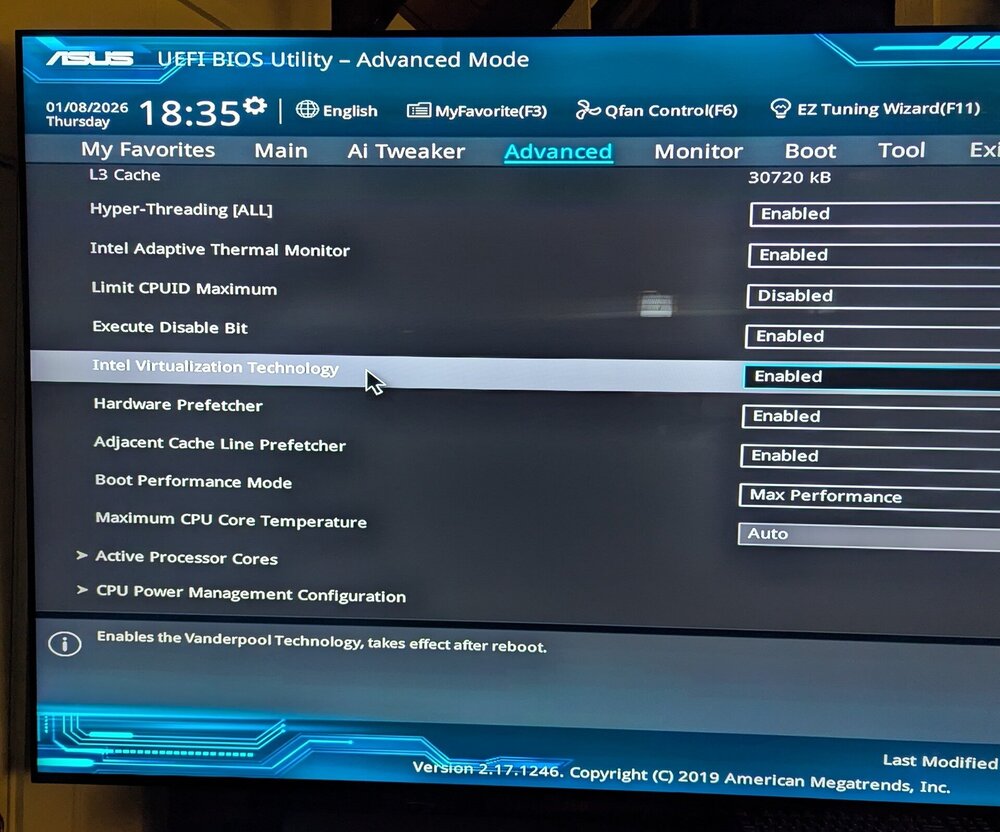
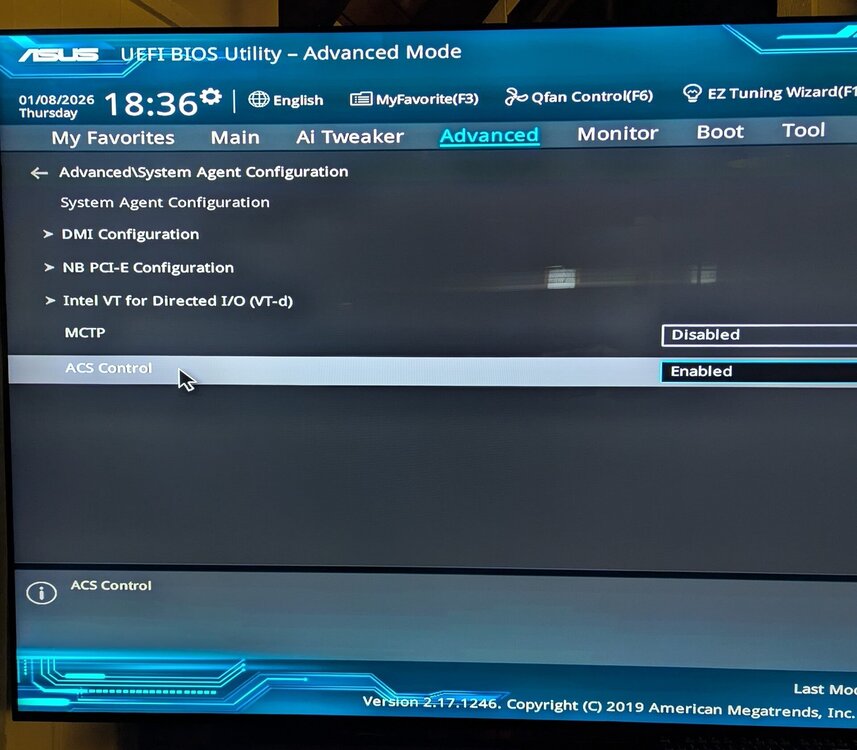
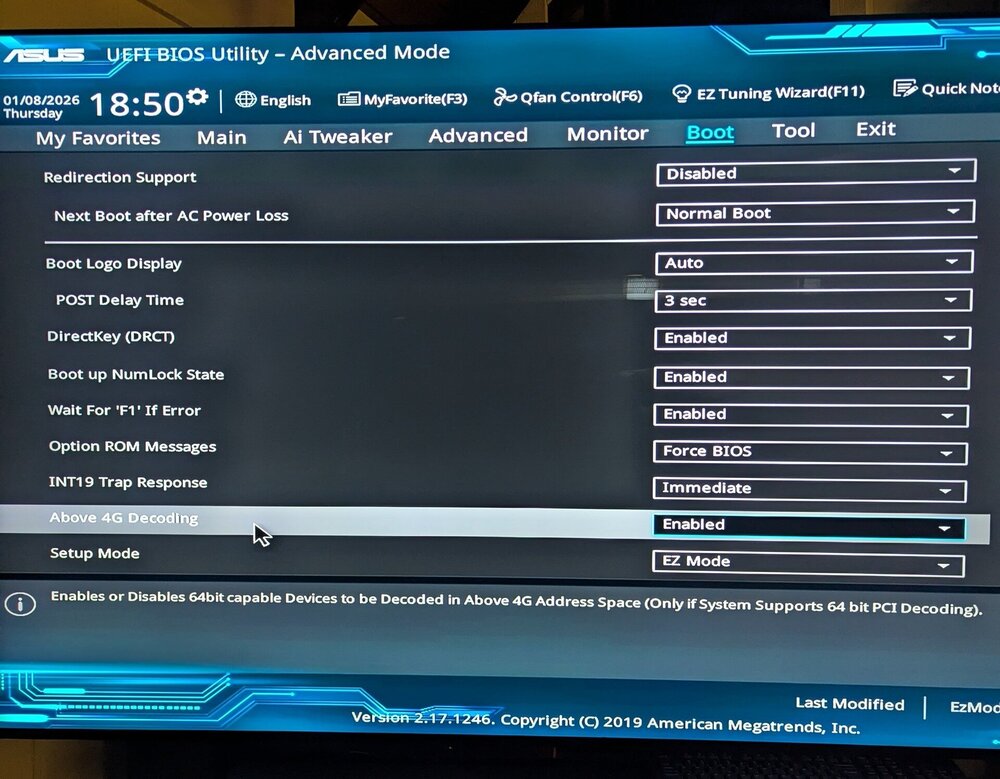
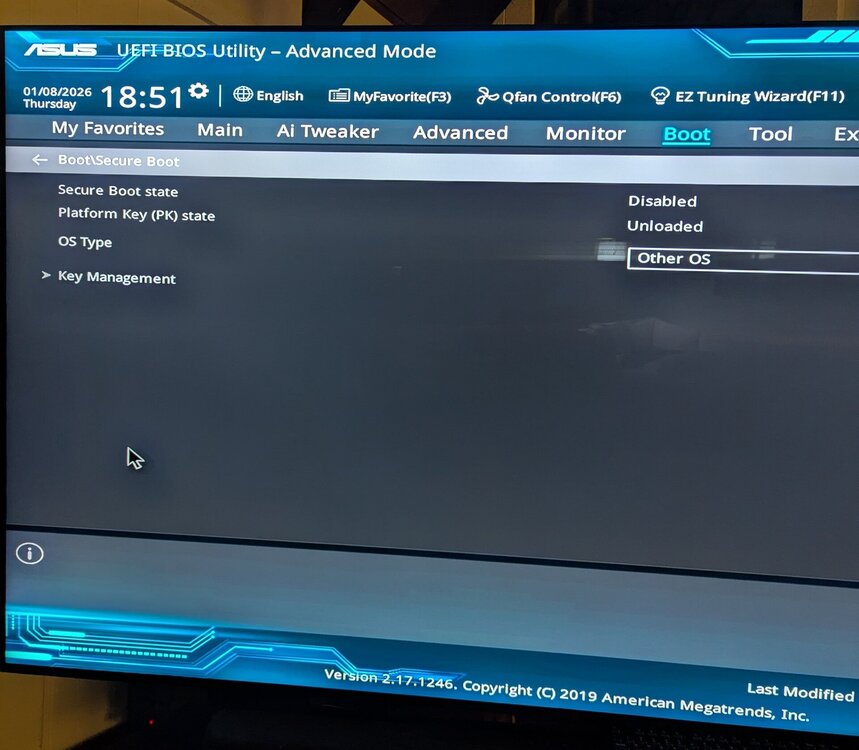
Here are some images of the bios settings. Now theres a LOT of settings in the bios, I just took picture of things I've changed. I have left most of the bios on factory default except for what I've read may be helpful for IOMMU and for unraid bootup (Intel Virtual Tech called it VT-X in the manual, VT-d/ACS, and 4G decoding). I have taken pictures of what I have changed. I have "Above 4G decoding" enabled because I read that sometimes its beneficial for passthrough but I've tried it on and off and it didn't make a difference. You will notice in one picture I disabled Secure Boot that is because it had some kind of key issue so I just cleared the key and disabled it. One the picture that has VT-d sub settings, I have ACS enabled, I have MCTP disabled because I read it's not applicable to IOMMU, that said I have tried then both on and off. I've tried many combinations with some on and some off, rebooted probably 20 times trying different things...... but this is how is currently sets and this is how is was when I tested the terminal lines you gave me to try out. This is all I could find online that is relative but maybe there's something else that you can direct me too.
-
over to the left in Plex where the menu is, you'll see the directory for your movies and a 3 dot menu just to the right of it, in that menu is "scan library files"....try that and see if it picks it up. If not, you probably just have Plex pointed at the wrong directory.

-
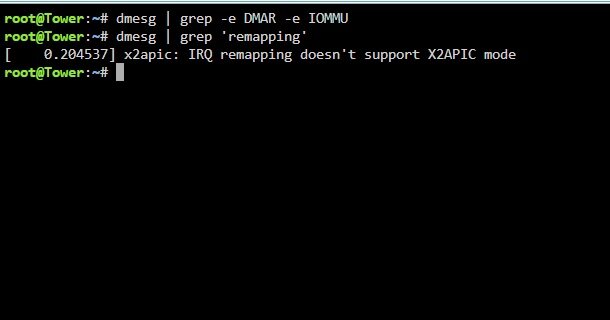
okay, I rebooted the server and went into BIOS to verify that the VT-d settings were all enabled, along with ACS. Then logged back into Unraid and ran the two lines you gave me....the first one turned up nothing....here are the results of both. n Now I spoke with someone who used to run one of these Asus x99 boards with passthrough on a Linux server...NOT Unraid.....so not sure if it will work or not. But here is what he told me is required for this older setup with these Asus x99 boards and old Xeon E5 processors. (I also found this same info in some real old posts online). I don't know enough about this to know if this is something I can try in Unraid or if its only helpful in Linux.... BUT, this is what he did get IOMMU grouping and maybe you can share your thoughts about it...... "I used kernel command line arguments...... intel_iommu=on iommu=pt which enable VT-d (I/O virtualization) code in the Linux kernel for Intel processers. This would be necessary for e.g. PCIe passthrough. I don't know enough about Unraid to directly say if this will work or where exactly to add it. Generally speaking, the bootloader executes the kernel and this is where command line arguments should be specified. On Debian/Ubuntu systems that use Grub for example this is typically /etc/default/grub. You add the arguments to the value of GRUB_CMDLINE_LINUX_DEFAULT in that file, run update-grub (which writes a new /boot/grub/grub.cfg), then reboot. So you'll need to research the Unraid way to do all that. And be warned: you can easily make your system un-bootable with a bad kernel command line argument or syntax error, but it's usually easy to fix by editing the command line at boot or by going into recovery mode. Good luck!" *** END OF WHAT HE TOLD ME*** Do you have any thoughts on that or do you think its worth a shot to try it? Since the boot files are in the USB, if it doesn't work I think I could just open the usb on my laptop and edit it back and put it back in the server like nothing ever happened. I don't think there's any real risk to try is there? If there's no real risk in trying, could you tell me how to go about putting that in and seeing what happens? Like I said, In Linux he gets full grouping using this, he said with this older versions of VT-d IOMMU wont show up in the OS unless these kernel commands are added.
-
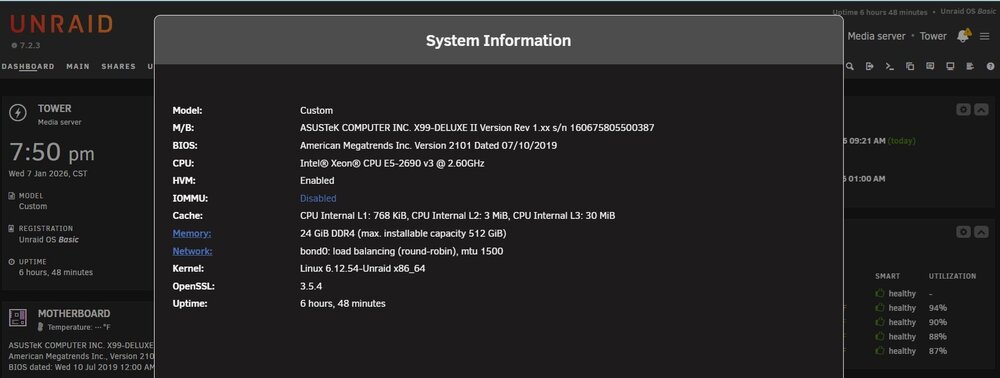
Here is the "Info" and the diagnostic file. The motherboard is a Asus x99 Deluxe II that had the latest bios update done yesterday and the cpu is a Intel Xeon E5-2690 v3 and both are old but still run great and are listed as supporting IOMMU and grouping. tower-diagnostics-20260107-1958.zip
-
I have a Asus x99 Deluxe ii motherboard and I am on current Unraid 7.2.3 I have Intel VM-X and VT-D enabled. I have fast boot disabled. I have secure boot disabled. I have CSM disabled. I also enabled 4G decoding since Google said that may help. I have Unraid booting up in UEIF with no legacy type settings active. In Unraid in the "Info" card I have HVM enabled but IOMMU disabled. . I have read that with some systems its necessary to manually enable IOMMU by adding a line iommu=on and iommu=pt to the kernal, however I do not want to do that without someone here that knows what they are doing walking me through that. Also, before doing that I feel like I need to verify if Unraid can see that VT-d is enabled on the bios side, it appears it is but that Unraid just cant see that. Hoping someone can walk me through some of this. Thanks! Stephen
-
@JorgeB @trurl Thank You both, did the update, its been up and running for several minutes now and everything seems to be working fine! I always get nervous about updates because I'm not knowledgeable enough to fix real issues hahaha
-
Should I be okay to jump all the way from 7.0.0 to this latest 7.2.3? I've never jumped so many releases at once before. Are there any specific precautions I should take?
-
I did the Update Assistant and it said there are no issues and I should be good to update but I've never skipped several versions before so just want to make sure that it should be okay. All of the plugins and apps are up to date, everything runs good. Just updating to get current again. I guess I still have update PTSD from several years ago when a update went real bad and I couldn't boot up.
-
I powered down for about 10 minutes then turned it back on and it booted up good and everything looks fine and its running fine. Is there a way I can figure out what happened? If a hardware is starting to get glitchy I'd rather replace it while its still working.





