John Detter
Members
-
Joined
-
Last visited
Everything posted by John Detter
-
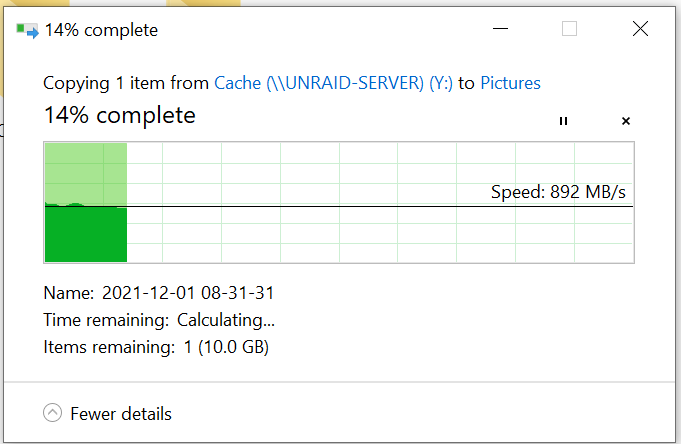
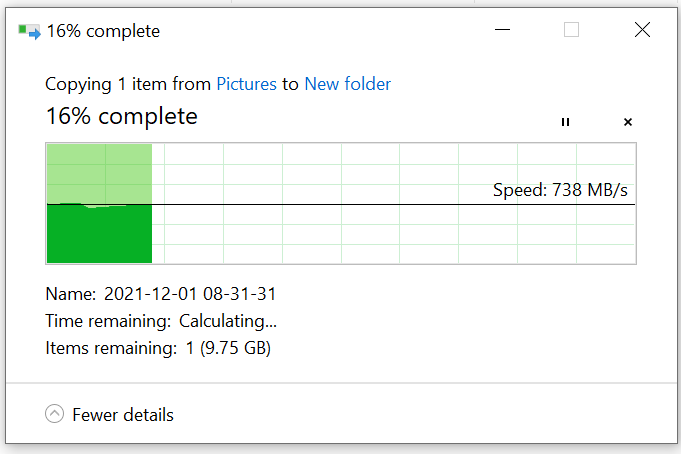
To finish up this post, I still don't really know what the exact issue was. I reconfigured my network so that my unraid machine is connected using an RJ45 transmitter instead of a DAC to the switch and the problem has completely gone away. If anyone else is experiencing this issue, I would suggest trying different connectors earlier in the debugging process. Its possible that my switch didn't like the direct attach copper cable I was using or it didn't like the original JR45 transceiver that I was using. If I had to start over I would definitely start with: 1. Connect to the unraid machine directly using a DAC cable. This requires buying 2 10G nics, but they're super cheap on ebay so this is worth it for debugging. Set a static IP to both the unraid machine and the test machine. Use iperf3 to test the connection speed - this eliminates your storage as a bottleneck. You can download iperf3 for unraid using the NerdPack plugin. 2. If you're still not getting the full speed, swap out your direct attach copper cables and/or transceivers for different brands. I'm not sure if the MikroTik switch I'm using was fussy about the hardware I was using, but after swapping out the DAC and using transceivers instead the problem has gone away. 3. Also measure your ethernet cable runs if you're using RJ45 transceivers, it seems like most entry-level transceivers only go up to 30 meters through CAT6a cable. Copying from Unraid is no longer an issue, the cache pool is now the bottleneck for the connection: Writing to the array is now slower than reading, which is what I originally expected (New Folder is in an Unraid cache pool): Thank you @Vr2Io for your suggestions, they helped move me along to the correct config 🙂
-
I was able to load up the Solarflare configuration utility and disable flow control, unfortunately it doesn't appear to have made a difference. I also turned off LSO and it didn't seem to help. I ordered a Mellanox Connect X-3 to replace this card, hopefully I have better luck with that. Its just strange to me that this card performs normally under Ubuntu 18.04 but doesn't work under Unraid. I am going to hold onto the Solarflare card and either use it under Windows or for another client machine (likely just going to stay in my test bench). I've also increased the send/receive tcp buffer sizes in the sysctl.conf file, that hasn't helped either. I also completely disabled flow control in the switch as well, also didn't make a difference. I'm not really sure what else to try Thanks again for the help 🙂
-
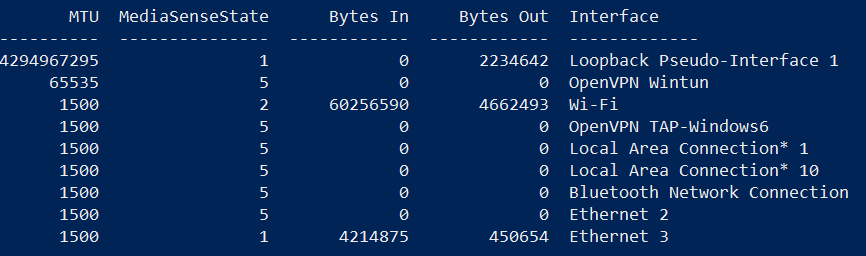
Ah, I did not notice the retry count - thanks for pointing that out. The MTU on my windows machine is the standard MTU (Ethernet 3 - 1500): I also confirmed in Unraid that it is set to the default MTU in the network settings, which I also confirmed in the syslog. I can see in my MikroTik switch that there are Tx Pauses, which I'm assuming is a symptom/cause of the retries: Could this also be a problem caused by the switch? I guess its also possible that its a bad DAC SFP+ cable, I don't have an extra one to try on hand but I could get one. Thanks for the input 🙂 - John

-
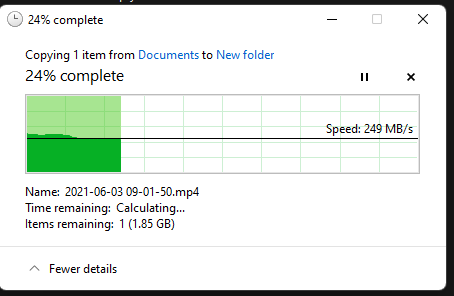
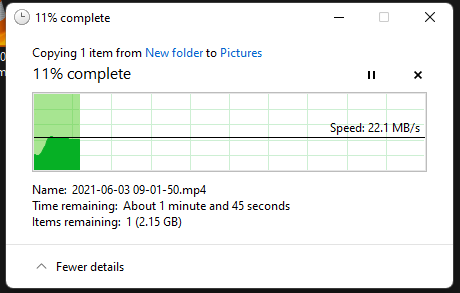
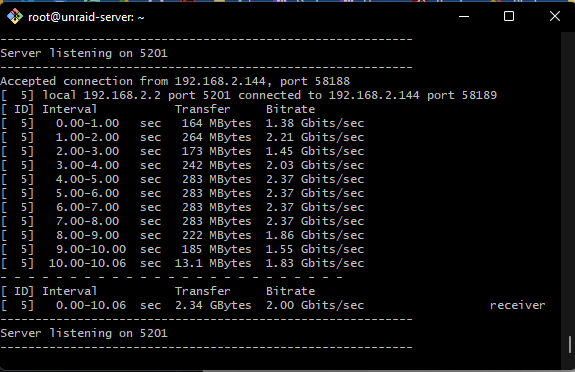
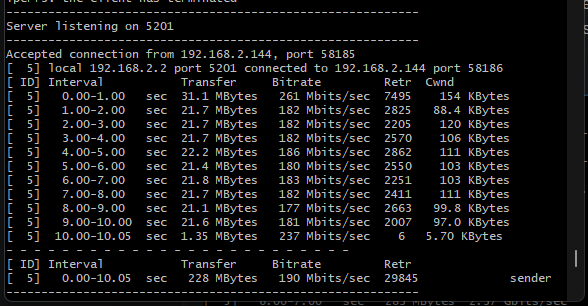
Hello everyone! I recently attempted to upgrade my Unraid machine to 10gbps networking. This is the card that I bought off of ebay: https://www.ebay.com/itm/164688767051 (Screenshot in case the listing is taken down) Originally I was super impressed with the write speeds, I only have a 2.5gbps network adapter to test with and I'm getting almost the full speed. I am using an SSD cache-only share to test this: But the read speeds are very slow, slower than a 1G connection: At first I thought the issue must be samba or my local windows 11 install, so I tried SFTP and got the exact same results, writing to the array is fast, reading is slow. After about 6 hours of debugging, I was able to figure out that the cache is performing just fine and I have narrowed it down to the network card. Running iperf3 on Unraid gives the expected results when Unraid is the server (again the max speed I'm expecting is 2.5Gbps because of my network adapter): When I set Unraid to be the client, I get the very slow network results: However, what is strange is that when I connect to the Unraid machine from a computer running with a 1Gbps card, I get the full 1Gbps speeds both in Samba, sftp and in iperf3. Extra Details: The Unraid machine and my test client are connected using a MikroTik switch: https://www.amazon.com/MikroTik-CRS305-1G-4S-Gigabit-Ethernet-RouterOS/dp/B07LFKGP1L The MikroTik switch is set to SwitchOS mode, I have also tried RouterOS mode and it performs the same. The raid contains 7 hard disks, 4 SSDs, 2 of the hard disks are parity disks Things I've tried so far: - I put the Solarflare network card into another desktop machine running Ubuntu 18.04 and it was able to perform the iperf3 test at the full expected speed. This makes me think the card and the switch are working as expected. - Swapping the PCI slot that the network card is attached to - The Unraid server is connected to the MikroTik switch using a DAC SFP+ cable - The test server is connected to the MikroTik switch using a 2.5Gbps to USB-C network adapter => CAT6 RJ45 cable => 10gbps RJ45 transceiver, I have swapped out the CAT6 cable for other cables and it has had no effect. - I have upgraded the firmware on the Solarflare card to the latest available. This was done using the solarflare firmware update tool available on Windows. I have also attached my anonymous diagnostics, but I'm not sure if they will be much help here. I have read through more than 20 other unraid posts complaining about a similar issue, but I wasn't able to find a solution to this problem. Does anyone know how to fix this, or any ideas to move forward on debugging this? I have provided as much information as possible, but if you have more questions please let me know. Thanks for the help and thanks for reading, John unraid-server-diagnostics-20211211-1621.zip