Mystic
Members
-
Joined
-
Last visited
Everything posted by Mystic
-
Thanks for all the help on this @skois - I am not sure what is expected. I assume you are trying to replicate the issue on your own network.. I will configure the client on my machine and attempt to upload large amounts of data. I will post results.
-
I am on OS Big Sure Latest ver of Chrome
-
Yes, changed php-local-ini value. I am using the Web... Will I get better results with the client?
-
Transferring from Qnap to Nexrcloud has improved with the latest config change to the php.php-local.ini, but I am still getting the "Error when assembling chunks, status code 504". Is there a tool beside the Flowuploader app I found on Nextcloud app site which seams to be very buggy. Does anyone have a suggestions on how to move data? currently attempting to transfer a 7.5GB file of .MOV and I keep getting error.
-
Thanks skois - I will try that.
-
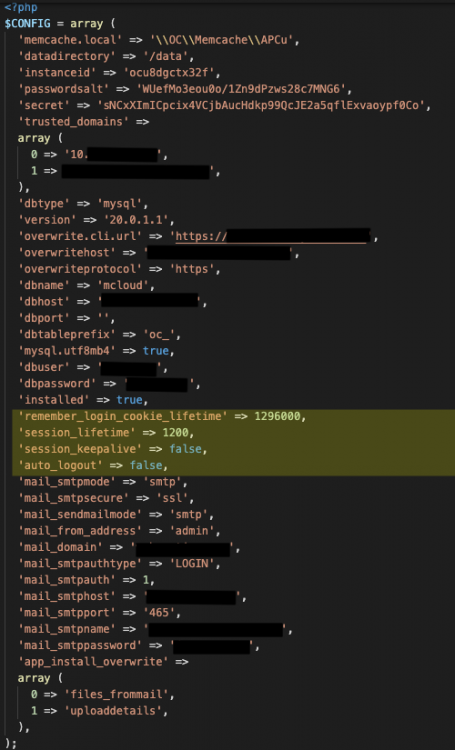
HOW can the limit be changed... I am moving data from my Qnap to Nextcloud. Very large transfers keep generating: "Error when assembling chunks, status code 504" I have spent a day investigating, changing conf files and I still get the error code. I am unclear if the issue is size or limit of browser time session. Using Big Sure OS. Chrome Browser to log into nextcloud and transfer files from both local drive and Qnap. UnRaid Server: AMD Ryzen 7 8 core 16GB Memory Dockers all installed 11/16 - latest: miriadb nextcloud swag I changed: appdata>nextcloud>www>nectcloud>config>config.php - the highlighted code I added: I can provide log files if needed.