





Dazwhite
Members
-
Joined
-
Last visited
Everything posted by Dazwhite
-
Resolved... Deleted docker.img file and reinstalled apps. correct network was there after deleting. Thanks @Vr2Io
-
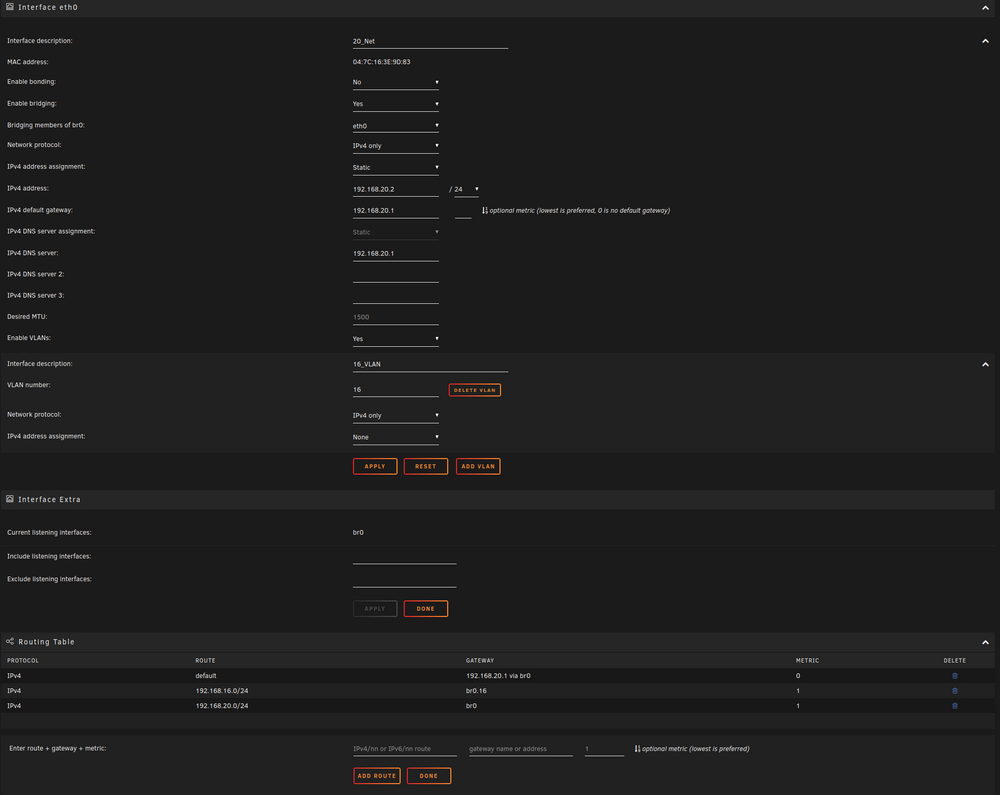
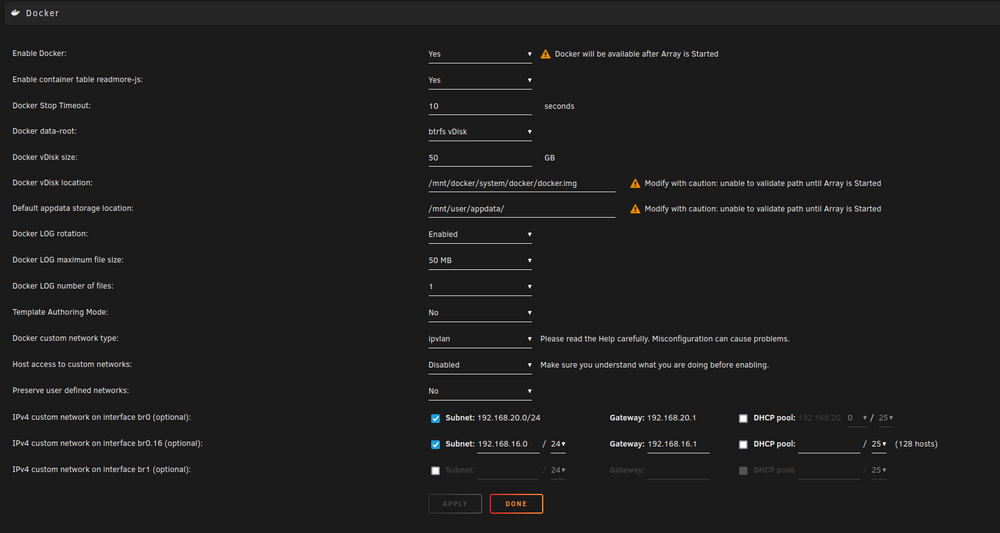
Thanks for the input @Vr2Io. Doing this seems to have removed the br1 interface from the Docker settings which you highlighted however, the problem with only br0 and br1 appearing when actually configuring a docker network setting persists. Ther is still no br0.16 option and br1 remains there.
-
I had been running Unraid virtualized in Proxmox. I began having issues with my Proxmox server and decided I'm going to run UnRaid as my main host instead. I am pretty sure I am aware of everything I need to do to make this happen but unfortunately, right from the get-go I'm running into network issues I can't figure out. VLANs are all configured in pfsense and everything is good with that configuration. Previously, Proxmox managed the VLANs and I just passed through 2 virtual NICS to UnRaid, br0 and br1. My host has 1 physical NIC so I need UnRaid to manage the VLANs. I have configured this and now have br0 and br0.16. I want to simply change everything previously configured as br1 to br0.16. Docker config has br0 and br0.16 set up as interfaces but when I try to change docker configs, it shows only the following options: Bridge Host None Custom: br0 -- 20_Net Custom: br1 br1 no longer exists and br0.16 should show but doesn't. Not sure what is wrong here. Any input would be appreciated.
-
Doesn't sound like the same issue. I had always passed through the sound portion of the card as well. It is always recommended to pass through sound as well, so the was probably the cause of your issues.
-
My only resolution I found was to use an AMD card. When I used a 1050TI and a 1030 I had the issue. Every AMD card I tried did not have the issue. I don't need a very powerful GPU so I am using an R9 270 at the moment and have no issues.
-
My issues were also on a dual-cpu socket 1366 motherboard (Asus Z8NA-D6) so it could be some kind of bug with the Chipset. As I mentioned, the only thing that managed to fix it for me was switching to an AMD Graphics card. I have since switched from the Radeon 7570 to an R7- 265 which also works with no issues. I would say go out and buy a cheap old AMD Graphics card to test, or if you are feeling lucky, go and grab an RX-580 which is pretty much the equivalent to the GTX 1060 and see if that resolves it for you. Good luck!
-
Crash also happened when I started a VM yesterday which I had started several times previously without issue. I disabled unsafe interupts and the crash did not happen while running CA backup last night, so it seems like it could have been unsafe interrupts causing my issue.
-
Last couple of days I have woken up to a frozen unraid server. Was using it at 4:00am and woke up at 9:00am and it was frozen (I don't get a lot of sleep. lol). My app backups run daily at 6:00am so I figured it may have something to do with that. Ran app backups manually today and I noticed the server crashed when it was restarting the Plex docker after all the backups and verification were done. I am able to start/stop plex in the GUI without crashing the server. How is stopping starting dockers handled in CA backup that is different that may cause crashing? I use nvidia unraid plugin and have a quadro k2200 passed through to plex. I can provide diagnostics, etc if requested. Thanks,
-
I was having this issue for probably about a year or more. I had tried, quite literally everything over that time but it still crashed every time I shut down the VM, but only after it had been on for a decent amount of time (over 1 hour). Long story short, it happened when I passed through both GPUs I had available to me... A GTX 1050 and a GT1030. What ended up fixing it was to change the GPU to an AMD Radeon HD 7570. Also, both the GTX 1050 and the GT 1030 worked fine in another unraid server I had with different hardware. Overall, I don't know exactly what caused the issue but if you are passing through an Nvidia 10 series GPU, try swapping it out for maybe an older AMD GPU and see if it makes a difference.


