elys_k
Members
-
Joined
-
Last visited
Everything posted by elys_k
-
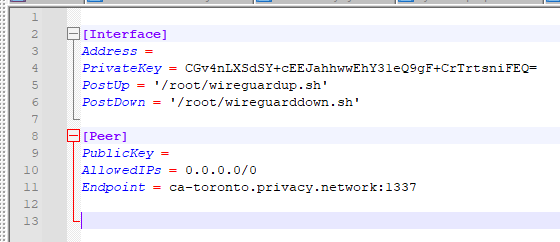
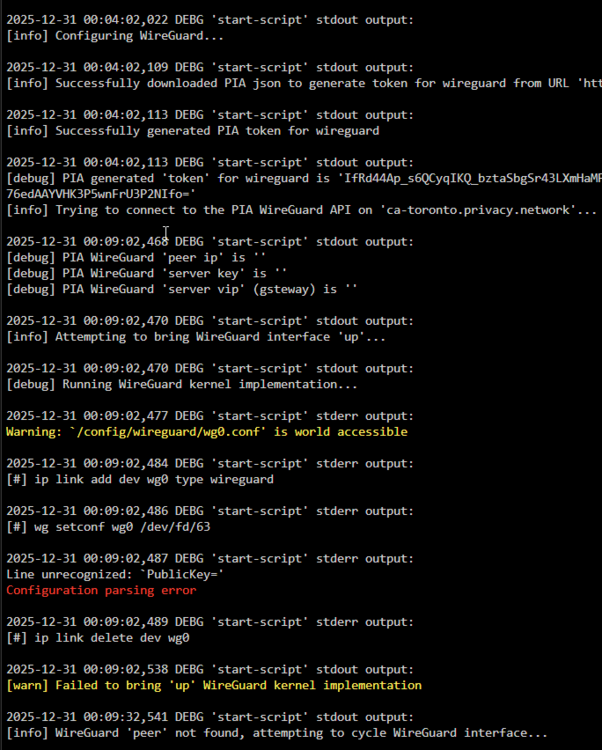
I have the same issue as the one presented here: [help needed] binhex-qbittorrentvpn + PIA : r/unRAID It started some time in the past few months. Everything was working great with wireguard before that, and openvpn before that. I have tried the following which produced the same result - Deleting the /config/wireguard/wg0.conf file - Switching to USERSPACE_WIREGUARD = yes - Disabling the Tailscale container integration - Switching to openvpn then back to wireguard - Switching to a different PIA endpoint Nothing that I have found in this thread, nor in the VPN nor VPN Docker FAQ pages have helped. No matter what the configuration, it seems that the Address and PublicKey fields are never populated in the produced Wireguard config file. I've attached the supervisord file and the unraid command execution with PID censored. Any help is greatly appreciated, thank you! command_execution.txt supervisord.txt