





reven
Members
-
Joined
-
Last visited
Everything posted by reven
-
Since you're not actually using anything about the image. Just use an input file instead of image file. This will avoid the sixlabors issue.
-
not the best place to get support. but quickly, you can only reprocess a file, that will use the flow assigned that library when they begin reprocessing. but you can create a flow that does some checking inside if you want to split that into different flows to go to or sub flows. for better support, jump on discord.
-
https://docs.fileflows.com/guides/unraid/nvidia-setup thats the instrutions for nvidia on unraid. Sorry, I don't monitor this forum very often, best place to get support is the discord channel, thats where the bulk of the users are.
-
do you mean to the UI? if so, sorry I only know english, so can't translate it myself.
-
that suggests FileFlows doesnt have write permissions to that path. check if you can open that path in file explorer and manually delete it.
-
https://docs.fileflows.com/guides/external-processing-node The mapping section.
-
its storing the in memory object and all its properties. C# stores string internally as unicode, utf-16, so that increases memory. if you got tens of thousands of files, thats all the dates, filename, records of what flow parts were run against each file etc. So that definetly has an effect on memory usage. To what amount, I cannot tell until I can easily switch to an external database and compare the differences.
-
HDR to SDR was an example. FileFlows currently only supports a sqlite database and due to limitation of that database, it caches all objects also in memory to improve performance. This obvisouly uses more memory, and the bigger the library the more memory it will use. You mentioned gigs of log files, which suggests you have a large library of files processed. This could be the the reason for the memory usage. I am planning on adding support for an external database very shortly (my next big thing to add), which if configured (it would be opt in, sqlite by default) would mean nothing needs to be stored in memory and just loaded when needed. But I am aware of the memory usage problem and will be focusing on reducing this as much as possible.
-
Memory usage: this could be ffmpeg and depends on what you are processing. e.g. the HDR to SDR can consume a lot of memory. Logs: This will be fixed soon in an upcoming release
-
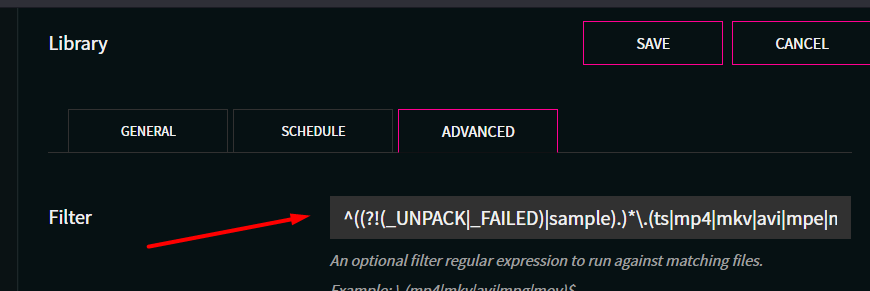
You can use a library "Filter" to match items. So in this example (which is "SABnzbd Videos" its ignoring files that contain _UNPACk or _FAILED or sample. This regex is tested against the full path of files it finds, so you can get quite complex with this if you want.
-
I'm not even sure what you mean by this? strip a music file/audio file???? Ive only ever seen these with single tracks.
-
Created a ticket for this on github https://github.com/revenz/FileFlows/issues/24 I'll fix it in the next release (probably this weekend).
-
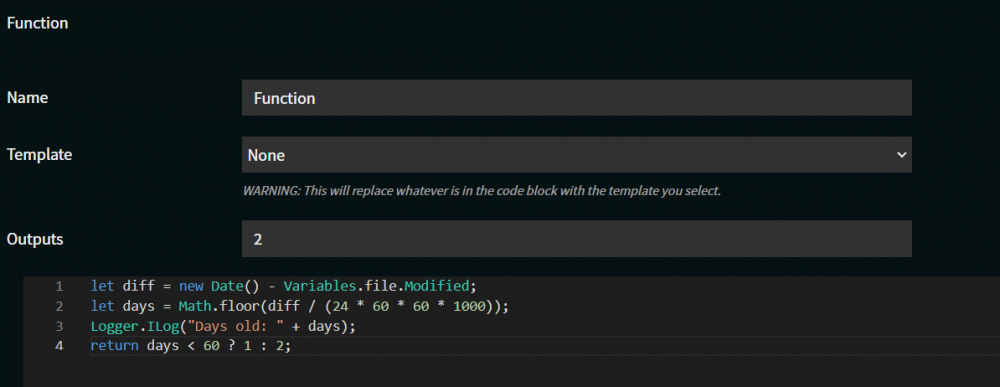
This isnt the best place for support, discord is quickest, then github. I rarely check here tbh. So you can achieve this by using a "Function" node. with the following code let diff = new Date() - Variables.file.Modified; let days = Math.floor(diff / (24 * 60 * 60 * 1000)); Logger.ILog("Days old: " + days); return days < 60 ? 1 : 2; Where output 1 will be less than 60 days old, output 2 is greater than 60 days
-
lol. my newest intel cpu is also 4th gen theyre just simply too old.
-
trying encoding in "H265 Automatic" and "h264 Automatic". see what ffmpeg commands they produce.
-
Sorry, I'll be of little help here. I don't have any intel gpus to test and ive never used one, so not sure the parameters needed for the docker container. The ffmpeg I use is the same one as tdarr, jellyfin 4.3 version. So if you can find out the parameters needed for tdarr it would likely be the same for FileFlows.
-
1/2. Theres no current way to look if a file exists from a flow. I could expose this to the function node though. 3. Similar thing, no current way to look for other folders. I could also expose this somehow. 5. no current way to notify sonarr/plex/radarr directly. plugins could be written to do this but its not high on my priority list. plex would be higher, and i have considered it, I just have been busy with more important features atm. I have briefly looked at the Plex API didnt see how to notify plex of a single file change, only to rescan an entire library. I need mroe time to investigate this further. I was going to add a simple node that just used the x-token until I came up with a better solution. i suggest using fileflows as a man in the middle between a download client and sonarr/radarr. have a download client download to say /mnt/user/downloads/complete have file flows watch that folder and a move action to /mnt/user/downloads/converted. then have /mnt/user/download/complete mapped in sonarr/radarr to /mnt/user/downloads/converted. then sonarr/radarr will get the files after processing, and move it into your library which can then notify plex of the new file. I would suggest shifting all this looking for file stuff though into the flow itself. using a function node you could look at the name of the file to determine what you should do with it. eg if(Variables.file.fullName.toLower().contains('8 out of 10 cats') return 2; // panel show most of this stuff would be best for the function node since its pretty specific / non generic stuff. the function node lets you run custom javascript during the flow and exposes some helper objects. Audio normalization just uses ffmpeg (all the video nodes use ffmpeg), and uses the loudnorm filter to normalize it. I'm not an expert on this, I found how to do this online and just created a node to do it. Seems to have good results. All my tv shows I ran through a two pass normalization. Movies I don't do this too
-
did you have a chance to try the console of the docker to see if that file exists? also for quicker support use my discord server, im pretty much always available there unless sleeping
-
it is doing this check if (file.Exists == false) { Console.WriteLine("Library file does not exist, deleting from library files: " + file.FullName); libfileService.Delete(libFile.Uid).Wait(); return; } so it is checking that file exists before starting the flow, the file system is reporting that file does not exist, so its deleting it. is the file name casing exactly right? you could try opening the console on the docker image and manually checking that file exists in that path in the docker container.
-
most likely its due to mapping being incorrect. The node tries to map the file locally, it can't find it, it assumes the file has been deleted, it deletes the library file entry. You only need to use an additional processing node if you dont want to use the intenral node on the same machine. The internal node is a lot easier, since theres nothing to map. But if you want to use an external processing node, then yeah, most likely its the mapping.
-
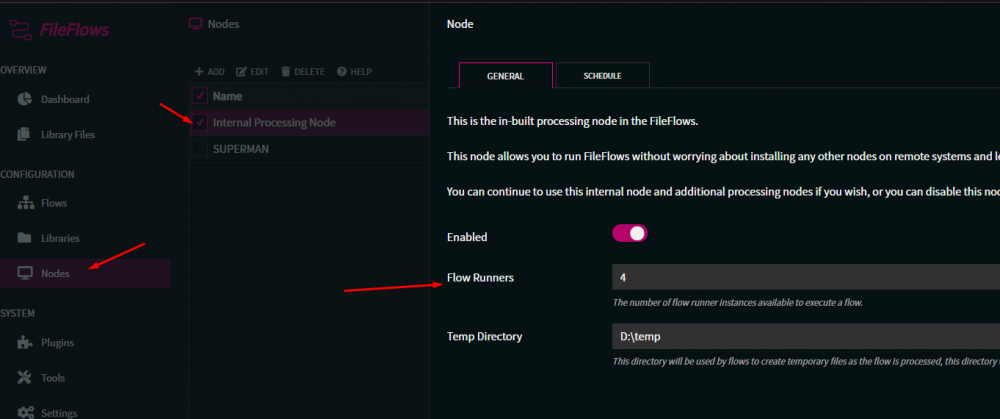
Go to "Nodes" Edit "Internal Processing Node" Change "Flow Runners" to how many you want to run at the same time Save
-
I was literraly just uploading the new builds as you posted this. So you can update the docker now to get the latest version.
-
nice. sadly unraid/docker cant just do this automatically and not something I can make the app just auto configure. because yes, its bad user experience having to manually configure this. however... unraid isnt exactly a computer illiterate piece of software so if youre using it youre more advanced than the typical computer user. so its not unreasonable. ill also update the docker instructions with the image to point to that wiki page to hopefully make it easier for other users
-
I've added instructions how to configure an NVIDIA GPU to the FileFlows wiki. https://github.com/revenz/FileFlows/wiki/Unraid-NVIDIA-Setup
-
Big Update. Can now have additional processing nodes, so you can offload some processing (video conversion/whatever) to more systems. I've added windows installers to https://fileflows.com for the server app and the node. The server/main app has an internal node, so if you dont want to have 2 installs, you don't need to. unRAID currently just have the single server docker image. Not sure if people would want a node docker for this? Makes more sense making unRAID the server IMO. But if someone has a use case for unRAID as a node, let me know.



