





Evo
Members
-
Joined
-
Last visited
Everything posted by Evo
-
movies folder was created from backup after the last movies folder went missing. problem solved. thanks
-
root@Data:~# ls -l /mnt/user/Media total 488386704 drwxrwxrwx 1 nobody users 4096 Jan 9 2023 Audio\ Books/ drwxrwxrwx 1 nobody users 16384 Jan 9 2023 Documentaries/ drwxrwxrwx 1 nobody users 222 Nov 25 01:15 Games/ drwxr-xr-x 1 root root 61440 Jan 31 14:23 Movies/ drwxrwxrwx 1 nobody users 58 Feb 6 13:17 TV/ drwxrwxrwx 1 nobody users 44 May 13 2024 Untitled/ -rw-rw-rw- 1 nobody users 500107862016 Aug 15 2023 Untitled.img -rw-rw-rw- 1 nobody users 1088 Mar 6 2024 new\ 1.txt drwxrwxrwx 1 nobody users 4096 Feb 25 2024 unsorted/ root@Data:~# data-diagnostics-20250207-1223.zip
-
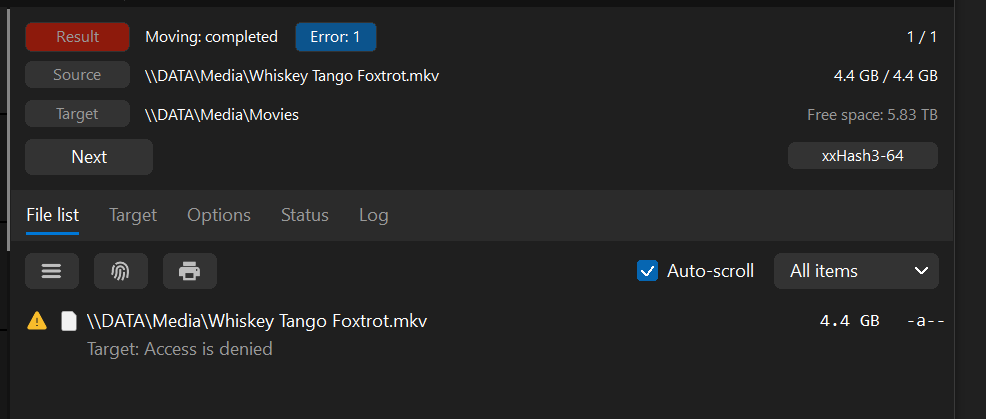
I'm unable to copy anything to my movies folderr on my share. Can copy to other folders fine.
-
how do i do this?
-
no, thats a seperate problem. the movies folder was on disk 1, 2 or 3. i forget which.
-
data-diagnostics-20241205-1341.zip
-
I'm running plex. it shows the movies as unavaliable but it shows the movies as existing but missing. If that makes sense.
-
Hello, I had several folders on my array. eg TV, Movies, Docos. Each folder was on on a seperate hard drive. The TV and Doco folders are there but the Movies folder has gone missing. I have not deleted it. Anyways to find/recover it? Size is approx 3tb in space.
-
it was a pool inside the array. it was running xfs, like the other drives.
-
root@Data:~# xfs_repair -n /dev/sde1 Phase 1 - find and verify superblock... bad primary superblock - bad magic number !!! attempting to find secondary superblock... ......................................................................................................................................................................................................................................................................................................................................................... I'll let you know when it finishes
-
root@Data:~# fdisk -l /dev/sde Disk /dev/sde: 7.28 TiB, 8001563222016 bytes, 15628053168 sectors Disk model: WDC WD80EFZX-68U Units: sectors of 1 * 512 = 512 bytes Sector size (logical/physical): 512 bytes / 4096 bytes I/O size (minimum/optimal): 4096 bytes / 4096 bytes Disklabel type: gpt Disk identifier: 3D16043F-20E0-45D7-8727-22280BB9B85C Device Start End Sectors Size Type /dev/sde1 64 15628053134 15628053071 7.3T Linux filesystem
-
root@Data:~# blkid /dev/sda1: LABEL_FATBOOT="UNRAID" LABEL="UNRAID" UUID="272C-EBE2" BLOCK_SIZE="512" TYPE="vfat" /dev/loop1: TYPE="squashfs" /dev/sdf1: UUID="75b92662-26cb-4550-bf13-5bdf9e89c21e" BLOCK_SIZE="4096" TYPE="xfs" PARTUUID="77f563c7-a884-4285-85cf-f256aaf88418" /dev/nvme0n1p1: UUID="820a3414-6ab9-42e0-ae94-792e4cc8fc5f" UUID_SUB="defbd4b1-130a-4e65-ba1d-54a18bda8a52" BLOCK_SIZE="4096" TYPE="btrfs" /dev/sdd1: UUID="3f75e282-f55e-4961-ac7a-4dcf3886473c" BLOCK_SIZE="4096" TYPE="xfs" PARTUUID="b1c6eded-137d-47b0-9176-05a35f77ea3d" /dev/sdb1: UUID="85accf12-355d-454c-bc03-7de44b69b98f" BLOCK_SIZE="512" TYPE="xfs" PARTUUID="9049746d-014d-4132-a585-2a85e225dfca" /dev/loop0: TYPE="squashfs" /dev/sdc1: UUID="cf600bf2-e6c8-497d-af6a-6bf4ed663cad" BLOCK_SIZE="512" TYPE="xfs" PARTUUID="06b4c72b-4f4f-4507-b904-5c4c66ad2159" /dev/md2p1: UUID="cf600bf2-e6c8-497d-af6a-6bf4ed663cad" BLOCK_SIZE="512" TYPE="xfs" /dev/md1p1: UUID="3f75e282-f55e-4961-ac7a-4dcf3886473c" BLOCK_SIZE="4096" TYPE="xfs" /dev/md3p1: UUID="75b92662-26cb-4550-bf13-5bdf9e89c21e" BLOCK_SIZE="4096" TYPE="xfs" /dev/loop2: UUID="741d8845-5e33-4e63-8b19-7944d7528378" UUID_SUB="d35154c1-0782-4e70-99ad-6fdfcc4be628" BLOCK_SIZE="4096" TYPE="btrfs" /dev/sde1: PARTUUID="283e7bfe-ad2d-4d5f-a73d-83fe3059df2c"
-
diag if useful data-diagnostics-20241122-1606.zip
-
adding another pic

-
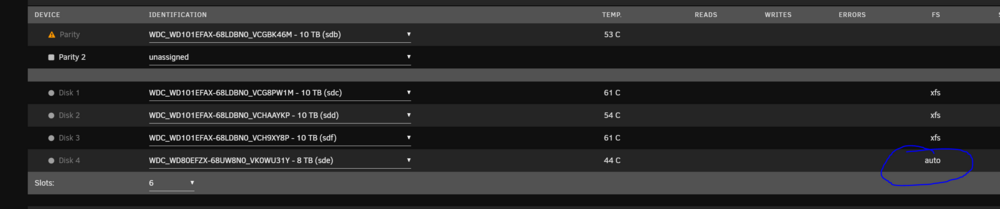
I added a new 10tb drive to the pool. something went wrong and now the 8th existing drive wont load. pics attached. unsure what to try

-
thanks for all your hard work. -------------- 21.40.1 doesnt work for me: ---Checking for optional scripts--- ---No optional script found, continuing--- ---AMD driver not present--- ---Installing AMD drivers, please wait!--- ---Downloading driver from https://repo.radeon.com/amdgpu-install/21.40.1/ubuntu/focal/amdgpu-install_21.40.1.40501-1_all.deb--- % Total % Received % Xferd Average Speed Time Time Time Current Dload Upload Total Spent Left Speed ---Installing driver, this can take a very long time with no output. Please wait!--- ---AMD Driver installation finished--- and thats it... i suspect the install is failing because it goes from "installing" to "finished" in about 10 seconds/ 21.20 does work for me, however the fans on my 6900xt never spin up. ----------------------------- i find the container gets recreated for simple things like a change to a parameter. ie changing target temp from 80 to 70 will force a container recreate.
-
i can only speak for amd drivers, yes, everytime.
-
im wondering if Phoenix Miner 5.7b fixes the issue, given that the container is running 5.6d, and the change notes for 5.7b mention: -Implemented full hardware control for AMD RX6900/6800/6700 cards under Linux. Note that with these cards under Linux you need to specify relative core voltage: e.g. -cclock -50 will set the core voltage to be 50 mV under the default value -Fixed an issue causing crashing with some RX6900/6800/6700 cards under Linux (there is no need to run these cards with -clkernel 0 anymore)
-
I have a 6800XT and having the same issue. i suspect its an issue with the driver or phoenixminer. what ive noticed is 1 cpu thread gets stuck at 100%, followed by this in the logfile [93mGPU1 not responding [91mThread(s) not responding. Restarting. mining a nvidia 1060 using t-rex works fine


