





thomasH
Members
-
Joined
-
Last visited
Everything posted by thomasH
-
i did that and now its not showing my vms at all.
-
the vms were working for a while as an array so how would i go about making them a network share and will they have access to al drives or just a couple of my choosing? also would you recommend doing it this way or removing them from the array and doing a passthrough?if its not apart of the vm how does the vm use it? it has a ssd used for windows and a couple game but a hdd for mostly evrything. how would it have windows if its not apart of the vm?so would i just need to un-mount the drive?not entirely sure it was a while ago and i had someone help me but for the first vm i posted the XML for you.im back (thomas). heres the xml for the first vm <?xml version='1.0' encoding='UTF-8'?> <domain type='kvm'> <name>Hallie</name> <uuid>781e1920-3b69-1f69-da80-2c64b4c3d523</uuid> <metadata> <vmtemplate xmlns="unraid" name="Windows 10" icon="windows.png" os="windows10"/> </metadata> <memory unit='KiB'>20971520</memory> <currentMemory unit='KiB'>20971520</currentMemory> <memoryBacking> <nosharepages/> </memoryBacking> <vcpu placement='static'>8</vcpu> <cputune> <vcpupin vcpu='0' cpuset='2'/> <vcpupin vcpu='1' cpuset='18'/> <vcpupin vcpu='2' cpuset='3'/> <vcpupin vcpu='3' cpuset='19'/> <vcpupin vcpu='4' cpuset='4'/> <vcpupin vcpu='5' cpuset='20'/> <vcpupin vcpu='6' cpuset='5'/> <vcpupin vcpu='7' cpuset='21'/> </cputune> <os> <type arch='x86_64' machine='pc-q35-6.2'>hvm</type> <loader readonly='yes' type='pflash'>/usr/share/qemu/ovmf-x64/OVMF_CODE-pure-efi.fd</loader> <nvram>/etc/libvirt/qemu/nvram/781e1920-3b69-1f69-da80-2c64b4c3d523_VARS-pure-efi.fd</nvram> </os> <features> <acpi/> <apic/> <hyperv mode='custom'> <relaxed state='on'/> <vapic state='on'/> <spinlocks state='on' retries='8191'/> <vendor_id state='on' value='none'/> </hyperv> </features> <cpu mode='host-passthrough' check='none' migratable='on'> <topology sockets='1' dies='1' cores='4' threads='2'/> <cache mode='passthrough'/> <feature policy='require' name='topoext'/> </cpu> <clock offset='localtime'> <timer name='hypervclock' present='yes'/> <timer name='hpet' present='no'/> </clock> <on_poweroff>destroy</on_poweroff> <on_reboot>restart</on_reboot> <on_crash>restart</on_crash> <devices> <emulator>/usr/local/sbin/qemu</emulator> <disk type='file' device='disk'> <driver name='qemu' type='raw' cache='writeback'/> <source file='/mnt/disks/50026B7682DF00C4/vdisk1.img'/> <target dev='hdc' bus='sata'/> <boot order='1'/> <address type='drive' controller='0' bus='0' target='0' unit='2'/> </disk> <disk type='block' device='disk'> <driver name='qemu' type='raw' cache='writeback'/> <source dev='/dev/disk/by-id/ata-WDC_WD1003FZEX-00K3CA0_WD-WCC6Y1ACJDV9'/> <target dev='hdd' bus='sata'/> <address type='drive' controller='0' bus='0' target='0' unit='3'/> </disk> <controller type='pci' index='0' model='pcie-root'/> <controller type='pci' index='1' model='pcie-root-port'> <model name='pcie-root-port'/> <target chassis='1' port='0x8'/> <address type='pci' domain='0x0000' bus='0x00' slot='0x01' function='0x0' multifunction='on'/> </controller> <controller type='pci' index='2' model='pcie-root-port'> <model name='pcie-root-port'/> <target chassis='2' port='0x9'/> <address type='pci' domain='0x0000' bus='0x00' slot='0x01' function='0x1'/> </controller> <controller type='pci' index='3' model='pcie-root-port'> <model name='pcie-root-port'/> <target chassis='3' port='0xa'/> <address type='pci' domain='0x0000' bus='0x00' slot='0x01' function='0x2'/> </controller> <controller type='pci' index='4' model='pcie-root-port'> <model name='pcie-root-port'/> <target chassis='4' port='0xb'/> <address type='pci' domain='0x0000' bus='0x00' slot='0x01' function='0x3'/> </controller> <controller type='pci' index='5' model='pcie-root-port'> <model name='pcie-root-port'/> <target chassis='5' port='0xc'/> <address type='pci' domain='0x0000' bus='0x00' slot='0x01' function='0x4'/> </controller> <controller type='pci' index='6' model='pcie-root-port'> <model name='pcie-root-port'/> <target chassis='6' port='0xd'/> <address type='pci' domain='0x0000' bus='0x00' slot='0x01' function='0x5'/> </controller> <controller type='pci' index='7' model='pcie-to-pci-bridge'> <model name='pcie-pci-bridge'/> <address type='pci' domain='0x0000' bus='0x01' slot='0x00' function='0x0'/> </controller> <controller type='virtio-serial' index='0'> <address type='pci' domain='0x0000' bus='0x02' slot='0x00' function='0x0'/> </controller> <controller type='sata' index='0'> <address type='pci' domain='0x0000' bus='0x00' slot='0x1f' function='0x2'/> </controller> <controller type='usb' index='0' model='nec-xhci' ports='15'> <address type='pci' domain='0x0000' bus='0x00' slot='0x07' function='0x0'/> </controller> <interface type='bridge'> <mac address='52:54:00:17:1a:9f'/> <source bridge='br0'/> <model type='e1000-82545em'/> <address type='pci' domain='0x0000' bus='0x03' slot='0x00' function='0x0'/> </interface> <serial type='pty'> <target type='isa-serial' port='0'> <model name='isa-serial'/> </target> </serial> <console type='pty'> <target type='serial' port='0'/> </console> <channel type='unix'> <target type='virtio' name='org.qemu.guest_agent.0'/> <address type='virtio-serial' controller='0' bus='0' port='1'/> </channel> <input type='tablet' bus='usb'> <address type='usb' bus='0' port='4'/> </input> <input type='mouse' bus='ps2'/> <input type='keyboard' bus='ps2'/> <audio id='1' type='none'/> <hostdev mode='subsystem' type='pci' managed='yes'> <driver name='vfio'/> <source> <address domain='0x0000' bus='0x03' slot='0x00' function='0x0'/> </source> <address type='pci' domain='0x0000' bus='0x04' slot='0x00' function='0x0'/> </hostdev> <hostdev mode='subsystem' type='pci' managed='yes'> <driver name='vfio'/> <source> <address domain='0x0000' bus='0x03' slot='0x00' function='0x1'/> </source> <address type='pci' domain='0x0000' bus='0x05' slot='0x00' function='0x0'/> </hostdev> <hostdev mode='subsystem' type='usb' managed='no'> <source> <vendor id='0x0c45'/> <product id='0x7666'/> </source> <address type='usb' bus='0' port='1'/> </hostdev> <hostdev mode='subsystem' type='usb' managed='no'> <source> <vendor id='0x1532'/> <product id='0x0084'/> </source> <address type='usb' bus='0' port='2'/> </hostdev> <hostdev mode='subsystem' type='usb' managed='no'> <source> <vendor id='0x1532'/> <product id='0x0537'/> </source> <address type='usb' bus='0' port='3'/> </hostdev> <memballoon model='none'/> </devices> </domain>hey just so you know thomas left and asked me to help with this, Im his roommate and i have no idea what any of that means, if you could please simplify it for me that would be great. thank youmy vms are set up as follows 1 HDD 1 SSD Doesn't recognize SSD (wont run) 1 HDD Doesn't recognize HDD (wont display) 1 HDD 1 SSD recognizes both in Unraid and runs but while in VM it doesn't show HDD space or able to use it despite it being formatted. Also every so often my keyboard stops working in the VM but that's a minor issue comparatively. pain-diagnostics-20230729-1611.ziphi ive been having issues with my vms recognizing my storage devices properly for the past couple months. any help would be greatly appreciated.my vms are set up as follows 1 HDD 1 SSD Doesn't recognize SSD (wont run) 1 HDD Doesn't recognize HDD (wont run) 1 HDD 1 SSD recognizes both in Unraid and runs but while in VM it doesn't show HDD space or able to use it despite it being formatted. Also every so often my keyboard stops working in the VM but that's a minor issue comparatively. help with this would be GREATLY appreciated.my vms are set up as follows 1 HDD 1 SSD Doesn't recognize SSD (wont run) 1 HDD Doesn't recognize HDD (wont run) 1 HDD 1 SSD recognizes both in Unraid and runs but while in VM it doesn't show HDD space or able to use it despite it being formatted. Also every so often my keyboard stops working in the VM but that's a minor issue comparatively. pain-diagnostics-20230514-1543.zipi think i might've deleted a BUNCH of data unnecessarily from your "help"can you please send over another moderator or someone better at actually helping.there is no "disk management" tab or option anywhereyou are INCREDIBLY unhelpfulhow do you re-format within a vm?is there anyone else you can contact who understands better to assist you in this?that means nothing to me and doesnt help in the slightest. please respond with a solutionthey were set to auto and would go into NTFS and when i made them XFS instead the issue still persisted
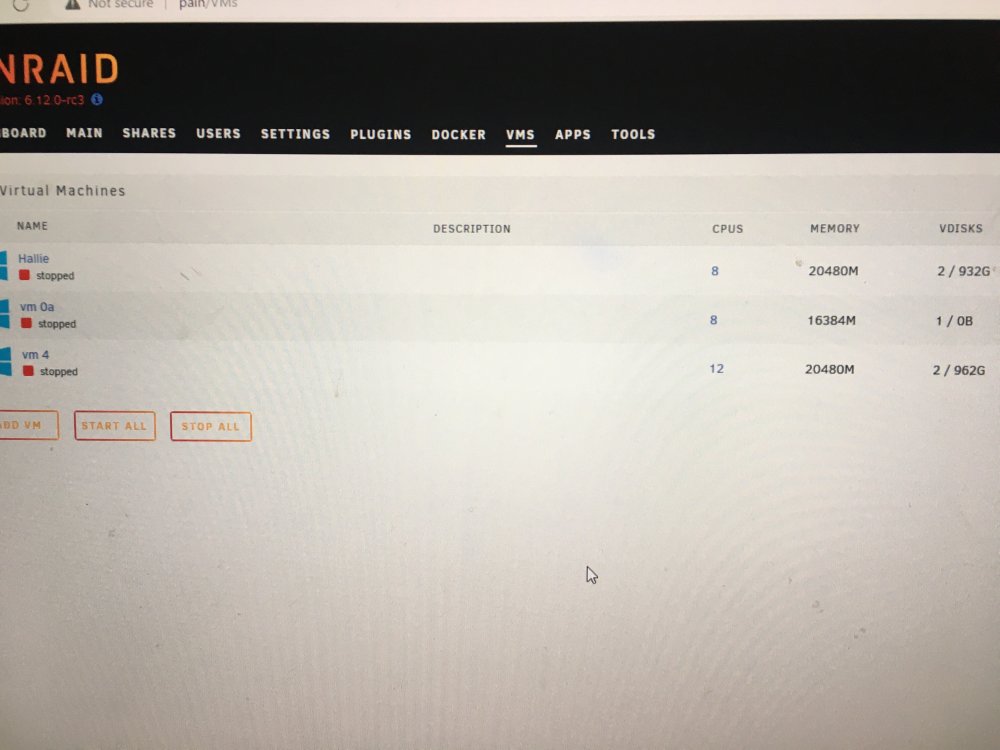
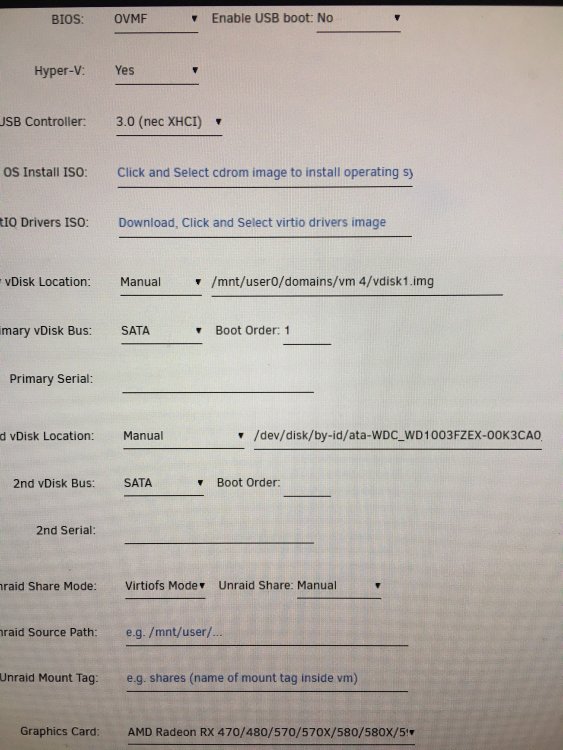 the problem is my vms stopped recognizing some of the drives assigned to them and wont boot now because of thisall 3 vms i have aren't recognizing drives properly they say A -2/932 gb B -1/0B C -2/962 gb they have A -480gb SSD + 1 TB HDD B -1TB HDD C -480gb SSD + 1 TB HDDre-formatted them but the vms still arnt recognizing them pain-diagnostics-20230430-1700.zipit s not giving me the option to change them from NTFS -> xfs like the others, is the FS the issue?yes

