





DejMacro
Members
-
Joined
-
Last visited
Everything posted by DejMacro
-
Shipping notification received. Looks like the CPU is being RMA'd. and on way back to me now. Thanks for bringing the CPU issue to my attention. I would NEVER have looked at it as a potential issue. I have started consuming youtube again, because I missed this. Used to pretty regularly consume Level1techs, LTT, etc etc. Like a form of IT news. Was shocked to hear about how significant this INTEL issue was! Thanks JorgeB Merry XMAS. Daniel
-
Whilst I work away at the RMA request. And for anyone else out there with same/similiar issue. Intel 13th and 14th Gen CPU i9 and i7 and the like are all affected to a degree, less or more. My Intel CPU 13600K which I purchased thinking it might be more reliable as it was verified for more intense tasks. is affected. After following on from advice online and using best guess I have found the ability to further reduce the spikes and voltage requirements. Motherboard changes: long and short duration wattage reduced to 65 and 65w and 28 seconds. boosting turned off. Core Ratios down to 3.5ghz. memory capped at 3200. CPU has ---> 1 P core disabled and all E cores disabled. Was getting longer and longer ON period as i reduced this down. System uptime is in the hours again. WOOHOO> thanks intel. I have raised an RMA, can't imagine ill have this buttoned up before Xmas. Must be on the COAL list. Thanks
-
ok i just dove into that info. seems like it is pretty well reported. suggesting 12700 non-K as a good/best alternative? Been running windows 11 on the hardware for 30mins or more without error so far. perhaps it's more pronounced in certain configurations. I'm reading that I might have luck with locking down some of the behaviour in BIOS for the CPU. it may help. But might just get the more suitable CPU and be done with it? NOPE EDIT. Windows also getting no-where. lasted short while, back to the same behaviour. Thanks for your help. speaking with vendor now. And will probably get a 12th gen non K CPU. Dan
-
if I move the unraid mobo-ram-cpu to desk/desktop setup. I guess we will see if its reliable. perhaps in a different scenario it will be. but also if i get the same results after changing the motherboard ram and cpu then guess i have to start looking at hard disks. or the GPU not much after that.
-
Yer. It just disappears. And is back booting up again. USB gets killed (corrupted/unbootable) 99% of the time. I think I am going to tear my 2 desktops apart and build try and determine if its mobo ram or CPU I guess. I find it hard to believe it's going to be the WS680 ACE. but I guess more bizarre things have happened. I haven't had such a mysterious issue before. and had happily been using the hard ware for quite some time.
-
OK So we have replaced the PSU with 1000w Platinum Seasonic. New Batteries in APC UPS. Draw in watts isn't peaking and VA is fine. But batteries were at 3 years. So, remove that possibility from equation by replace them. We do get the odd power outage here. especially this time of year. UPS load should be fine. It's just the server and a Switch and Router plugged on to UPS. Checked all cables. New ones installed with PSU anyways. All fans running, all devices showing online. But System just drops after boot. mostly after everything is up and running array started. Anyone out there got some pointers for troubleshooting this. Maybe UNRAID doesn't understand my hardware. I have tried tweaking motherboard settings to more reliable states, reduce boosting and power sleep settings. to keep everything awake. Feeling more and more lost as I go. thanks
-
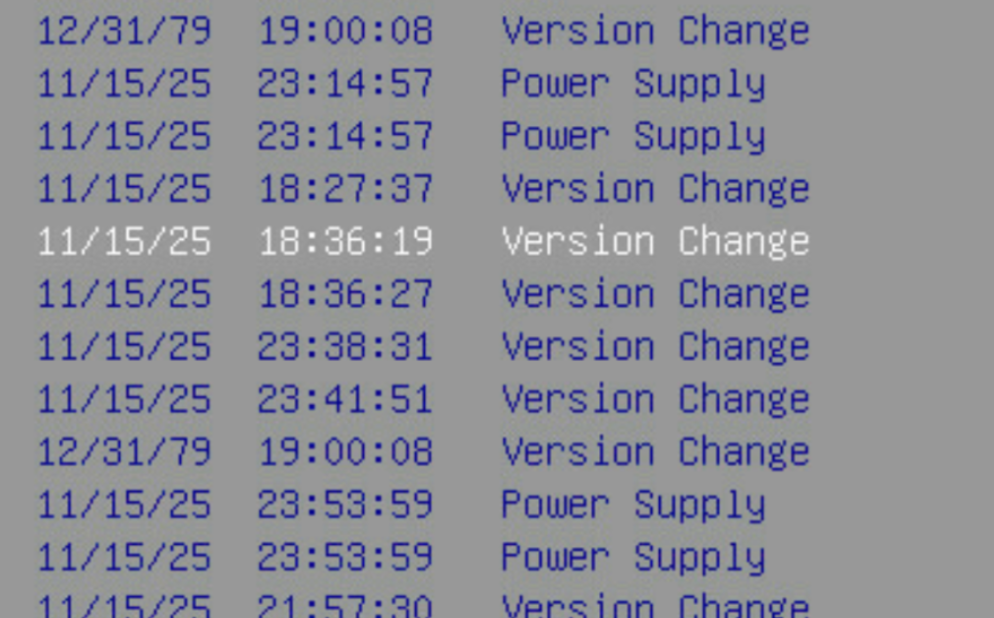
my apologies. Have attached latest 2 from usb, after repair usb and make bootable i am back up running for the moment. I did notice some power events in BMC/IPMI from recent time before crash. The logs I have posted don't give me confidence of an OS side issue causing freeze. going to consider this a power issue for the time being. I don't like all the kernel errors in unraid logs. not sure i can do much with them from my experience so far many thanks Downloads.zip
-
removed due to length
-
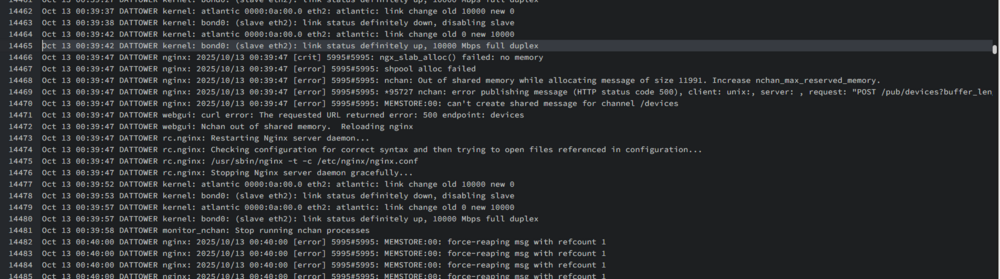
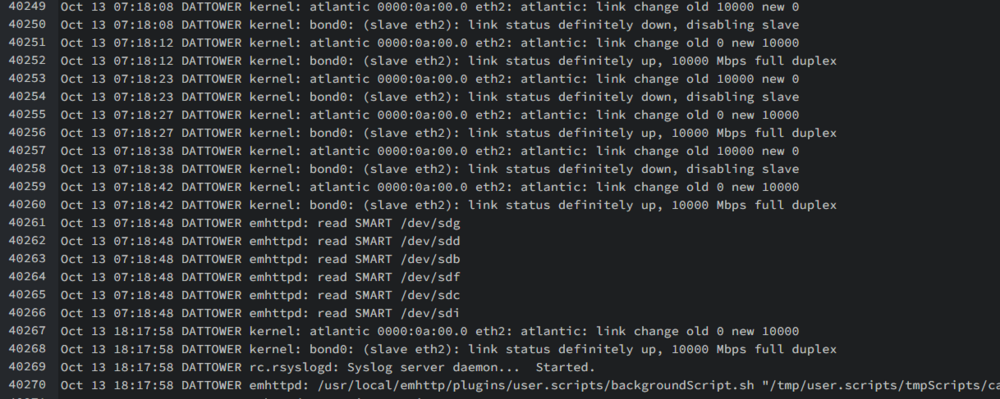
The last line was repeated till the second image - 20,000 lines at the same time stamp. however server crashed at 7am many hours later. nothing really posted in logs immediately prior to system offline. was sitting powered up and unresponsive. line .

-
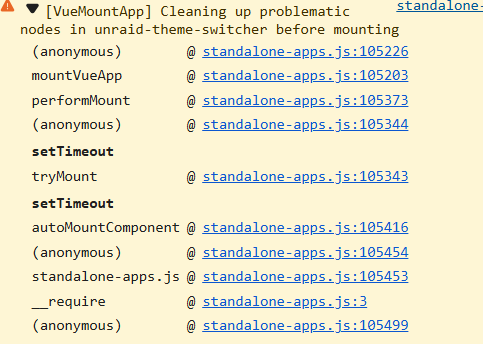
ok had another crash - i had quite a few things in motion this time (so feeling a little more negative this time). everything just freezes up (network adapters offline - all activity ceases) . I tried adjusting the syslog to store locally. but looks as though also issue with this. Does it appear that it's unable to write to this location.? I have tried more than one share. and doesn't appear to be generating any files. What is the easiest way i can catch this little terror in its tracks?!?? Oct 11 10:21:52 DATTOWER webgui: Successful login user root from 192.168.1.71 Oct 11 10:26:36 DATTOWER ool www[157695]: /usr/local/emhttp/plugins/dynamix/scripts/rsyslog_config Oct 11 10:26:36 DATTOWER rc.rsyslogd: Restarting Syslog server daemon... Oct 11 10:26:36 DATTOWER rc.rsyslogd: Stopping Syslog server daemon... Oct 11 10:26:36 DATTOWER rc.rsyslogd: killall --ns 157794 rsyslogd Oct 11 10:26:40 DATTOWER rc.rsyslogd: Syslog server daemon... Started. Oct 11 10:26:41 DATTOWER rsyslogd: [origin software="rsyslogd" swVersion="8.2102.0" x-pid="158795" x-info="https://www.rsyslog.com"] start Oct 11 10:29:25 DATTOWER kernel: docker0: port 1(veth21ae526) entered disabled state Oct 11 10:29:25 DATTOWER kernel: veth10fcce3: renamed from eth0 Oct 11 10:29:25 DATTOWER kernel: docker0: port 1(veth21ae526) entered disabled state Oct 11 10:29:25 DATTOWER kernel: veth21ae526 (unregistering): left allmulticast mode Oct 11 10:29:25 DATTOWER kernel: veth21ae526 (unregistering): left promiscuous mode Oct 11 10:29:25 DATTOWER kernel: docker0: port 1(veth21ae526) entered disabled state Oct 11 10:32:39 DATTOWER ool www[206925]: /usr/local/emhttp/plugins/dynamix/scripts/rsyslog_config Oct 11 10:32:39 DATTOWER rc.rsyslogd: Restarting Syslog server daemon... Oct 11 10:32:39 DATTOWER rc.rsyslogd: Stopping Syslog server daemon... Oct 11 10:32:39 DATTOWER rc.rsyslogd: killall --ns 206973 rsyslogd Oct 11 10:32:43 DATTOWER rc.rsyslogd: Syslog server daemon... Started. Oct 11 10:32:44 DATTOWER rsyslogd: [origin software="rsyslogd" swVersion="8.2102.0" x-pid="207272" x-info="https://www.rsyslog.com"] start Oct 11 10:33:14 DATTOWER nginx: 2025/10/11 10:33:14 [error] 5995#5995: *2147 open() "/usr/local/emhttp/webGui/javascript/ace/mode-log.js" failed (2: No such file or directory) while sending to client, client: 192.168.1.71, server: , request: "GET /webGui/javascript/ace/mode-log.js HTTP/2.0", host: "192.168.1.152", referrer: "https://192.168.1.152/Shares/Browse?dir=/mnt/user/Downloads"ok. Server has been running for a while now. but not in the error state. NOTE: since rebuilding the OS USB and migrating the settings over (instead of a restore). I'd have to say it has been a great improvement overall. I am going to share diagnostics despite no frozen SYSTEM state in the current uptime. perhaps something in this still that you might be able to determine.. Noticed there a couple diags from last month sitting here. sharing those 2 also. Please ignore if this is pointless. i will reply with diagnostics when system in error state soon as i can. Some Critical Alerts cpu present today. 2025-10-01 09:56:32(+1000) (00:00:06) CRITICAL on CPU_IOWAIT(5) 2025-10-01 09:51:00(+1000) (00:01:25) CRITICAL on CPU_IOWAIT(26.4): s6-supervise, Plex Media Scanner, unraidd2 2025-10-01 09:48:53(+1000) (00:01:57) CRITICAL on CPU_IOWAIT(29.5): s6-supervise, python3, shfs 2025-10-01 09:48:09(+1000) (00:00:09) CRITICAL on CPU_IOWAIT(7.1): s6-supervise, dockerd, python3 2025-10-01 09:47:00(+1000) (00:00:14) CRITICAL on CPU_IOWAIT(5.7): s6-supervise, python3, dockerd 2025-10-01 09:37:47(+1000) (00:00:37) CRITICAL on CPU_IOWAIT(8): s6-supervise, dockerd, python3 2025-10-01 09:36:38(+1000) (00:00:20) CRITICAL on CPU_IOWAIT(12.8): s6-supervise, python3, dockerd 2025-10-01 08:31:19(+1000) (00:00:06) CRITICAL on CPU_IOWAIT(6.1): s6-supervise, Plex Media Serv, python3 thanks for the support.dattower-diagnostics-20251001-0837.zipfeedback-diagnostics-20250907-0807.zipfeedback-diagnostics-20250907-0839.zipHey looks alike server is partially running again. How can I preserve diagnostics before going to next steps. Ui is unresponsive. DanPlugin update just came through, Version 2025.09.08.1804 fixed GUI issue. even the display issue from API keys in the Connect settings page. That was short lived. Behaviour is back to Connect icon dissapear and API section missing from Connect settings page.Corrupted USB message hasn't come back. I may down grade and upgrade again to prompt it. not sure of another way to "force" it. an issue that is persistent is for example. the gui Unraid Icon (top right) the Connect Menu. sometimes it hides after click (refresh to bring back - dissapear after click again). But every time (when menu isn't disappearing as mentioned before) I click the submenu for ConnectMenu>Settings or ConnectMenu>GoToConnect, nothing happens at all. Happening on Stable version for me. the other options are working ok (Check for update, My Account, and sign out). Just to note: tried on more than one end point and browser vendor. Adding some notes below for browser investigation https://10.10.10.10/plugins/dynamix.my.servers/unraid-components/nuxt/standalone-apps.js function mountVueApp(options) { const { component, selector, appId = selector, useShadowRoot = false, props = {}, skipRecovery = false } = options; if (mountedApps.has(appId)) { console.warn[VueMountApp] App ${appId} is already mounted); return mountedApps.get(appId); } if (selector.includes("unraid-modals") || selector === "#modals") { const existingModalApps = ["modals", "modals-direct", "unraid-modals"]; for (const modalId of existingModalApps) { if (mountedApps.has(modalId)) { console.debug[VueMountApp] Modals component already mounted as ${modalId}, skipping ${appId}); return mountedApps.get(modalId); } } } const potentialTargets = document.querySelectorAll(selector); for (const target of potentialTargets) { const element = target; const hasVueAttributes = element.hasAttribute("data-vue-mounted") || element.hasAttribute("data-v-app") || element.hasAttribute("data-server-rendered"); if (hasVueAttributes || element.__vueParentComponent) { const hasContent = element.innerHTML.trim().length > 0 || element.children.length > 0; if (hasContent) { console.info[VueMountApp] Element ${selector} already has working Vue component, skipping remount); const existingApp = mountedApps.get(appId); if (existingApp) { return existingApp; } return null; } console.warn[VueMountApp] Element ${selector} has Vue attributes but no content, cleaning up); try { element.removeAttribute("data-vue-mounted"); element.removeAttribute("data-v-app"); element.removeAttribute("data-server-rendered"); Array.from(element.attributes).forEach((attr) => { if (attr.name.startsWith("data-v-")) { element.removeAttribute(attr.name); } }); element.innerHTML = ""; delete element.__vueParentComponent; console.info[VueMountApp] Cleared Vue state from ${selector} without unmounting (prevents nextSibling errors)); } catch (error) { console.warn[VueMountApp] Error cleaning up existing Vue instance:, error); element.innerHTML = ""; element.removeAttribute("data-vue-mounted"); element.removeAttribute("data-v-app"); element.removeAttribute("data-server-rendered"); Array.from(element.attributes).forEach((attr) => { if (attr.name.startsWith("data-v-")) { element.removeAttribute(attr.name); } }); } } } const targets = document.querySelectorAll(selector); if (targets.length === 0) { console.warn[VueMountApp] No elements found for selector: ${selector}); return null; } ensureTeleportContainer(); const firstTarget = targets[0]; const parsedProps = { ...parsePropsFromElement(firstTarget), ...props }; const app = createApp(component, parsedProps); const i18n = setupI18n(); app.use(i18n); app.use(globalPinia); app.provide(DefaultApolloClient, apolloClient); const clones = []; const containers = []; targets.forEach((target, index) => { const mountTarget = target; if (!mountTarget.isConnected || !mountTarget.parentNode || !document.contains(mountTarget)) { console.warn[VueMountApp] Mount target not properly connected to DOM for ${appId}, skipping); return; } if (mountTarget.childNodes.length > 0) { let hasProblematicNodes = false; const nodesToRemove = []; Array.from(mountTarget.childNodes).forEach((node) => { if (node.parentNode !== mountTarget) { hasProblematicNodes = true; return; } if (node.nodeType === Node.TEXT_NODE && node.textContent?.trim() === "") { nodesToRemove.push(node); hasProblematicNodes = true; } else if (node.nodeType === Node.COMMENT_NODE) { nodesToRemove.push(node); hasProblematicNodes = true; } }); if (hasProblematicNodes) { console.warn[VueMountApp] Cleaning up problematic nodes in ${selector} before mounting); nodesToRemove.forEach((node) => { try { if (node.parentNode) { node.parentNode.removeChild(node); } } catch (_e2) { mountTarget.innerHTML = ""; } }); const remainingInvalidChildren = Array.from(mountTarget.childNodes).filter((node) => { return node.parentNode !== mountTarget; }); if (remainingInvalidChildren.length > 0) { console.warn[VueMountApp] Clearing all content due to remaining orphaned nodes in ${selector}); mountTarget.innerHTML = ""; } } } mountTarget.classList.add("unapi"); mountTarget.setAttribute("data-vue-mounted", "true"); if (useShadowRoot) { if (!mountTarget.shadowRoot) { mountTarget.attachShadow({ mode: "open" }); } const container = document.createElement("div"); container.id = "app"; container.setAttribute("data-app-id", appId); mountTarget.shadowRoot.appendChild(container); containers.push(container); injectStyles(mountTarget.shadowRoot); if (index === 0) { try { app.mount(container); } catch (error) { console.error[VueMountApp] Error mounting main app to shadow root ${selector}:, error); throw error; } } else { const targetProps = { ...parsePropsFromElement(mountTarget), ...props }; const clonedApp = createApp(component, targetProps); clonedApp.use(i18n); clonedApp.use(globalPinia); clonedApp.provide(DefaultApolloClient, apolloClient); try { clonedApp.mount(container); clones.push(clonedApp); } catch (error) { console.error[VueMountApp] Error mounting cloned app to shadow root ${selector}:, error); } } } else { injectStyles(document); if (index === 0) { try { if (!mountTarget.isConnected || !document.contains(mountTarget)) { throw new ErrorMount target disconnected before mounting: ${selector}); } app.mount(mountTarget); } catch (error) { console.error[VueMountApp] Error mounting main app to ${selector}:, error); if (!skipRecovery && error instanceof TypeError && error.message.includes("nextSibling")) { console.warn[VueMountApp] Attempting recovery from nextSibling error for ${selector}); mountTarget.removeAttribute("data-vue-mounted"); setTimeout(() => { try { if (mountTarget.isConnected && document.contains(mountTarget)) { app.mount(mountTarget); mountTarget.setAttribute("data-vue-mounted", "true"); console.info[VueMountApp] Successfully recovered from nextSibling error for ${selector}); } else { console.error[VueMountApp] Recovery failed - element no longer in DOM: ${selector}); } } catch (retryError) { console.error[VueMountApp] Recovery attempt failed for ${selector}:, retryError); } }, 10); return; } throw error; } } else { const targetProps = { ...parsePropsFromElement(mountTarget), ...props }; const clonedApp = createApp(component, targetProps); clonedApp.use(i18n); clonedApp.use(globalPinia); clonedApp.provide(DefaultApolloClient, apolloClient); try { clonedApp.mount(mountTarget); clones.push(clonedApp); } catch (error) { console.error[VueMountApp] Error mounting cloned app to ${selector}:, error); } } } });
 im away and logged into check just now and the offline/corruption message appears to be gone. Ill issue a reboot to see if it comes back. i did notice this in the logs however. 4 times same entry in less than 10minutes. webGui/nchan/parity_list timed out after 30 seconds. Exiting. navigating around the GUI i was able to produce some more. Sep 7 21:11:43 DATTOWER publish: webGui/nchan/device_list timed out after 30 seconds. Exiting. Sep 7 21:11:48 DATTOWER publish: webGui/nchan/parity_list timed out after 30 seconds. Exiting. Sep 7 21:22:27 DATTOWER flash_backup: adding task: /usr/local/emhttp/plugins/dynamix.my.servers/scripts/UpdateFlashBackup update Sep 7 21:22:39 DATTOWER publish: webGui/nchan/update_2 timed out after 30 seconds. Exiting. Sep 7 21:22:40 DATTOWER publish: webGui/nchan/update_1 timed out after 30 seconds. Exiting. Sep 7 21:22:41 DATTOWER publish: webGui/nchan/vm_dashusage timed out after 30 seconds. Exiting. Sep 7 21:23:13 DATTOWER publish: webGui/nchan/wg_poller timed out after 30 seconds. Exiting. Sep 7 21:23:13 DATTOWER publish: webGui/nchan/update_3 timed out after 30 seconds. Exiting. Sep 7 21:23:17 DATTOWER publish: webGui/nchan/ups_status timed out after 30 seconds. Exiting.Hello there, I am working my way through identification of the causes of my issues. But would greatly appreciate some help. I experienced a SYSTEM HALT. System was on, Fans Spinning, but no one was home. IPMIKVM etc, everything frozen. This was unusual. After reboot, I had trouble with the boot device. (scanned and repaired in another windows device as errors found) then was able to boot again. But System was stalling Freezing pretty regularly. 3 times while trying to watch "the foundation" latest episode. I have worked through replacement of USB using restoration method. This was getting same HALT outcome. I'm sensing hardware issue, or power related. But also thinking USB system files issue. NOTE: Hardware issue concern started much longer ago. Sometimes when i boot system, i must reboot a few times before it will complete a boot correctly/completely, resulting in loading the usb. Sometimes it just doesn't even get to the UNRAID boot selection screen. this boot issue has continued after my USB change and testing more than one port on the motherboard. Then cleared the USB and installed 7.14 back and transferred over my configs. Booted and definitely noticed a speed bump in boot. Some years of customs and old plugins etc. However, I am still noticing some issue with GUI and or Connect Plugin. BUT! Server is no longer crashing out! I feel as though something possibly may be discovered further that are leading to these issues. I have just tried to utilise the 7.2 beta2 again. and now i have the flash drive corrupted or offline message. Downgrade to 7.14 removed the message. Upgrade again to 7.2 beta - brought back the Corrupted message. Could be a false warning. USB is online and writes and read occuring it appears. Anyone like to assist or lead me astray>?thanks for the above this got me really close on the drives I had. (ex data center ULTRASTAR's) But I had to run ""smartctl -s wcache-sct,ata,p /dev/sdX"" first to be able to update the cache setting. The command to enable cache hdparm would always return cache status disabled. Adding into script was easy. thanks all. Addition was: # Smart adjust for drive in ${StringArray[@]}; do smartctl -s wcache-sct,ata,p /dev/disk/by-id/$drive done ...... Whole script was: #!/bin/bash # Drives declare -a StringArray=("ata-WUH721816ALE6L4_REDACTED" "ata-WUH721816ALE6L4_REDACTED") # SMART CTL -s for drive in ${StringArray[@]}; do smartctl -s wcache-sct,ata,p /dev/disk/by-id/$drive # Show status echo "Current drive status: " for drive in ${StringArray[@]}; do hdparm -W /dev/disk/by-id/$drive done # Enable write caching for drive in ${StringArray[@]}; do hdparm -W 1 /dev/disk/by-id/$drive done # Show status again echo "Finished running, check if the write cache was enabled!" for drive in ${StringArray[@]}; do hdparm -W /dev/disk/by-id/$drive done Make sure to add "ata-" before drive ID Cheers!Happy New Year. So, it seems that ipvlan has helped no crash since. But still errors occurring. Was going to wait for a crash to post. Do any of these errors attached provide insights.? A few different issues present, some of which are network mis-configs, I need to take a look at. Could these be contributing to the kernal issues>? Dan dattower-syslog-20240101-0701.zipDear All, Could someone kindly take a look into my issues. I am trying to work on understanding it before posting. But honestly having a little trouble. So here I am earlier than I would have liked. Error LOGS that seemed interesting. Dec 18 09:22:29 DATTOWER kernel: ACPI Error: AE_ALREADY_EXISTS, CreateBufferField failure (20220331/dswload2-477) Dec 18 09:22:29 DATTOWER kernel: ACPI Error: Aborting method \_SB.PC00.PEG1.PEGP._DSM due to previous error (AE_ALREADY_EXISTS) (20220331/psparse-529) Dec 18 09:13:03 DATTOWER kernel: ACPI BIOS Error (bug): Failure creating named object [\_SB.PC00.PEG1.PEGP._DSM.USRG], AE_ALREADY_EXISTS (20220331/dsfield-184) Dec 18 09:13:03 DATTOWER kernel: ACPI Error: AE_ALREADY_EXISTS, CreateBufferField failure (20220331/dswload2-477) Dec 18 09:13:03 DATTOWER kernel: ACPI Error: Aborting method \_SB.PC00.PEG1.PEGP._DSM due to previous error (AE_ALREADY_EXISTS) (20220331/psparse-529) Dec 18 09:13:03 DATTOWER kernel: nvidia_uvm: module uses symbols nvUvmInterfaceDisableAccessCntr from proprietary module nvidia, inheriting taint. Dec 18 09:13:03 DATTOWER kernel: nvidia-uvm: Loaded the UVM driver, major device number 238. Dec 18 09:06:06 DATTOWER kernel: x86/split lock detection: #AC: crashing the kernel on kernel split_locks and warning on user-space split_locks Dec 18 09:06:06 DATTOWER kernel: DMI: ASUSTeK COMPUTER INC. System Product Name/Pro WS W680-ACE IPMI, BIOS 2703 08/11/2023 Dec 18 09:06:06 DATTOWER kernel: ACPI: Early table checksum verification disabled Dec 18 09:06:06 DATTOWER kernel: PCI: Using host bridge windows from ACPI; if necessary, use "pci=nocrs" and report a bug Dec 18 09:06:06 DATTOWER kernel: acpi PNP0A08:00: FADT indicates ASPM is unsupported, using BIOS configuration Downgrading the GPU Driver to Production (v535.146.02) AND shifting macvlan>ipvlan in Docker settings, seemed to help, running a little more reliably. Though it has only started getting unusable in the last 24 hours, maybe too soon to say. System will hang with a few CPU Cores pinned. Shutting down docker and attempting to stop array seems to be of no benefit. Manual reboot required. System does not respond to gentle shutdown signals. What do we need to diagnose this? Kindests, DanDevice is i7 CPU with 32G Ram. No VM's running. Mostly used for Plex docker and Usenet Grabbers. Running Pro Licence. Ill come home sometimes and CPU cores are all up over 50% Peaking at 70-80 percent at times with the overall utilization.Good Morning or afternoon. Getting spikes on CPU sometimes for prolonged periods.. Seemed at first the UNRAID Api. Deleted the plugin. CPU still peaking. Tried to learn about the processes (htop sorted by utilisation), that were chewing the cpu capacity, and haven't been able to make enough sense of it. Reboot server, still seems to be unhappy. When I check to see if dockers are responsible. I can see low docker cpu usage. Whilst the system CPU utilisation is high. Why am I, sometimes, idling at 40% or more. ?? Where should I begin to investigate.Just wanted to say thanks for the solution here. Can State that the above settings still working a treat today for running MetaSploitable.vmdk Directly in UnRaid VM manager. No need to convert the vmdk just configure the new VM as above and off you go.



