





Maginos
Members
-
Joined
-
Last visited
-
Hi, I also have this. maybe you want to look at /var/log/nginx/error.log. These messages fill up my log files in /var/log: 2026/07/20 19:44:47 [error] 13526#13526: *737800 open() "/usr/local/emhttp/plugins/dynamix.docker.manager/images/question.png" failed (2: No such file or directory) while sending to client, client: 10.x.y.z, server: , request: "GET /plugins/dynamix.docker.manager/images/question.png HTTP/1.1", host: "ip_of_unraid_host", referrer: "http://ip_of_unraid_host:55080/Dashboard" 2026/07/20 19:44:47 [error] 13526#13526: *737800 open() "/usr/local/emhttp/plugins/dynamix.docker.manager/images/question.png" failed (2: No such file or directory) while sending to client, client: 10.x.y.z, server: , request: "GET /plugins/dynamix.docker.manager/images/question.png HTTP/1.1", host: "ip_of_unraid_host", referrer: "http://ip_of_unraid_host:55080/Dashboard" 2026/07/20 19:44:47 [error] 13526#13526: *737800 open() "/usr/local/emhttp/plugins/dynamix.docker.manager/images/question.png" failed (2: No such file or directory) while sending to client, client: 10.x.y.z, server: , request: "GET /plugins/dynamix.docker.manager/images/question.png HTTP/1.1", host: "ip_of_unraid_host", referrer: "http://ip_of_unraid_host:55080/Dashboard" 2026/07/20 19:44:47 [error] 13526#13526: *737800 open() "/usr/local/emhttp/plugins/dynamix.docker.manager/images/question.png" failed (2: No such file or directory) while sending to client, client: 10.x.y.z, server: , request: "GET /plugins/dynamix.docker.manager/images/question.png HTTP/1.1", host: "ip_of_unraid_host", referrer: "http://ip_of_unraid_host:55080/Dashboard" 2026/07/20 19:44:47 [error] 13526#13526: *737800 open() "/usr/local/emhttp/plugins/dynamix.docker.manager/images/question.png" failed (2: No such file or directory) while sending to client, client: 10.x.y.z, server: , request: "GET /plugins/dynamix.docker.manager/images/question.png HTTP/1.1", host: "ip_of_unraid_host", referrer: "http://ip_of_unraid_host:55080/Dashboard" 2026/07/20 19:44:47 [error] 13526#13526: *737800 open() "/usr/local/emhttp/plugins/dynamix.docker.manager/images/question.png" failed (2: No such file or directory) while sending to client, client: 10.x.y.z, server: , request: "GET /plugins/dynamix.docker.manager/images/question.png HTTP/1.1", host: "ip_of_unraid_host", referrer: "http://ip_of_unraid_host:55080/Dashboard" 2026/07/20 19:44:47 [error] 13526#13526: *737800 open() "/usr/local/emhttp/plugins/dynamix.docker.manager/images/question.png" failed (2: No such file or directory) while sending to client, client: 10.x.y.z, server: , request: "GET /plugins/dynamix.docker.manager/images/question.png HTTP/1.1", host: "ip_of_unraid_host", referrer: "http://ip_of_unraid_host:55080/Dashboard" 2026/07/20 19:44:47 [error] 13526#13526: *737800 open() "/usr/local/emhttp/plugins/dynamix.docker.manager/images/question.png" failed (2: No such file or directory) while sending to client, client: 10.x.y.z, server: , request: "GET /plugins/dynamix.docker.manager/images/question.png HTTP/1.1", host: "ip_of_unraid_host", referrer: "http://ip_of_unraid_host:55080/Dashboard" 2026/07/20 19:44:47 [error] 13526#13526: *737800 open() "/usr/local/emhttp/plugins/dynamix.docker.manager/images/question.png" failed (2: No such file or directory) while sending to client, client: 10.x.y.z, server: , request: "GET /plugins/dynamix.docker.manager/images/question.png HTTP/1.1", host: "ip_of_unraid_host", referrer: "http://ip_of_unraid_host:55080/Dashboard" 2026/07/20 19:44:47 [error] 13526#13526: *737800 open() "/usr/local/emhttp/plugins/dynamix.docker.manager/images/question.png" failed (2: No such file or directory) while sending to client, client: 10.x.y.z, server: , request: "GET /plugins/dynamix.docker.manager/images/question.png HTTP/1.1", host: "ip_of_unraid_host", referrer: "http://ip_of_unraid_host:55080/Dashboard" Here's what I did: - Download icons from here: https://forums.unraid.net/topic/92824-icon-collections-for-docker-folder-plugin/ - Extract the zip folder with the icons - Copy one of the icons to the following folder on your unraid host (change SSH_PORT and IP_OF_UNRAID_HOST accordingly): scp -P SSH_PORT C1-128px/c1b-pirate.png root@IP_OF_UNRAID_HOST:/usr/local/emhttp/plugins/dynamix.docker.manager/images/ - move into the directory on your unraid host and rename the file cd /usr/local/emhttp/plugins/dynamix.docker.manager/images/ mv c1b-pirate.png question.png- change ownership to 755 chmod 755 question.png - Go to unraid dashboard and afterwards check /var/log/nginx/error.log. There should be no errors anymore. Bonus tip: "Empty" log files in /var/log if they use a lot of space: truncate -s 0 /var/log/nginx/error.log For me this worked. I don't know how long, but at least the error messages don't occur anymore. Best regards Maginos
-
@dlandon and @Frank1940: Hi guys, unfortunately, LibreOffice was not the issue. What I did today: - First I edited File A via SMB on my dads pc - Then I copied that file via SMB on my dads pc into the same folder - Saving this copy didn't work, and I got the error message that I don't have permissions to do so. The permissions of this copy are: -rwxrw----+ 1 username users The getfacl command gives this output: getfacl: Removing leading '/' from absolute path names # file: mnt/user/sharename/A/Test2 - Kopie.docx # owner: username # group: users user::rwx user:nobody:rwx #effective:rw- group::--- group:users:--- group:NT\040Authority\\anonymous\040logon:rwx #effective:rw- group:3007:rwx #effective:rw- mask::rw- other::--- After leaving folder A via SMB on my dads pc, the whole folder A is locked with the permission error. Has anyone any idea, what else I could try? Thank you once again! Maginos Edit: After using "New Permissions" via the Unraid Gui, the output of the getfacl command changes, which is expected of course: getfacl: Removing leading '/' from absolute path names # file: mnt/user/sharename/A/Test2 - Kopie.docx # owner: nobody # group: users user::rw- user:nobody:rwx #effective:rw- group::--- group:users:--- group:NT\040Authority\\anonymous\040logon:rwx #effective:rw- group:3007:rwx #effective:rw- mask::rw- other::rw-
-
I tried now the same cable on one of my linux hosts and got around 940 Mbit/s in both directions. So the cable should be fine. Theres definitely something wrong either with my docking station or with my laptop.
-
Yes I did, here the results: 740 Mbit/s Normal Mode; 797 Mbit/s Reverse Mode; Not too good, but at least write speeds are far away from the results from LAN Speed Test: 305 Mbit/s Write 778 Mbit/s Read I will try different cable later.
-
Ok, so I deleted all vlans, switched off Netbios, removed un-get and Nerd Tools and rebooted my unraid server. It has a static IP address from day 1, so this is also set. In the network settings on my Windows 10 PC I checked, that SMBv1 is deactivated. The results from LAN Speed Test did not change. I checked the network load with netdata and it is pretty low (7 Mbit/s incoming, which is a stream from my surveillance camera, and 1.5 Mbit/s outgoing), so a secondary NIC should not be necessary. What else can I do?
-
No, I don't need it, I will turn it off. I will remove them as well. I have address reservation in my firewall, so it gets always the same IP. Already done. Ok, I will remove them. Thank you for your tips!
-
@dlandon did you find anything in the diagnostics that might help me?
-
Here are the diagnostics. tilda-diagnostics-20240403-1323.zip
-
@dlandon Maybe we can have a look at SMB speeds now. I did following tests: WINDOWS PCS: - My PC: iperf3: 713 Mbit/s Normal Mode; 787 Mbit/s Reverse Mode; LST: 261 Mbit/s Write; 649 Mbit/s Read (LST = LAN Speed Test App) - My Dads PC: iperf3: 857 Mbit/s Normal Mode; 939 Mbit/s Reverse Mode; LST: 566 Mbit/s Write; 877 Mbit/s Read LINUX PCs: - Proxmox shell: iperf3: 932 Mbit/s Normal Mode; 942 Mbit/s Reverse Mode; - DietPi PC (Shell): iperf3: 931 Mbit/s Normal Mode; 935 Mbit/s Reverse Mode; dd: 800 Mbit/s (dd command: sudo dd if=/dev/zero bs=1G count=1 of=/media/pictures/test status=progress; the path for the of is mounted via autofs). Here my interpretations: - Both WIN PCs don't get the same iperf3 results like the Linux based PCs, for my dads PC it's at least close. - Both WIN PCs get significant lower transfer speeds in the LAN Speed Test - The DietPi PC has okish write speeds - The SMB performance on my PC is lower than on my dads PC I have a Dell XPS 9560 Laptop and a Dell 6000 Docking station connected to it for the Ethernet Port. What can I do to improve the SMB performance on the Windows PCs?
-
Good morning guys, maybe I have found what causes these issues: LibreOffice! I did some tests in my Win 10 VM and here are the results: WITH LIBREOFFICE INSTALLED: - When I rename a .odt file on the share in the Explorer, open it afterwards, edit it and try to save it, I get the permissions error. After around 5 retries, I can save the file. - When I go then back to the Explorer and try to rename the SAME .odt file, I get the permission error again. And not only for this file, but for the whole share. Then I uninstalled LibreOffice and installed OnlyOffice, did the same tests and everything works without any issues. I can edit and rename documents as long as I want, everything works. So I assume LibreOffice was the problem. I will now install OO on my dads PC and will report back in some weeks. I already set a reminder, so I won't forget. Thank you very much for your help!
-
This sounds great, I'm looking forward to that! But yes, you're right, let's figure out the SMB issue first. So what I just did on my DADS PC (which is in the LAN network) is the following: - In the Windows Explorer, I browsed all folders in /mnt/user/sharename, which worked perfectly fine. - Then, I created the file /mnt/user/sharename/test.odt, which worked also perfectly fine. Renaming it to test2.odt worked also. - Then I entered the folder /mnt/user/sharename/folderA and did there the same. Here comes the difference: After creating the /mnt/user/sharename/folderA/test.odt, I was NOT able to rename it due to a permission error. I went back to /mnt/user/sharename/ and tried to rename the test.odt file there, which DID NOT work (permission error again). Deleting this file worked. What I also observed is, that it is not possible to access the folder /mnt/user/sharename/folderA again after the permission error occured. All other folder I can enter, but not this one. On the VM on my unraid server, which is in the same network, as the unraid server, I got this error message as well. Actually I got an "network error" by clicking on my unraid servers name in the "Network" section in the windows explorer. So it doesn't seem to be a problem specifically related to my dads pc.
-
At the moment not, but I will. At least in some months. I'm waiting for the feedback to the new Mac Studio and if this is positive, I will buy one. I already have a MacBook Pro from Late 2016, but I don't want to use it anymore, as it doesn't get updates anymore. I tested SMB Performance on that machine and it was quite terrible. Loading times were very long and transfer rates were slow. With the settings I set, the performance improved drastically and it was on the same level as for Windows PCs. I don't know, how performance is on recent machines, but this is crucial for me, that I have a good SMB Performance. If I have to wait some seconds before I can access any folder on a SMB share, this is definitely too long. So I can remove the SMB Extras for some months, but when I get a new Mac and the SMB Performance is bad, I will definitely come back to this. I will also disable macOS Interoperability and multi-channel. Lets see, how it performs tomorrow.
-
As far as I understand, the server gets only detected under the "Network" tab, when both devices (PC and server) are in the same subnet, which is not the case. As I said, my unraid server is in a separate subnet, so the packet to the broadcast address of the windows pc should not be seen by it. BUT: I have a Windows 10 VM on my unraid server which is in the same subnet as the unraid server and I tested it there. Works without any issues so far. 🤷♂️
-
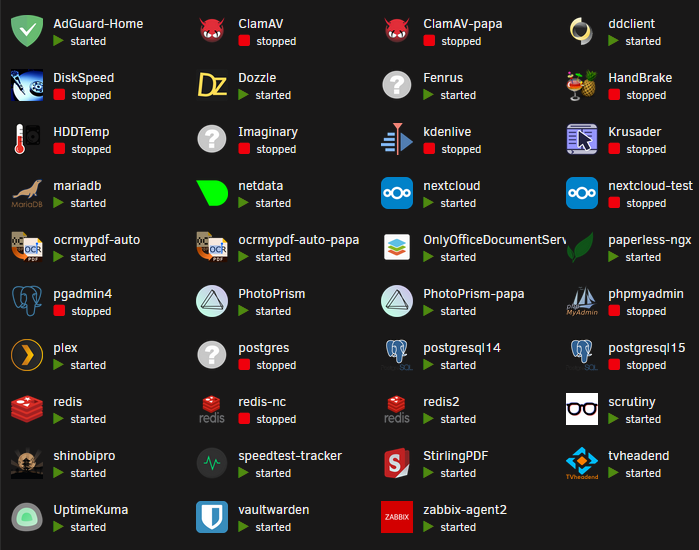
Strange news: I was able to access the share now as normal and also the file I created at 10:45 was there. Actually several other files with the same name were there, so I assume, that despite there's this error message, the file is created. This would mean, that the share is "temporarily" locked (for around 8 h or less) and then unlocked again. The permissions of the /mnt/user/sharename/foldername did not change. I don't know if my Nextcloud is interferring with that? I have a combination of the Linuxserver NC, mariadb and redis running. The shares are passedthrough to the NC Container as volume mappings/bind mounts (-v analogon). In the NC, I use the External storage app to get access to the shares. As far as I know, Nextcloud/the DB scans storage paths from the External storage app automatically, so a sudo -u www-data php occ files:scan --all is not necessary. Nevertheless, could it be, that NC/mariadb/redis is locking the share? I appended also a screenshot of my docker containers. I'm not exactly sure what you mean. I opened the mapped drive in Windows Explorer, right clicked and then "Create Document".
-
Actually that was me, when I tried to access the folder (double click in windows explorer). Yes, the share has a fixed mapping under Windows. But a disconnect and reconnect didn’t help. I already tried that.


