Haggqvist
Members
-
Joined
-
Last visited
-
Thx! didnt think of that! 😄
-
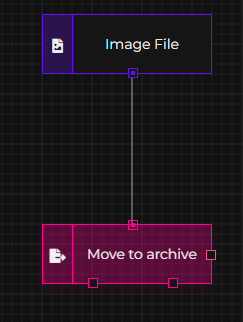
I have an issue with image sorting and guidance needed. I have +100k images i need to sort into Year/Month/Extention The images is a mix of different sorts of file types, and im having issues with the file type .arw and maybe .nef when I get to those. both .arw and .nef are raw files of Sony and Nikon. When I make a flow proces, I get errors on .arw files. Fileflow: Destination folder: /media/_Arkiv/Done/{img.DateTaken.Year}/{img.DateTaken.Month}/{ext} But i get the following error: 2024-03-31 11:39:39.569 [ERRR] -> Execution error: StripOffsets are missing and are required for decoding the TIFF image! at SixLabors.ImageSharp.Formats.Tiff.TiffThrowHelper.ThrowImageFormatException(String errorMessage) at SixLabors.ImageSharp.Formats.Tiff.TiffDecoderOptionsParser.VerifyRequiredFieldsArePresent(ExifProfile exifProfile, TiffFrameMetadata frameMetadata) at SixLabors.ImageSharp.Formats.Tiff.TiffDecoderOptionsParser.VerifyAndParse(TiffDecoderCore options, ExifProfile exifProfile, TiffFrameMetadata frameMetadata) at SixLabors.ImageSharp.Formats.Tiff.TiffDecoderCore.DecodeFrame[TPixel](ExifProfile tags, CancellationToken cancellationToken) at SixLabors.ImageSharp.Formats.Tiff.TiffDecoderCore.Decode[TPixel](BufferedReadStream stream, CancellationToken cancellationToken) at SixLabors.ImageSharp.Formats.ImageDecoderUtilities.Decode[TPixel](IImageDecoderInternals decoder, Configuration configuration, Stream stream, Func`3 largeImageExceptionFactory, CancellationToken cancellationToken) at SixLabors.ImageSharp.Formats.ImageDecoderUtilities.Decode[TPixel](IImageDecoderInternals decoder, Configuration configuration, Stream stream, CancellationToken cancellationToken) at SixLabors.ImageSharp.Formats.Tiff.TiffDecoder.Decode[TPixel](Configuration configuration, Stream stream, CancellationToken cancellationToken) at SixLabors.ImageSharp.Formats.Tiff.TiffDecoder.Decode(Configuration configuration, Stream stream, CancellationToken cancellationToken) at SixLabors.ImageSharp.Image.Decode(Stream stream, Configuration config, CancellationToken cancellationToken) at SixLabors.ImageSharp.Image.<>c__DisplayClass134_0.<Load>b__0(Stream s) at SixLabors.ImageSharp.Image.WithSeekableStream[T](Configuration configuration, Stream stream, Func`2 action) at SixLabors.ImageSharp.Image.Load(Configuration configuration, Stream stream, IImageFormat& format) at SixLabors.ImageSharp.Image.Load(Configuration configuration, String path, IImageFormat& format) at SixLabors.ImageSharp.Image.Load(String path, IImageFormat& format) at FileFlows.ImageNodes.Images.ImageBaseNode.PreExecute(NodeParameters args) in /src/ImageNodes/Images/ImageBaseNode.cs:line 54 at FileFlows.FlowRunner.RunnerFlowElements.ExecuteFlow.Execute(NodeParameters args) in /src/FlowRunner/RunnerFlowElements/ExecuteFlow.cs:line 177 What is StripOffsets and how can i add it to fileflow? Or is there a way for me to get this thing working?