Melvin451
Members
-
Joined
-
Last visited
Everything posted by Melvin451
-
Thanks for the quick reply. If I understand you correctly, I can also ignore the errors reported on 1/25?
-
So, this just happened as reported by "Fix Common Problems" and I have no idea what, if anything, I should do about it. I can tell you that this server runs 24/7 without issue and has not been shut down for over 24 days. Diagnostics file attached. Please help. towerii-diagnostics-20260125-1208.zip
-
Updated a couple of days ago from 7.0.0. Everything went well. The problem I had, that was introduced in 7.0.0, where several drives refused to spin down after 30 min (my default setting) is no more. Not sure why it happened or why this update fixed it, but my thanks to the team.
-
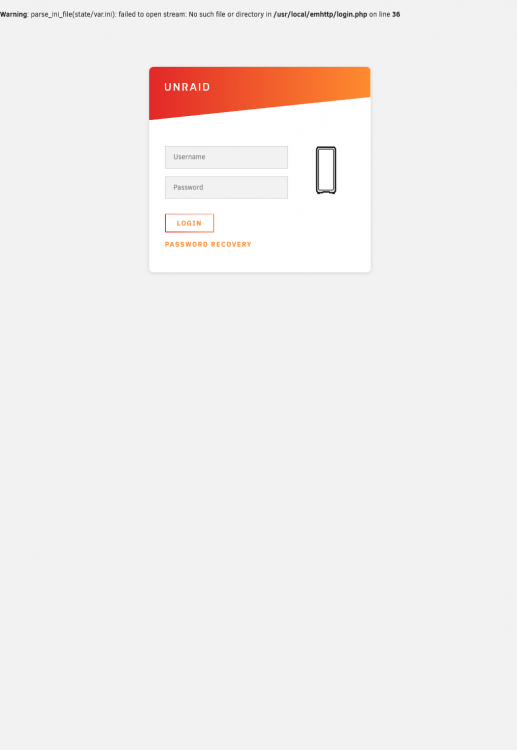
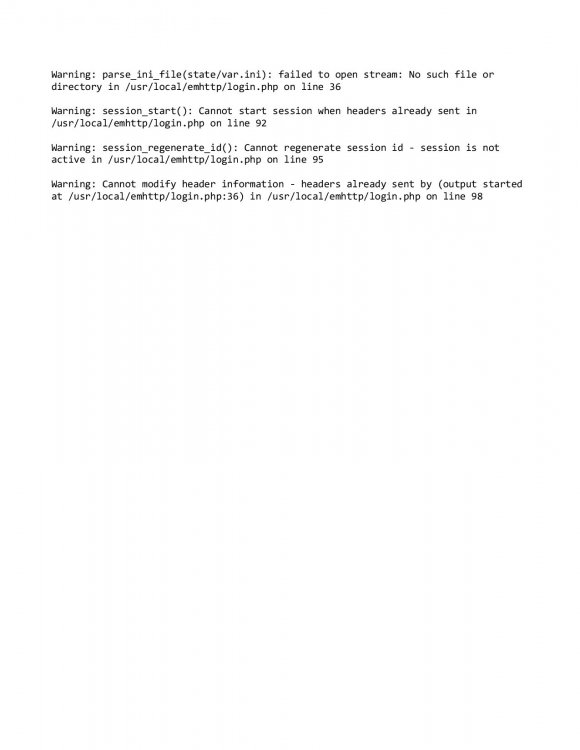
I seem to be having an intermittent problem trying to login to one of my servers. I can access shares, but when I go to the IP address I'll get a warning with the login screen (see attached jpg) and then another warning once I attempt to login (see attached jpg). Seems to go away for awhile with a power cycle. I've changed my root password. Any ideas?