sully316
Members
-
Joined
-
Last visited
Everything posted by sully316
-
Yeah so I made a vm with the disk by id like in my first post again and it worked but Ill play around with not using virtio as this is ssd using the sata connections on mbx it will require some fiddling. ill post my updates and let ye know Also yes I use UD plugin to format it only but I dont mount it via UD sa then its not recognizable for what I need
-
So I redid a vm using vdisk1.img and can pass through gpu no problem. which I am then assuming that my IOMMU are the nsetup correctly. Il start working on the disk by id next
-
Thanks all for the info, not had time to go over this but will in next few days. Just a note the sdd is not nvme but a 2.5" connected to sata3 port on the mbx I have the IOMUU setup correctly as when i dont try to pass through the disk by id ie and instead use a vdisk1.img the gpu asses through no problem Then if I use disk-by-id and dont pass through gpu it works Ill review how I setup the VMs and config both via gui and xml and see what I am missing thank aall
-
Thank you ill do some research on those and see where I am 🫡
-
Also worth noting ssd passthrough using SeaBIOS as per other docs and vm using OVMF, not sure this matters also this is ssd via data not nvme sorry for all the updates
-
Worth noting I tested creating win10 vm with virtual disk (so no hdd passthrough and it worked) Here is the xml for that <?xml version='1.0' encoding='UTF-8'?> <domain type='kvm' id='9'> <name>Windows 10</name> <uuid>cc544cc4-a7c6-f79f-c074-b9369a9e826a</uuid> <metadata> <vmtemplate xmlns="unraid" name="Windows 10" icon="windows.png" os="windows10"/> </metadata> <memory unit='KiB'>10485760</memory> <currentMemory unit='KiB'>10485760</currentMemory> <memoryBacking> <nosharepages/> </memoryBacking> <vcpu placement='static'>8</vcpu> <cputune> <vcpupin vcpu='0' cpuset='2'/> <vcpupin vcpu='1' cpuset='8'/> <vcpupin vcpu='2' cpuset='3'/> <vcpupin vcpu='3' cpuset='9'/> <vcpupin vcpu='4' cpuset='4'/> <vcpupin vcpu='5' cpuset='10'/> <vcpupin vcpu='6' cpuset='5'/> <vcpupin vcpu='7' cpuset='11'/> </cputune> <resource> <partition>/machine</partition> </resource> <os> <type arch='x86_64' machine='pc-i440fx-7.2'>hvm</type> <loader readonly='yes' type='pflash'>/usr/share/qemu/ovmf-x64/OVMF_CODE-pure-efi.fd</loader> <nvram>/etc/libvirt/qemu/nvram/cc544cc4-a7c6-f79f-c074-b9369a9e826a_VARS-pure-efi.fd</nvram> </os> <features> <acpi/> <apic/> <hyperv mode='custom'> <relaxed state='on'/> <vapic state='on'/> <spinlocks state='on' retries='8191'/> <vendor_id state='on' value='none'/> </hyperv> </features> <cpu mode='host-passthrough' check='none' migratable='on'> <topology sockets='1' dies='1' cores='4' threads='2'/> <cache mode='passthrough'/> </cpu> <clock offset='localtime'> <timer name='hypervclock' present='yes'/> <timer name='hpet' present='no'/> </clock> <on_poweroff>destroy</on_poweroff> <on_reboot>restart</on_reboot> <on_crash>restart</on_crash> <devices> <emulator>/usr/local/sbin/qemu</emulator> <disk type='file' device='disk'> <driver name='qemu' type='qcow2' cache='writeback'/> <source file='/mnt/user/domains/Windows 10/vdisk1.img' index='3'/> <backingStore/> <target dev='hdc' bus='virtio'/> <serial>vdisk3</serial> <boot order='1'/> <alias name='virtio-disk2'/> <address type='pci' domain='0x0000' bus='0x00' slot='0x03' function='0x0'/> </disk> <disk type='file' device='cdrom'> <driver name='qemu' type='raw'/> <source file='/mnt/user/isos/win/Win10_20H2_v2_English_x64.iso' index='2'/> <backingStore/> <target dev='hda' bus='sata'/> <readonly/> <boot order='2'/> <alias name='sata0-0-0'/> <address type='drive' controller='0' bus='0' target='0' unit='0'/> </disk> <disk type='file' device='cdrom'> <driver name='qemu' type='raw'/> <source file='/mnt/user/isos/virtio-win-0.1.248-1.iso' index='1'/> <backingStore/> <target dev='hdb' bus='sata'/> <readonly/> <alias name='sata0-0-1'/> <address type='drive' controller='0' bus='0' target='0' unit='1'/> </disk> <controller type='pci' index='0' model='pci-root'> <alias name='pci.0'/> </controller> <controller type='sata' index='0'> <alias name='sata0'/> <address type='pci' domain='0x0000' bus='0x00' slot='0x04' function='0x0'/> </controller> <controller type='virtio-serial' index='0'> <alias name='virtio-serial0'/> <address type='pci' domain='0x0000' bus='0x00' slot='0x05' function='0x0'/> </controller> <controller type='usb' index='0' model='ich9-ehci1'> <alias name='usb'/> <address type='pci' domain='0x0000' bus='0x00' slot='0x07' function='0x7'/> </controller> <controller type='usb' index='0' model='ich9-uhci1'> <alias name='usb'/> <master startport='0'/> <address type='pci' domain='0x0000' bus='0x00' slot='0x07' function='0x0' multifunction='on'/> </controller> <controller type='usb' index='0' model='ich9-uhci2'> <alias name='usb'/> <master startport='2'/> <address type='pci' domain='0x0000' bus='0x00' slot='0x07' function='0x1'/> </controller> <controller type='usb' index='0' model='ich9-uhci3'> <alias name='usb'/> <master startport='4'/> <address type='pci' domain='0x0000' bus='0x00' slot='0x07' function='0x2'/> </controller> <interface type='bridge'> <mac address='52:54:00:f8:e6:10'/> <source bridge='br0'/> <target dev='vnet8'/> <model type='virtio-net'/> <alias name='net0'/> <address type='pci' domain='0x0000' bus='0x00' slot='0x02' function='0x0'/> </interface> <serial type='pty'> <source path='/dev/pts/0'/> <target type='isa-serial' port='0'> <model name='isa-serial'/> </target> <alias name='serial0'/> </serial> <console type='pty' tty='/dev/pts/0'> <source path='/dev/pts/0'/> <target type='serial' port='0'/> <alias name='serial0'/> </console> <channel type='unix'> <source mode='bind' path='/var/lib/libvirt/qemu/channel/target/domain-9-Windows 10/org.qemu.guest_agent.0'/> <target type='virtio' name='org.qemu.guest_agent.0' state='connected'/> <alias name='channel0'/> <address type='virtio-serial' controller='0' bus='0' port='1'/> </channel> <input type='tablet' bus='usb'> <alias name='input0'/> <address type='usb' bus='0' port='1'/> </input> <input type='mouse' bus='ps2'> <alias name='input1'/> </input> <input type='keyboard' bus='ps2'> <alias name='input2'/> </input> <audio id='1' type='none'/> <hostdev mode='subsystem' type='pci' managed='yes'> <driver name='vfio'/> <source> <address domain='0x0000' bus='0x01' slot='0x00' function='0x0'/> </source> <alias name='hostdev0'/> <address type='pci' domain='0x0000' bus='0x00' slot='0x06' function='0x0'/> </hostdev> <hostdev mode='subsystem' type='pci' managed='yes'> <driver name='vfio'/> <source> <address domain='0x0000' bus='0x01' slot='0x00' function='0x1'/> </source> <alias name='hostdev1'/> <address type='pci' domain='0x0000' bus='0x00' slot='0x08' function='0x0'/> </hostdev> <memballoon model='none'/> </devices> <seclabel type='dynamic' model='dac' relabel='yes'> <label>+0:+100</label> <imagelabel>+0:+100</imagelabel> </seclabel> </domain>
-
So I had a gaming vm with passedthrough gtx 1070 few months ago but was using virtual disk and wasnt great so deleted it, I have since got a 1tb ssd now and wanted to passthrough to get better performance so follwed steps here and also SpaceInvaderOne videos and got it working and can connect via vnc and rdp. I then tried to get same gpu passed through but when I do it says started but cant rdp to it (I can when using virtual gpu) I have the nvidia gpu in its own iomuu with its audio part as follows IOMMU group 0: [8086:9bc8] 00:02.0 VGA compatible controller: Intel Corporation CometLake-S GT2 [UHD Graphics 630] (rev 03) IOMMU group 1: [8086:9b53] 00:00.0 Host bridge: Intel Corporation Comet Lake-S 6c Host Bridge/DRAM Controller (rev 03) IOMMU group 2: [8086:1901] 00:01.0 PCI bridge: Intel Corporation 6th-10th Gen Core Processor PCIe Controller (x16) (rev 03) IOMMU group 3: [8086:1911] 00:08.0 System peripheral: Intel Corporation Xeon E3-1200 v5/v6 / E3-1500 v5 / 6th/7th/8th Gen Core Processor Gaussian Mixture Model IOMMU group 4: [8086:43ed] 00:14.0 USB controller: Intel Corporation Tiger Lake-H USB 3.2 Gen 2x1 xHCI Host Controller (rev 11) Bus 001 Device 001 Port 1-0 ID 1d6b:0002 Linux Foundation 2.0 root hub Bus 001 Device 002 Port 1-2 ID 8087:0032 Intel Corp. AX210 Bluetooth Bus 001 Device 003 Port 1-3 ID 174c:2074 ASMedia Technology Inc. ASM1074 High-Speed hub Bus 001 Device 004 Port 1-7 ID 0781:556b SanDisk Corp. Cruzer Edge Bus 001 Device 005 Port 1-11 ID 05e3:0608 Genesys Logic, Inc. Hub Bus 001 Device 006 Port 1-14 ID 1462:7d17 Micro Star International MYSTIC LIGHT Bus 002 Device 001 Port 2-0 ID 1d6b:0003 Linux Foundation 3.0 root hub Bus 002 Device 002 Port 2-2 ID 174c:3074 ASMedia Technology Inc. ASM1074 SuperSpeed hub [8086:43ef] 00:14.2 RAM memory: Intel Corporation Tiger Lake-H Shared SRAM (rev 11) IOMMU group 5: [8086:43e0] 00:16.0 Communication controller: Intel Corporation Tiger Lake-H Management Engine Interface (rev 11) IOMMU group 6: [8086:43d2] 00:17.0 SATA controller: Intel Corporation Device 43d2 (rev 11) [2:0:0:0] disk ATA KINGSTON SEDC500 J2.7 /dev/sdb 480GB [4:0:0:0] disk ATA MK000960GWCFA HPG2 /dev/sdc 960GB [5:0:0:0] disk ATA MK0400GCTZA HPG4 /dev/sdd 400GB IOMMU group 7: [8086:43c4] 00:1b.0 PCI bridge: Intel Corporation Device 43c4 (rev 11) IOMMU group 8: [8086:43bc] 00:1c.0 PCI bridge: Intel Corporation Tiger Lake-H PCI Express Root Port #5 (rev 11) IOMMU group 9: [8086:43bd] 00:1c.5 PCI bridge: Intel Corporation Device 43bd (rev 11) IOMMU group 10: [8086:4387] 00:1f.0 ISA bridge: Intel Corporation B560 LPC/eSPI Controller (rev 11) [8086:f0c8] 00:1f.3 Audio device: Intel Corporation Device f0c8 (rev 11) [8086:43a3] 00:1f.4 SMBus: Intel Corporation Tiger Lake-H SMBus Controller (rev 11) [8086:43a4] 00:1f.5 Serial bus controller: Intel Corporation Tiger Lake-H SPI Controller (rev 11) IOMMU group 11: [10de:1b81] 01:00.0 VGA compatible controller: NVIDIA Corporation GP104 [GeForce GTX 1070] (rev a1) [10de:10f0] 01:00.1 Audio device: NVIDIA Corporation GP104 High Definition Audio Controller (rev a1) IOMMU group 12: [1000:0072] 02:00.0 Serial Attached SCSI controller: Broadcom / LSI SAS2008 PCI-Express Fusion-MPT SAS-2 [Falcon] (rev 03) [1:0:0:0] disk ATA WDC WD40EFAX-68J 0A82 /dev/sde 4.00TB [1:0:1:0] disk ATA ST4000DM000-1F21 CC52 /dev/sdf 4.00TB [1:0:2:0] disk ATA WDC WD120EDAZ-11 0A81 /dev/sdg 12.0TB [1:0:3:0] disk ATA WDC WD80EDAZ-11T 0A81 /dev/sdh 8.00TB [1:0:4:0] disk ATA ST10000DM0004-1Z DN01 /dev/sdi 10.0TB [1:0:5:0] disk ATA Hitachi HUA72302 A840 /dev/sdj 2.00TB [1:0:6:0] disk ATA Hitachi HUA72302 A840 /dev/sdk 2.00TB IOMMU group 13: [10ec:8125] 03:00.0 Ethernet controller: Realtek Semiconductor Co., Ltd. RTL8125 2.5GbE Controller (rev 05) IOMMU group 14: [8086:2725] 04:00.0 Network controller: Intel Corporation Wi-Fi 6E(802.11ax) AX210/AX1675* 2x2 [Typhoon Peak] (rev 1a) See VFIO log Loading config from /boot/config/vfio-pci.cfg BIND=0000:01:00.0|10de:1b81 0000:01:00.1|10de:10f0--- Processing 0000:01:00.0 10de:1b81 Vendor:Device 10de:1b81 found at 0000:01:00.0 IOMMU group members (sans bridges): /sys/bus/pci/devices/0000:01:00.0/iommu_group/devices/0000:01:00.0 /sys/bus/pci/devices/0000:01:00.0/iommu_group/devices/0000:01:00.1 Binding... success... Device 10de:1b81 at 0000:01:00.0 bound to vfio-pci --- Processing 0000:01:00.1 10de:10f0 Vendor:Device 10de:10f0 found at 0000:01:00.1 IOMMU group members (sans bridges): /sys/bus/pci/devices/0000:01:00.1/iommu_group/devices/0000:01:00.0 /sys/bus/pci/devices/0000:01:00.1/iommu_group/devices/0000:01:00.1 Binding... 0000:01:00.0 already bound to vfio-pci 0000:01:00.1 already bound to vfio-pci success... Device 10de:10f0 at 0000:01:00.1 bound to vfio-pci --- Devices listed in /sys/bus/pci/drivers/vfio-pci: lrwxrwxrwx 1 root root 0 May 2 14:56 0000:01:00.0 -> ../../../../devices/pci0000:00/0000:00:01.0/0000:01:00.0 lrwxrwxrwx 1 root root 0 May 2 14:56 0000:01:00.1 -> ../../../../devices/pci0000:00/0000:00:01.0/0000:01:00.1 vfio-pci binding complete Here is the config screenshot and xml <?xml version='1.0' encoding='UTF-8'?> <domain type='kvm'> <name>gaming</name> <uuid>a8e735cf-1bce-e365-5e2c-a151fe2c35e9</uuid> <description>win gaming</description> <metadata> <vmtemplate xmlns="unraid" name="Windows 10" icon="windows.png" os="windows10"/> </metadata> <memory unit='KiB'>16777216</memory> <currentMemory unit='KiB'>16777216</currentMemory> <memoryBacking> <nosharepages/> </memoryBacking> <vcpu placement='static'>8</vcpu> <cputune> <vcpupin vcpu='0' cpuset='2'/> <vcpupin vcpu='1' cpuset='8'/> <vcpupin vcpu='2' cpuset='3'/> <vcpupin vcpu='3' cpuset='9'/> <vcpupin vcpu='4' cpuset='4'/> <vcpupin vcpu='5' cpuset='10'/> <vcpupin vcpu='6' cpuset='5'/> <vcpupin vcpu='7' cpuset='11'/> </cputune> <os> <type arch='x86_64' machine='pc-i440fx-7.2'>hvm</type> </os> <features> <acpi/> <apic/> <hyperv mode='custom'> <relaxed state='on'/> <vapic state='on'/> <spinlocks state='on' retries='8191'/> <vendor_id state='on' value='none'/> </hyperv> </features> <cpu mode='host-passthrough' check='none' migratable='on'> <topology sockets='1' dies='1' cores='4' threads='2'/> <cache mode='passthrough'/> </cpu> <clock offset='localtime'> <timer name='hypervclock' present='yes'/> <timer name='hpet' present='no'/> </clock> <on_poweroff>destroy</on_poweroff> <on_reboot>restart</on_reboot> <on_crash>restart</on_crash> <devices> <emulator>/usr/local/sbin/qemu</emulator> <disk type='block' device='disk'> <driver name='qemu' type='raw' cache='writeback'/> <source dev='/dev/disk/by-id/ata-MK000960GWCFA_S3EANX0K519910'/> <target dev='hdc' bus='virtio'/> <serial>vdisk1</serial> <boot order='2'/> <address type='pci' domain='0x0000' bus='0x00' slot='0x06' function='0x0'/> </disk> <disk type='file' device='cdrom'> <driver name='qemu' type='raw'/> <source file='/mnt/user/isos/win/Win10_20H2_v2_English_x64.iso'/> <target dev='hda' bus='sata'/> <readonly/> <boot order='1'/> <address type='drive' controller='0' bus='0' target='0' unit='0'/> </disk> <disk type='file' device='cdrom'> <driver name='qemu' type='raw'/> <source file='/mnt/user/isos/virtio-win-0.1.248-1.iso'/> <target dev='hdb' bus='ide'/> <readonly/> <address type='drive' controller='0' bus='0' target='0' unit='1'/> </disk> <controller type='pci' index='0' model='pci-root'/> <controller type='ide' index='0'> <address type='pci' domain='0x0000' bus='0x00' slot='0x01' function='0x1'/> </controller> <controller type='sata' index='0'> <address type='pci' domain='0x0000' bus='0x00' slot='0x03' function='0x0'/> </controller> <controller type='virtio-serial' index='0'> <address type='pci' domain='0x0000' bus='0x00' slot='0x04' function='0x0'/> </controller> <controller type='usb' index='0' model='ich9-ehci1'> <address type='pci' domain='0x0000' bus='0x00' slot='0x07' function='0x7'/> </controller> <controller type='usb' index='0' model='ich9-uhci1'> <master startport='0'/> <address type='pci' domain='0x0000' bus='0x00' slot='0x07' function='0x0' multifunction='on'/> </controller> <controller type='usb' index='0' model='ich9-uhci2'> <master startport='2'/> <address type='pci' domain='0x0000' bus='0x00' slot='0x07' function='0x1'/> </controller> <controller type='usb' index='0' model='ich9-uhci3'> <master startport='4'/> <address type='pci' domain='0x0000' bus='0x00' slot='0x07' function='0x2'/> </controller> <interface type='bridge'> <mac address='52:54:00:17:03:08'/> <source bridge='br0'/> <model type='virtio-net'/> <address type='pci' domain='0x0000' bus='0x00' slot='0x05' function='0x0'/> </interface> <serial type='pty'> <target type='isa-serial' port='0'> <model name='isa-serial'/> </target> </serial> <console type='pty'> <target type='serial' port='0'/> </console> <channel type='unix'> <target type='virtio' name='org.qemu.guest_agent.0'/> <address type='virtio-serial' controller='0' bus='0' port='1'/> </channel> <input type='tablet' bus='usb'> <address type='usb' bus='0' port='1'/> </input> <input type='mouse' bus='ps2'/> <input type='keyboard' bus='ps2'/> <graphics type='vnc' port='-1' autoport='yes' websocket='-1' listen='0.0.0.0' keymap='en-us'> <listen type='address' address='0.0.0.0'/> </graphics> <audio id='1' type='none'/> <video> <model type='qxl' ram='65536' vram='65536' vgamem='16384' heads='1' primary='yes'/> <address type='pci' domain='0x0000' bus='0x00' slot='0x02' function='0x0'/> </video> <memballoon model='virtio'> <address type='pci' domain='0x0000' bus='0x00' slot='0x08' function='0x0'/> </memballoon> </devices> </domain> Here is vm log and it stays there for about 5-10 min before i kill it again Any help will be allreciated
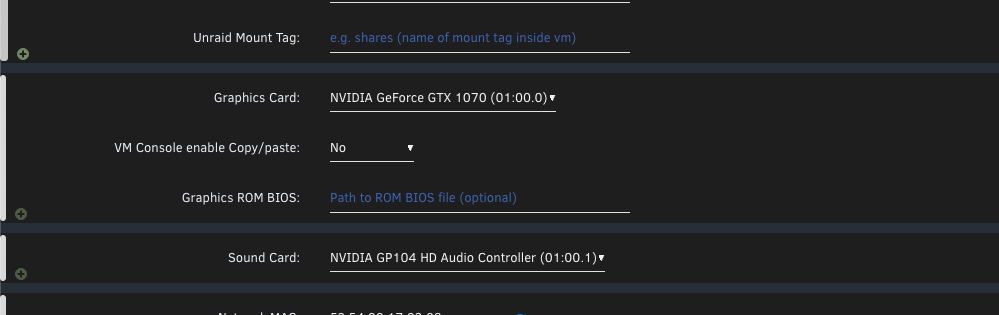
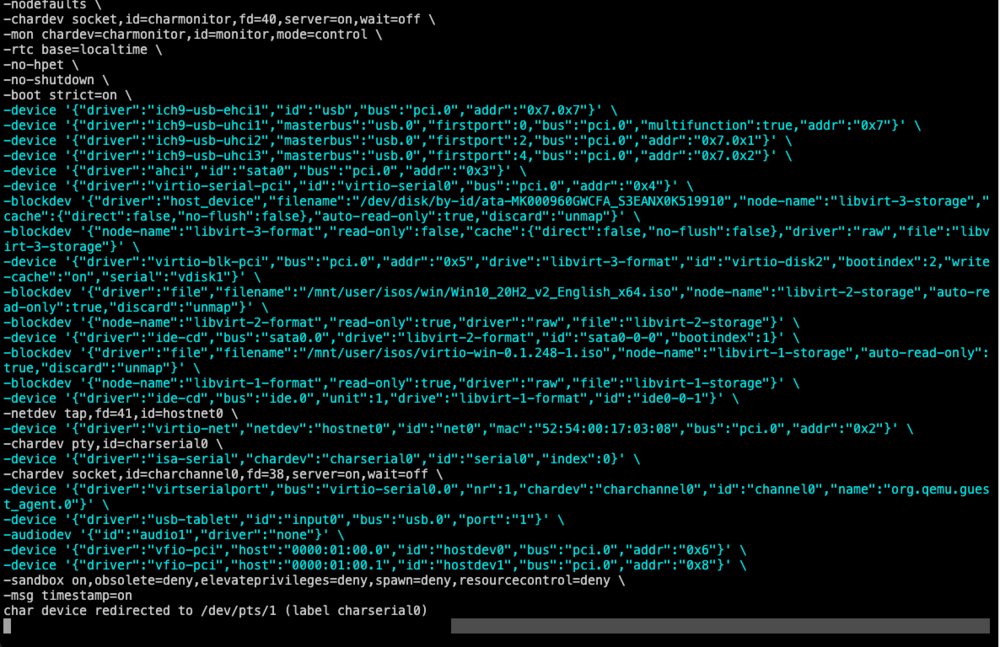
-
So what I had to do was pass through renderd129 and make it appear as renderd128 in the docker, and same for card1 and card0 so something like this --device=/dev/dri/renderd129:/dev/dri/renderd128 and --device=/dev/dri/card1:/dev/dri/card0 So the docker picks up intel gpu as the 1st one
-
Hi sorry if posted before but I have new 10400 intel cpu and I installed plex. I added this extra parameter and it just worked. --device=/dev/dri:/dev/dri/ When I check /dev/dri it showed card0 and renderD128 whicgh referenced the intel quick sync. But now after I added nvidia card and installed nvidia driver plugin it now has card0 and renderD128 pointing to nvidia and the intel QSV pointing to card1 and renderD129. This has broken my plex hardware transcoding as I assume plex is defaulting to card0 and renderd128. Any way to make it point to intel only? Or switch them around making intel point to renderd128? Been at this for 2 days now