Nov845
Members
-
Joined
-
Last visited
Everything posted by Nov845
-
Can you take another look? I replaced the cable and the issue was fixed for a little bit, but now it's back again. dadabase-diagnostics-20230529-1948.zip
-
Awesome. That worked. Thank you
-
From the Dadabase pool
-
No errors are being reported on any of the drives. And they're all showing as healthy.
-
Can anyone tell me why my read speed suddenly dropped? I was getting around 200MB/sec before. Now it's bouncing between 1-30MB/sec. dadabase-diagnostics-20230528-1912.zip
-
Cam someone figure out why my parity check speed is so slow? I was getting a disk cable error, but I replaced all my SATA cables with brand new cables. tower-diagnostics-20230203-0819.zip
-
Does it say which disks? I can't tell
-
Can someone tell me what my network error might be? My file transfer keeps getting interrupted. tower-diagnostics-20230121-0955.zip
-
I just bought Disk 2 and 3 new, and they're already having millions of errors. Are these disks defective? Or is it an issue with something else in the system? jjserver-diagnostics-20221231-1040.zip

-
Can someone help me with figuring out what's going on with the millions of disk writes/reads on my Parity, Disk 1, 9, and 16? I don't think I was moving enough files to justify that amount. nas-diagnostics-20221031-1045.zip
-
nas-smart-20220912-0513.zip
-
Here's the extended SMART report for Disk 16
-
Here's the SMART report on Disk 5 after I ran the extended test. nas-smart-20220910-0603.zip
-
I rebooted the machine. Is this now up-to-date? nas-diagnostics-20220909-0820.zip
-
Can someone tell my why I'm getting so many disk errors on Disk 5 and 16? The last time I was getting so many errors was because I was using Marvell HBAs, but I since switched to Fujitsu 9211-8I HBAs. nas-diagnostics-20220908-1853.zip
-
Can't get to diagnostics if I can't get the machine to boot up.
-
https://www.ebay.com/itm/143326429412
-
I bought two Fujitsu 9211-8I's from eBay, and the listing said they were already flashed to IT mode. When I first installed them, everything worked except two drives were reported missing. So I tried swapping cables, other troubleshooting steps, etc to try and get the drives to be recognized. After a couple reboots, the cards are now stuck on Initializing. Could the cards have been thrown out of IT mode? Google just says that stuck on initializing means that it's not on IT mode or that two pins need to be taped over.
-
What controller do you recommend?
-
It was getting tens of thousands of errors in the Error column on the Main page.
-
I was getting drive errors. So I replaced the bad drive, but I'm still getting extremely slow parity sync speeds (around 1mb/sec). I can't figure out why it's so slow. nas-diagnostics-20220713-1302.zip
-
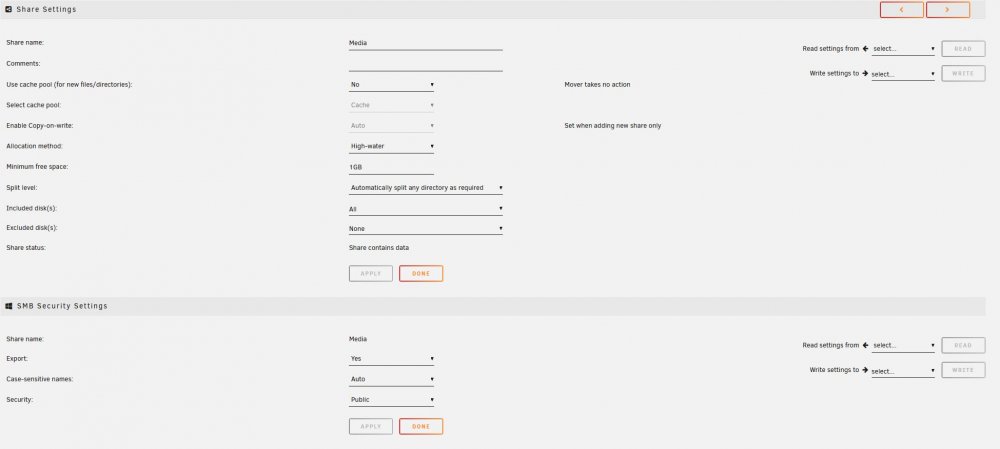
I only have one Share, and here are the settings for it. As for the file names, they're mainly movie and tv show titles.
-
Version: 6.9.2 Is this amount of writes to only one disk normal for Unraid? It just seems too high to me.