





meat
Members
-
Joined
-
Last visited
Everything posted by meat
-
well the good news is.. on the second attempt I've gotten to the point where it's only the 18TBs left and the speed nearly doubled, writing at 165MB/sec now... fingers crossed it keeps this up.
-
that's interesting.. I'm not sure what that would have been, those 2 disks would have essentially be done with their part of the sync as I was way past the 4TB point.. Not sure if the actual diagnostic running wrote at that time or not... I've restarted the sync and it's humming along for now.. at 16.1% Tomorrow morning I should know if it's going to hang at the 50% spot again and I will look into those drives, etc.. for now I guess just wait it out..
-
Help me to understand what you are seeing in the diags to show that something else is hitting the array, or explain what else can hit the array, I'm drawing a blank on anything that could be.. VMs and Docker off and nothing on the network hitting it, I even killed network just to be safe.. I'm not sure what else internal to unraid would be hitting it.. system files and logs hitting the cache, watching the drive read / writes, I'm only seeing what would appear to be a parity sync. If something else accessing it, I'd see way more reads or writes. Are there processes in place that will throttle the sync for any reasons if say for example, CPU utilization gets too high? If that were the case, possibly it got stuck in that mode even after CPU dropped down. When it first started getting slow, everything just bogged down, I knew it had dropped off because my VM I had running had stopped working.. CPU was high at that time, that's when I shut everything down except the sync.. but those speeds never came back up.. I cleaned up cache and the cache returned to normal utilization levels, I was able to then turn back on VM and it all worked.. but the sync speeds never returned to what they should be.
-
Absolutely nothing else is accessing it, I had turned off Docker and VMs, even killed network for a while to test to make sure of that, and yes, as I mentioned in my post, there were 69 read errors early on in the process and it ran smooth for several hours after that.. My cache pool was pretty full, all my isos, appdata, system, logs, and domains are on the cache pool and I was able to free up a good amount of space by removing some snapshots, and that made things go slightly better, it allowed me to turn the VMs and Docker back on, which makes sense, but it didn't really do anything for the parity sync. I turned Docker and VMs back off to let it run a bit more but it would still top out at 2.0MB/sec max which appeared to be a write limitation. Finally I just cancelled it, rebooted, and started over.. Wait to see if it slows again around the 50% mark.
-
I'm in the process of rebuilding my parity. I had updated a few drives to 18TB so I could later move off a bunch of my 2TB drives and shrink the array. Rebuild was going great for the first 24 hours or so.. I had approx. 28 hours to go and then the speed dropped way off and the estimated time jumped up to 60+ days. I turned off the VMs and the Docker services so the only thing running would be the rebuild and that helped a bit, but it's still saying around 30 days. In the past 10 hours it has gone from about 54% complete to 55.6% complete. CPU utilization is only at 3% or so RAM at 16%. I did have some read errors on one of the disks earlier on in the rebuild.. 69 errors on one of the 18TB drives (disk20) but when that happened it really didn't slow anything down and ran strong for hours after that. At this point, all of the 2-4TB disks are no longer being read, just the 6 18TBs, so I actually thought it would run faster at this point. I'm really not sure what to do at this point as everything appears to be running fine, just extremely slow for whatever reason. unraid-diagnostics-20250316-1036.zip
-
well I went ahead and used the "New Config" option and I'm in the process of re-building the parity. I'll look into finding a new USB drive.. hopefully one that lasts.
-
Is there any reason why this would only be happening during a parity check or is there any other reason other than a power/connection issue that multiple disks drop offline? And thanks for the heads up on the USB.. I just replaced that USB maybe 6 months ago..
-
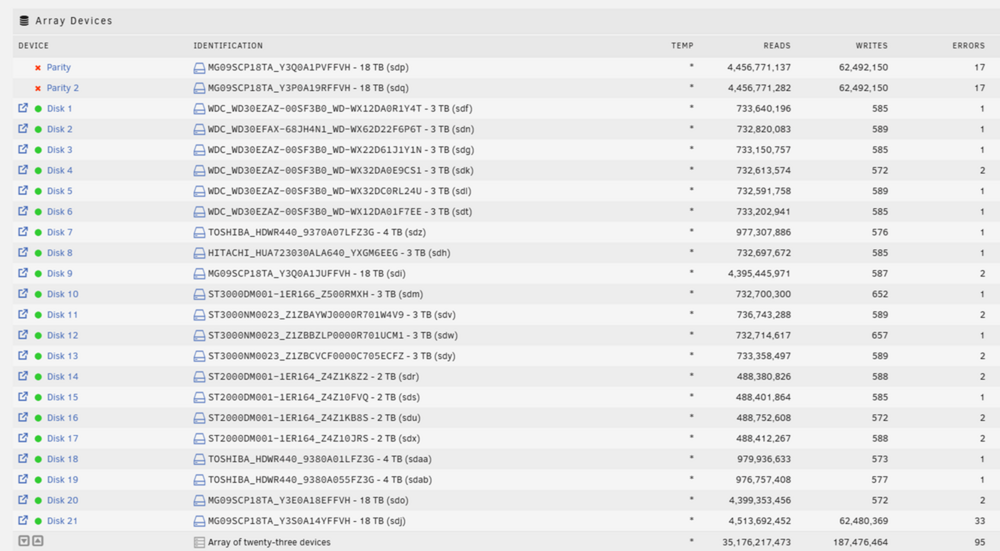
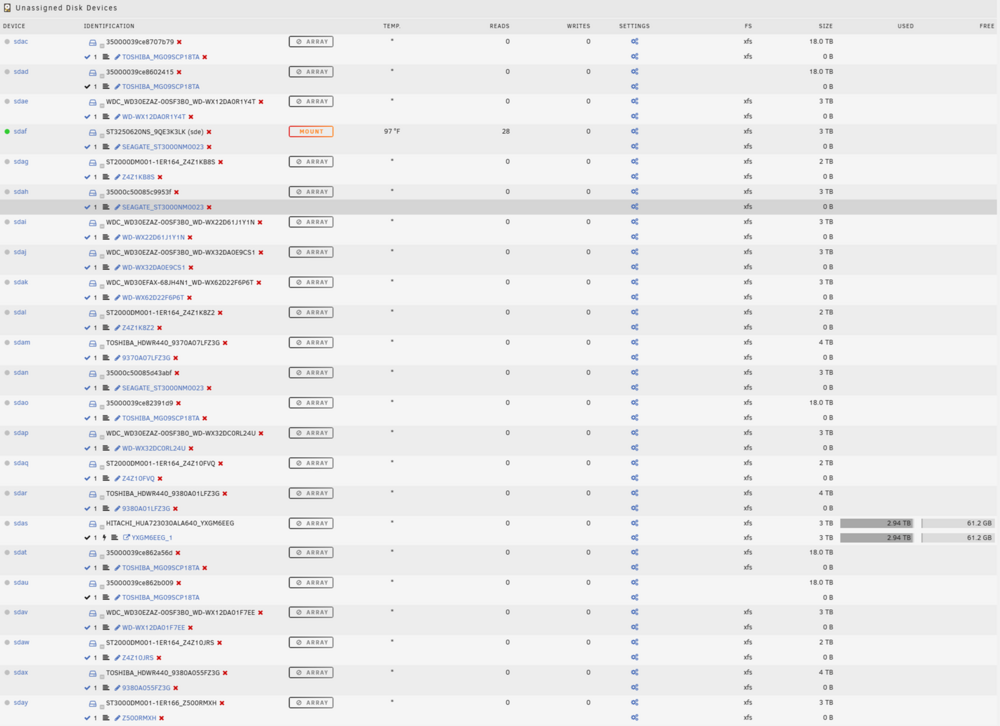
A month ago I had a similar issue where all of my disks were both active on the array but also showing up in the unassigned devices. I took some screen shots this time and I download the diagnostics.. this time the log seems to be more in tact than that last time. I rebooted and everything came back online with the exception of the Parity & Parity 2.. they show the RED X (disabled). Just like last time, this is happened at the beginning of the month towards the end of running the scheduled parity check, I don't know if is detecting errors and causing the issues or not. unraid-diagnostics-20250303-1320.zip
-
I think in this case that might not have been the case since everything was working up until right around the time the parity check completed, which took 4 days, but during the entire parity check you'll see that there were errors from the start. Maybe it's unrelated. I'll re-check and see what happens.
-
No power splitters are used, most disks are in a NetApp disk shelf and a few are in the drive bays of the server. Both the Server and the DS have dual power supplies. I'll run it again and see what happens. I'm not sure why all the logs weren't there, the syslog was empty and the syslog.1 only went to the 1st of the month so I'm missing any information on what actually happened. I'll go ahead and mark this as complete since everything at the moment is actually working, if I have issues again I'll open a new thread.
-
This morning I noticed all my shares were gone. The Array appeared normal but when I looked in the Unassigned Disk Devices, every disk showed up in there as well. My parity check showed complete with thousands of errors. I pulled a diagnostic, I'm not sure what that will show but it's attached. I then rebooted and started the array and everything was fine. The array didn't auto start like I though it normally did, but I may have disabled that, I'll have to double check. Everything seems normal now but I have no idea if my parity is actually valid or not. Hoping someone smarter than me can tell me what's going on here. unraid-diagnostics-20250204-0446.zip
-
Thank you for your help today. I'll let that run. Not sure how that happened, maybe my UPS is bad and we had a quick power failure.
-
just want to make sure I don't screw up this "new config" step. I had to do it once in the past a few years ago but I don't remember exactly what was involved. Right now the array is stopped. Disk 10 is unassigned. The disk with the data is an unassinged drive right now and all the data appears to be intact. Parity had a read error but Parity 2 is good. Do I re-assign the drive into Disk 10? Then chose Preserve ALL on the New Config and hit apply?
-
OK, so when mounting it as an unassigned disk it looks correct. So now just re-assign into disk 10 and do a new config?
-
well it mounted that time, when I look in it, it just has lost+found. Do I need to copy that over to another drive for safe keeping before I try to rebuild? Will rebuild restore it back to the way it was?
-
Phase 1 - find and verify superblock... sb realtime bitmap inode value 18446744073709551615 (NULLFSINO) inconsistent with calculated value 129 resetting superblock realtime bitmap inode pointer to 129 sb realtime summary inode value 18446744073709551615 (NULLFSINO) inconsistent with calculated value 130 resetting superblock realtime summary inode pointer to 130 Phase 2 - using internal log - zero log... ALERT: The filesystem has valuable metadata changes in a log which is being destroyed because the -L option was used. - scan filesystem freespace and inode maps... clearing needsrepair flag and regenerating metadata sb_icount 0, counted 115328 sb_ifree 0, counted 985 sb_fdblocks 732208911, counted 23931576 - found root inode chunk Phase 3 - for each AG... - scan and clear agi unlinked lists... - process known inodes and perform inode discovery... - agno = 0 bad CRC for inode 128 bad CRC for inode 128, will rewrite cleared root inode 128 - agno = 1 - agno = 2 - agno = 3 - process newly discovered inodes... Phase 4 - check for duplicate blocks... - setting up duplicate extent list... - check for inodes claiming duplicate blocks... - agno = 0 - agno = 2 - agno = 3 - agno = 1 Phase 5 - rebuild AG headers and trees... - reset superblock... Phase 6 - check inode connectivity... reinitializing root directory - resetting contents of realtime bitmap and summary inodes - traversing filesystem ... - traversal finished ... - moving disconnected inodes to lost+found ... disconnected dir inode 131, moving to lost+found disconnected dir inode 133, moving to lost+found disconnected dir inode 472750569, moving to lost+found disconnected dir inode 472750581, moving to lost+found disconnected dir inode 2565674431, moving to lost+found disconnected dir inode 2565674432, moving to lost+found disconnected dir inode 4594701663, moving to lost+found disconnected dir inode 4594701664, moving to lost+found disconnected dir inode 4594701665, moving to lost+found disconnected dir inode 6695536270, moving to lost+found Phase 7 - verify and correct link counts... resetting inode 1227 nlinks from 2 to 12 Maximum metadata LSN (2:2738601) is ahead of log (1:2). Format log to cycle 5. done
-
Phase 1 - find and verify superblock... bad primary superblock - bad CRC in superblock !!! attempting to find secondary superblock... .found candidate secondary superblock... verified secondary superblock... writing modified primary superblock sb realtime bitmap inode value 18446744073709551615 (NULLFSINO) inconsistent with calculated value 129 resetting superblock realtime bitmap inode pointer to 129 sb realtime summary inode value 18446744073709551615 (NULLFSINO) inconsistent with calculated value 130 resetting superblock realtime summary inode pointer to 130 Phase 2 - using internal log - zero log... ERROR: The filesystem has valuable metadata changes in a log which needs to be replayed. Mount the filesystem to replay the log, and unmount it before re-running xfs_repair. If you are unable to mount the filesystem, then use the -L option to destroy the log and attempt a repair. Note that destroying the log may cause corruption -- please attempt a mount of the filesystem before doing this.
-
After reboot Disk 10 now shows "Unmountable: Unsupported or no file system" and no option to even browse. unraid-diagnostics-20241213-0850.zip
-
I'm running v 6.12.13 In addition to the Parity and Disk 10 Error, I get a warning that says Array has 23 disks with read errors, I'm not sure why all the disks got errors all at once. About a week ago I added in a new 18TB drive, everything had been working fine, I was planning on moving over some of the data to it to start reducing the number of drives but I have not started that yet. I was going to just copy over data from Disk 10 to the newer drive but when I try to browse the emulated disk I get an "Invalid path" displayed where the shares normally are. When I've had disk go bad in past I simply replace and rebuild but this time a parity is down at same time so I want to be careful before I take any action. Attached is my diag. unraid-diagnostics-20241213-0817.zip
-
I recently had some issues where I thought I had some bad hard drives but it ended up being an issue with the server itself - either the backplane or controller. I ended up putting my drives back into my old server and was able to get everything back to 100% however, before doing so, I had moved several files from the emulated disk onto a good disk. Long story short, I now I have several duplicate files. I saw there is a script to handle this, however it was written 10 years ago and a lot has changed in unRAID since then. Are there any built in tools or any new scripts that people use to handle duplicates? thanks
-
thank you both for your help.. I moved things back to the Dell and currently rebuilding parity, fingers crossed it completes.. then I will start cleaning things up.. I suspect that the issues are with the HP.. I'll have to dig into that more, maybe I'll get an evaluation version of unraid and just run some tests, but if I get all the data moved to the drives on my netapp device, I can just use it exclusivly for disks and still use the horsepower of my HP.
-
thanks, I kinda figured.. I may very well have a bottle neck on my disk controller. I've never ran any speed tests or even really looked into it, I am using a netapp disk shelf for the majority of my drives and always wondered how those speeds compared or if it is any different.. After my rebuild is done, I'll looki into tuning mods you mentioned.
-
What do you recommend, CMR or SMR?
-
How long does it take to do a Parity check when using 8TB or larger drives like that? My largest drives are 4TB and takes over 24 hours.. would it twice as long with 8, or take a week if I were to use 16s?
-
Gotcha, thanks.. and I just looked, those 2 disks are in unassigned devices now.. I think I'll just power down and move everything back to the old server so I can at least get everything online and parity back up (hopefully) Then I can safely start moving data off the 2.5" disks.


