





SeldomNosePicker
Members
-
Joined
-
Last visited
-
I had same issue here was my workaround. If the container crashes on boot with FileNotFoundError: ...RapidOcr/...det_mobile.onnx does not exists and running the model download fails with PermissionError: [Errno 13] on /opt/app-root/src/.cache/..., the mounted appdata cache dir isn't writable by the container user. Fix: Temporarily set DOCLING_SERVE_LOAD_MODELS_AT_BOOT=false so the container boots without warming up. From the Unraid host terminal, chown your appdata path to the container UID (1001): chown -R 1001:1001 /mnt/user/appdata/docling(Confirm the UID with id in the container console first.) 3. In the container console, download the models: docling-tools models download --all -o /opt/app-root/src/.cache/docling/modelsSet DOCLING_SERVE_LOAD_MODELS_AT_BOOT=true again and restart. Boots clean. The remote-services toggle didn't fix it for me — the actual blocker was directory permissions on the mounted cache.
-
Hey there. I needed to open up my comfyui and wasn't able to, kept crashing. After creating a fresh install to troubleshoot and working with an AI a bit I was able to get it working using a workaround. Below are the findings and workaround in-case this helps someone else. The Problem On a host with a recent NVIDIA driver (595.45.04, CUDA 13.2) and an RTX 4070 Ti SUPER, the container was silently crashing on every start with !! ERROR: ComfyUI failed or exited with an error. No useful output in the Docker logs. I hit this on both the latest and ubuntu24_cuda13.1-latest image tags. The actual error (only visible by running ComfyUI manually inside the container) was: Fatal Python error: Bus error File "/comfy/mnt/venv/lib/python3.12/site-packages/comfy_kitchen/backends/cuda/__init__.py", line 84 in <module>Root Cause The culprit is comfy_kitchen==0.2.8, which ComfyUI pulls in as a dependency. It ships a pre-compiled CUDA binary that crashes at import time on newer CUDA 13.x host drivers. PyTorch itself works fine — it's purely a comfy_kitchen compatibility issue. Workaround Uninstalling comfy_kitchen lets ComfyUI start normally. It gracefully falls back with the message "Failed to import comfy_kitchen, fp8 and fp4 support will not be available" — everything else works fine. Script removes comfy_kitchen on both UV and PIP methods. To make this permanent across restarts, create a user_script.bash in your run directory aka comfy/mnt/user_script.bash: bash #!/bin/bash echo "== Removing incompatible comfy_kitchen package" /comfy/mnt/venv/bin/uv pip uninstall comfy_kitchen -y 2>/dev/null || \ /comfy/mnt/venv/bin/pip uninstall comfy_kitchen -y 2>/dev/null || \ echo "== comfy_kitchen not found or already removed, continuing" exit 0Make sure it's executable (chmod +x comfy/mnt/user_script.bash) run this on unraid terminal pointed at the right location. Hope this helps someone.
-
Wow that fix worked perfect thanks!
-
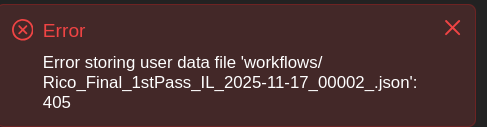
Hey!! Been a while since I've had a comment on this, this container has been really stable for me for a long time now so greatly appreciate that! I am having a weird issue saving and opening workflows that I've saved in the past. When I try to save a workflow, I get an error like attached. Then when I try to open an existing workflow, I can see the files in the webui, but clicking on it does nothing. I am able to download the existing workflows on my unraid serverfiles here '/mnt/user/appdata/comfyui-nvidia/basedir/user/default/workflows' and just upload them directly and keep working. I just dont really understand why I can't open or save workflows directly in the webui. Any thoughts? I do have set_chown to true to try and resolve but it doesn't help.
-
Thanks for the attention to detail and submitting that PR. I saw it was merged, I was able to uninstall then remove the extra directory in basedir and able to re-install the node just fine! You asked for a workflow earlier here is my current one I'm working with. I pretty much exclusively make images for my TTRPG games, its got a latent upscaler and face detailer all in there with things like Ollama prompt enhancement, controlnet, ipadapter LUTs and such. Thanks again for the work keeping this container up to date! TTRPG-workflow.json
-
First just want to say that I love this container and have been using it very frequently for a while now successfully. I run with over 20 custom nodes on my usual workflows and have great success with this container. This last update though with the basedir option I wasn't able to upgrade properly and had to start fresh, not a problem its easy for me to do this. But I ran into 2 issues this latest update, first one I've already found a workaround but want to note it. With the Mikey Nodes node (and another one I can't remember) I get an error when installing them the first time, looking at the logs though I noticed it was trying to find the comfy_extras folder located 'basedir/comfy_extras/' instead of 'mnt/ComfyUI/comfy_extras/'. I was able to fix this by copying the existing '/mnt/ComfyUI/comfy_extras/' folder here: 'basedir/comfy_extras/' and clicking 'try fix' in the Manager. Since other nodes didn't present this issue I figure this has something to do with the way that specific nodes is looking for that folder, but in-case someone else has this issue this could be a workaround. Another issue I've yet to figure out but it's not a big deal to me has to do with the ControlNet Preprocessor node found in ComfyUI ArtVenture. This node appears to install fine, but when using the specific node (ControlNet Preprocessor) to process an image into like a depth/lineart or other controlnet map you can't select the preprocessor in the node. I believe it is supposed to download the preprocessors when the node is installed. I do see an open issue for this in the ArtVenture github so it might have nothing to do with this container specifically but figured I'd just let you know how my experience was. Thanks for maintaining this container, I don't know what I would do without it!

