





zitzutzo
Members
-
Joined
-
Last visited
Everything posted by zitzutzo
-
the solution : post argument : && docker network connect proxy traefik && docker network connect nextcloud-aio traefik && docker network connect socket traefik remove all extra parameters and put Network Type on bridge
-
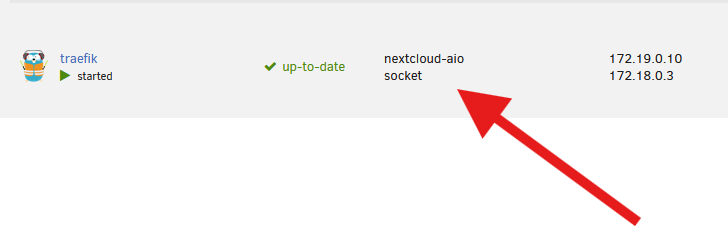
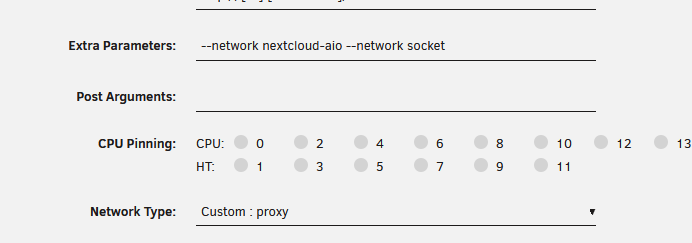
Hi all, I use a traefik docker container. I use extra parameter for add somes network like that : Extra Parameters: --network nextcloud-aio --network socket I use Network Type: Custom : proxy but I don't see my proxy network in the list of network in the docker interface. crowdsec is on the custom proxy network Traefik can't communicate with crowdsec. time=2026-05-03T09:19:55.970+02:00 level=ERROR msg="handleMetricsTicker:reportMetrics reportMetrics:query crowdsecQuery:unreachable url:http://crowdsec:8080/v1/usage-metrics All work fine before 7.2.5 update Any help on this problem ?
-
your help is really appreciate! It's really a pleasure to have someone so involved ^^ I'm not so good in english hope this sentence is ok
-
I just add in ADDITIONAL_PORTS and all work ! thanks again Binhex. To bring a little more precision I must also keep the port in the ports section:? If have more than one port I can do: - ADDITIONAL_PORTS = 9117,8191 ? thanks !
-
Hello I use the vpn part for other apps like jackett I have this in my ports section of qbitorrentvpn ports: - "9117:9117" #port pour jackett and in my jackett I have network_mode: "service:qbitorrentvpn" Looks like the latest changes no longer allow me to access jackett's gui on host ip : 9117
