





misfit616
Members
-
Joined
-
Last visited
-
Thanks mate, I've given up for today and I'm going to bed 😂 Hopefully I wake up to some success tomorrow! Thanks again so much for your help!
-
OK, I'm trying from within my network. So that's my problem. Just used my phones hotspot and I can now find the server in the Steam Sever list!! Thank you again, so much! I just tried to get a friend to connect to the server using EXTERNALIP:2457 in the steam server list but it shows server not responding and he is unable to connect. It won't show in the in-game list for either of us.
-
Thanks mate, I've managed to get my world to load now. Still having problems with getting the server visible from outside the network though. I have the three correct ports forwarded on the router. Not sure what else to try now. It was working fine last night with the same config. Thanks again for this, I did follow the pinned post yesterday when I first set up the container and it went so smoothly, today has been a bit of a nightmare. 😞
-
Ahhh ok, thanks for that mate. Changed it back to defaults and I can no see the server in the steam server list with UNRAIDIP:2457. This would only be accessible from within my network now? The next problem I have is bringing my "single player" world over to the dedicated server. I copy over the files but it won't load into my world. I have the naming correct in the container.
-
Just changed them. But the same thing was happening with the default settings too.
-
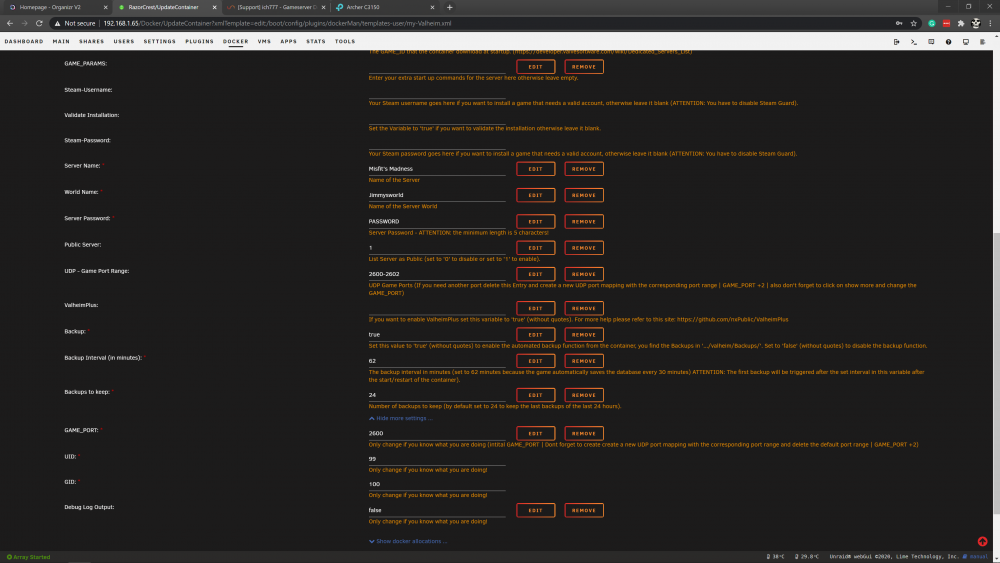
So I changed the container ports to 2600-2602, then changed the game port to 2600. If I go to the steam server list and add IPOFUNRAID:2601 I get nothing. Ports are forwarded correctly in my router settings also.
-
I have totally deleted all the folders created by the container and started from scratch. I do have the world files from my starting world I can transfer over though so I'm not worried about that. I just can't get the server to show up in the in-game list or by adding the IP address to the Steam servers list
-
I can't for the life of me get my Valheim server to show up or connect to it in any way. I had it all working perfectly yesterday, playing with friends, hopping in and out of the server without any issues. Today, I couldn't connect at all so I remade the container etc. changed the container ports and forwarded the new ports on my router. I've done everything I can think of. Hope someone can shed some light on this for me. ---Checking if UID: 99 matches user--- usermod: no changes ---Checking if GID: 100 matches user--- usermod: no changes ---Setting umask to 000--- ---Checking for optional scripts--- ---No optional script found, continuing--- ---Starting...--- ---Update SteamCMD--- Redirecting stderr to '/serverdata/serverfiles/Steam/logs/stderr.txt' [ 0%] Checking for available updates... [----] Verifying installation... Steam Console Client (c) Valve Corporation -- type 'quit' to exit -- Loading Steam API...OK. Connecting anonymously to Steam Public...Logged in OK Waiting for user info...OK ---Update Server--- Redirecting stderr to '/serverdata/serverfiles/Steam/logs/stderr.txt' [ 0%] Checking for available updates... [----] Verifying installation... Steam Console Client (c) Valve Corporation -- type 'quit' to exit -- Loading Steam API...OK. Connecting anonymously to Steam Public...Logged in OK Waiting for user info...OK Success! App '896660' already up to date. ---Prepare Server--- ---Server ready--- ---Starting Backup daemon--- ---Start Server--- [S_API] SteamAPI_Init(): Loaded local 'steamclient.so' OK. CAppInfoCacheReadFromDiskThread took 0 milliseconds to initialize CApplicationManagerPopulateThread took 0 milliseconds to initialize (will have waited on CAppInfoCacheReadFromDiskThread) RecordSteamInterfaceCreation (PID 60): SteamGameServer013 / RecordSteamInterfaceCreation (PID 60): SteamUtils009 / Setting breakpad minidump AppID = 892970 RecordSteamInterfaceCreation (PID 60): SteamGameServer013 / GameServer RecordSteamInterfaceCreation (PID 60): SteamUtils009 / Utils RecordSteamInterfaceCreation (PID 60): SteamNetworking006 / Networking RecordSteamInterfaceCreation (PID 60): SteamGameServerStats001 / GameServerStats RecordSteamInterfaceCreation (PID 60): STEAMHTTP_INTERFACE_VERSION003 / HTTP RecordSteamInterfaceCreation (PID 60): STEAMINVENTORY_INTERFACE_V003 / Inventory RecordSteamInterfaceCreation (PID 60): STEAMUGC_INTERFACE_VERSION014 / UGC RecordSteamInterfaceCreation (PID 60): STEAMAPPS_INTERFACE_VERSION008 / Apps [S_API FAIL] Tried to access Steam interface SteamNetworkingUtils003 before SteamAPI_Init succeeded. RecordSteamInterfaceCreation (PID 60): SteamNetworkingUtils003 / RecordSteamInterfaceCreation (PID 60): SteamNetworkingSockets008 /

