NV43
Members
-
Joined
-
Last visited
Everything posted by NV43
-
Unmounting a disk shows the emulated drive and contents look ok. Where do I find the option to rebuild? EDIT: Think I got it. Stopped the array again, added the disk back, and starting the array again triggered a rebuild. Going to take a touch over 5 hours for my 3TB drive. From there I just need to do this again with each drive? Is there a way once I know the partition format to create that on the other drives without a full rebuild?
-
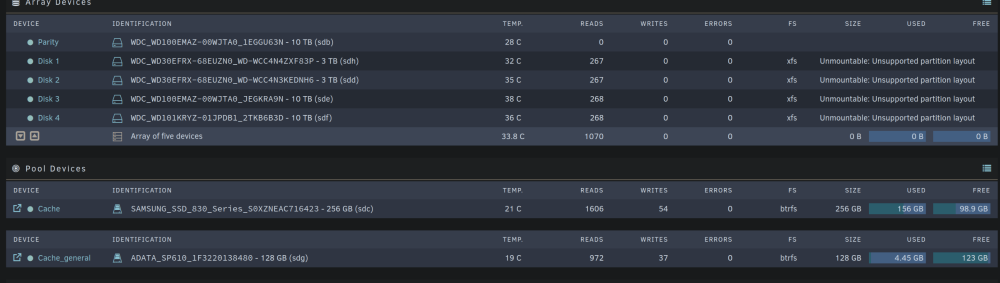
Hello all, I accidentally powered down my server without first safely spinning down the array. Dumb, I know. While it was down I figured I'd migrate it to new hardware. This all worked as expected but on booting I see my drives are unmountable. Following the guide here I've attempted an XFS repair on one of my drives. This looks to complete successfully but when stopping the array and restarting it to get out of maintenance mode it still shows unmountable Basically I'm doing the following: 1. Start array in maintenance mode 2. Run xfs repair on drive 3. Stop array 4. Start array - see drive is still unmountable 5. Repeat This is an example output from running xfs repair: Phase 1 - find and verify superblock... Phase 2 - using internal log - zero log... - scan filesystem freespace and inode maps... - found root inode chunk Phase 3 - for each AG... - scan and clear agi unlinked lists... - process known inodes and perform inode discovery... - agno = 0 - agno = 1 - agno = 2 - agno = 3 - process newly discovered inodes... Phase 4 - check for duplicate blocks... - setting up duplicate extent list... - check for inodes claiming duplicate blocks... - agno = 0 - agno = 1 - agno = 2 - agno = 3 Phase 5 - rebuild AG headers and trees... - reset superblock... Phase 6 - check inode connectivity... - resetting contents of realtime bitmap and summary inodes - traversing filesystem ... - traversal finished ... - moving disconnected inodes to lost+found ... Phase 7 - verify and correct link counts... done root@Spartan:~# fdisk -l /dev/sdh Disk /dev/sdh: 2.73 TiB, 3000592982016 bytes, 5860533168 sectors Disk model: WDC WD30EFRX-68E Units: sectors of 1 * 512 = 512 bytes Sector size (logical/physical): 512 bytes / 4096 bytes I/O size (minimum/optimal): 4096 bytes / 4096 bytes Any help would be greatly appreciated. spartan-diagnostics-20240202-2324.zip