





am1racle
Members
-
Joined
-
Last visited
-
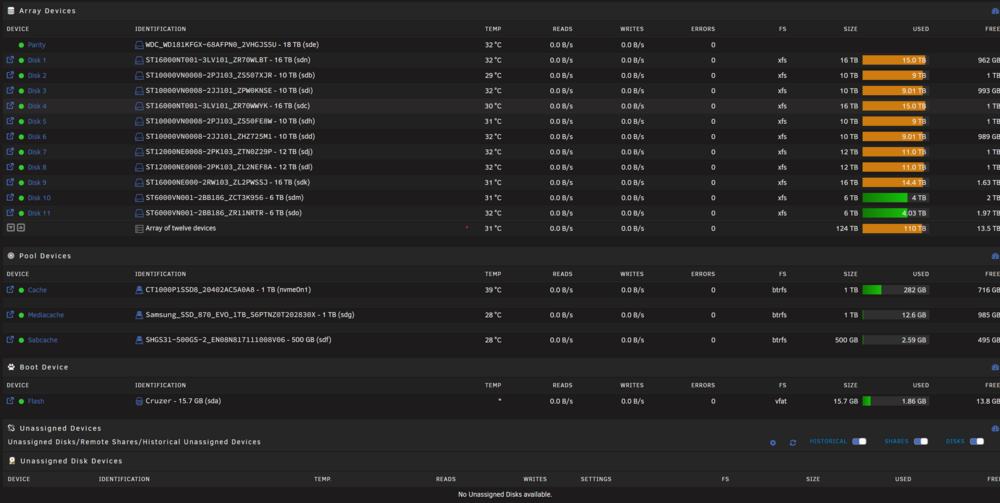
Hi there, Ive been using unraid for a few years now and love it, but wanted to just sanity check what I need to do to safely do a few upgrades. Additions/Improvements: Add additional HBA Card Add 4x HDDs 2x 20TB 1x 18TB 1x 16TB Make 2x 20TB Drives into parity drives Repurpose current 18tb parity drive into a storage drive Remove 1x SSD which is currently a pool cache drive Add 1x NVME to replace the SSD Currently - I have a single 18tb parity drive and 11 HDDs, and then 2x SSDs and a single NVME. These are all connected to the motherboard headers + my HBA card. What is the right order of operations to do the above upgrades? I assume it is something like this: Backup appdata etc etc to ensure everythings safe Power down system install all new hardware power up system, dont start array remove parity from array and replace the drive with one of the 20tb drives let parity rebuild once that parity is done, add second parity drive to the array Once both NEW parity drives are done, I can now clear/preclear all drives (including the old 18tb parity drive) Once preclears are done, I turn off the array one more time, add ALL disks to the array as applicable, and then turn the array back on Done(?) Does the above look like the correct order of operations? Attaching a screenshot of my current array/layout as well if its helpful. Thank you in advance very much.
-
Sorry to necro the thread - but I have now encountered the same issue. Any long-term solutions? I just tried adding 2 fans to the HBA (2x 120mm noctua's pointed right at the heatsink, and the heatsink isnt even hot to the touch) but it seems the issue still occurs. Using a 9300-16i and it seems everytime I run a parity check or drive clear, my entire system freezes/dashboard non responsive and I have to do a hard power down/restart. If I don't run parity check or add a drive, it seems to work completely fine.
-
Hi, new to the forums but have been using unraid for about 1.5-2years now. Thus far I haven't had any issues that I couldn't resolve by googling, but I am a bit confused with my current problem! As the title states, I have an array of 10 drives (1 parity + 9 pool) of various sizes between 6tb and 16tb, with my parity also being 16tb. I recently got the error "Array has 1 failed device" which is my Disk4 (10tb). When I mouse over the drive in the main tab, it states "Drive is disabled, contents are emulated". I went to the smart tab and see the following error: I have tried powercycling my unraid server, including pulling the power, and I have tried unplugging it and plugging it back in to my SAS controller, (all other drives are fine btw) but can't seem to figure out if the drive is actually failing or if its another issue. I've attached my logs here, but was hoping someone could enlighten me as to how I can determine if its a hardware failure (such as sata cable, power, etc) or a drive failure (smart issue?) I've attached two logs here which hopefully can help to diagnose. Thank you in advance! unraidserver-diagnostics-20230917-1035.zip unraidserver-smart-20230917-1035.zip
