





Mist80
Members
-
Joined
-
Last visited
-
Awesome, thanks squid. I think this might be the issue. Is there another way to set the --insecure-registry=localhost:5000 parameter? The gui doesn't allow this setting to be added.
-
I tried to do the recreate but no new vdisk file was created. I also dont see any attempt in syslog for the docker engine to attempt to start. When i disable docker in settings, i do see logs showing: Mar 3 09:09:04 storage emhttpd: shcmd (51771): /etc/rc.d/rc.docker stop Mar 3 09:09:04 storage root: stopping dockerd ... ... but I don't see anything in the logs that shows it attempting to start docker engine when i re-enable it. Any pointers would be greatly appreciated.
-
The service just doesn't start on a reboot. Docker config showing it is enabled, but the status at the top says stopped. I have toggled the "enable docker" option to no/yes but same issue persist.
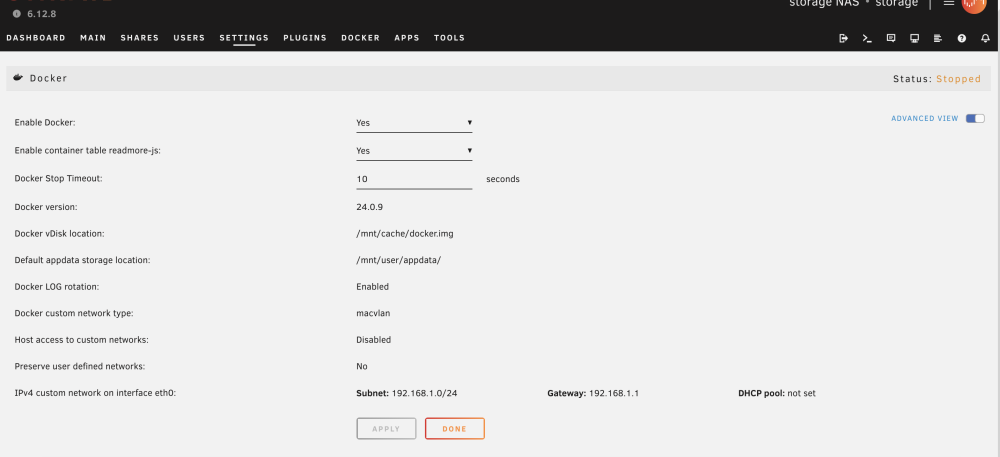

-
bumping this in case it was missed.
-
But the use of RiserFS isn't the cause of the docker service failing to start is it? That's my primary issue currently. I will have to plan out the fs conversion at a later date. Still keen on some help for the docker issue please.
-
Yes I think i do.
-
Wow, thanks for the heads up... i have had my unraid installation for a very long time (probably over 10years). I feel like this is going to cause a bit of pain. Will read up on options.
-
Hi gurus. I am struggling to troubleshoot the docker engine failing to start on my system. Would really appreciate some help from the community. Thanks! storage-diagnostics-20240302-1039.zip

