





skwisgaar
Members
-
Joined
-
Last visited
-
Is there really no advise out here? even old post with useful info would be good.

-
Had a cache drive failure but was able to get the data back with help in this post: Now I'm trying to restore the appdata So that the docker containers go back to a working state. I tried making a manual Backup folder & using the Appdata Backup pugin to restore from; But it keeps giving an Invalid source error. Clearly this is more complicated then just moving the files to the right place in appdata folder on Cache Drive. Would anyone be so kind as to help me work this out?
-
I was able to get the data back so I'll mark what we did as the solution. but I'm having trouble restoring the appdata & getting my docker containers go back to a working state. but I'll make another thread for that issue. Thanks for the help.
-
Okay I think I got it to copy the data off the nvme0n1 to disk13 with this: btrfs restore -v /dev/mapper/nvme0n1p1 /mnt/disk13/restore now that the data is recovered to disk13 do i format the nvme0n1 drive & move the data back on to it? That is what I assume but I'm asking all the same so I can write procedure if this happen again.
-
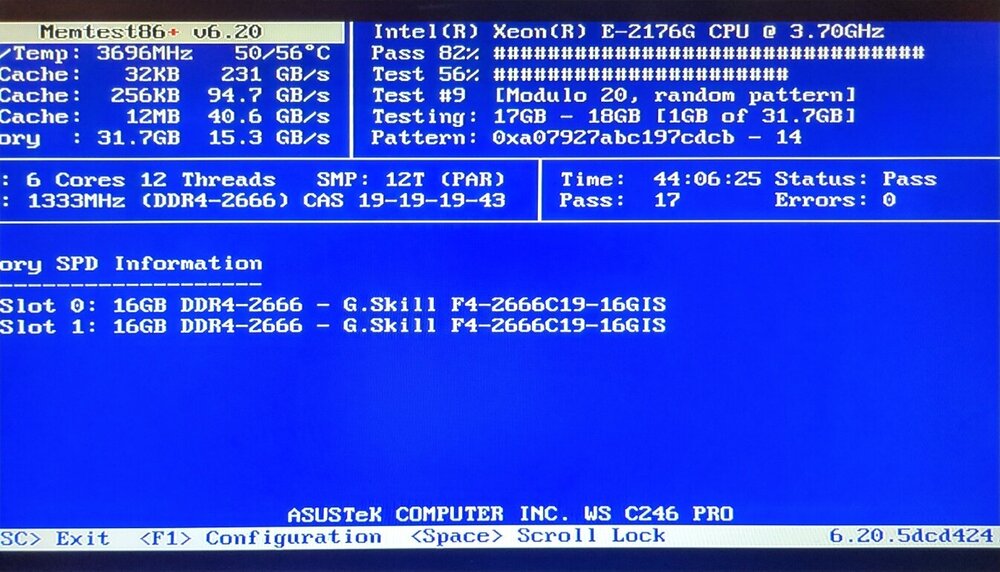
Alright I ran a memtest 2ish days. it had no errors. How does one decrypt a pool with out mounting it? Is there any guides to follow?
-
On reboot it told me the cache drive INTEL_SSDPEDMD020T4_CVFT4346004G2P0EGN (nvme0n1) was an unmountable disc present. I've since done some reading on forums about the Cache Drive Unmountable: unsupported or no file system problem. I tried the step 1 & 2 listed here in JorgeB post but systems not seeing it in the webterminal 2) BTRFS restore (safe to use) method root@Jessie:~# btrfs restore -v /dev/nvme0n1 /mnt/disk13/restore No valid Btrfs found on /dev/nvme0n1 Could not open root, trying backup super No valid Btrfs found on /dev/nvme0n1 Could not open root, trying backup super No valid Btrfs found on /dev/nvme0n1 Could not open root, trying backup super root@Jessie:~# btrfs restore -v /dev/nvme0n1p1 /mnt/disk13/restore No valid Btrfs found on /dev/nvme0n1p1 Could not open root, trying backup super No valid Btrfs found on /dev/nvme0n1p1 Could not open root, trying backup super No valid Btrfs found on /dev/nvme0n1p1 Could not open root, trying backup super root@Jessie:~# Pls help me understand what to do before going to the unsafe step 3. I'm out of my element here. I attached the diagnostics. jessie-diagnostics-20250127_1510.zip
-
I did the update from 6.16.6 to 7.0. On reboot it told me the cache drive INTEL_SSDPEDMD020T4_CVFT4346004G2P0EGN (nvme0n1) was unmountable disc present What do I do to fix this. Is downgrading an option? Or am I just SOL? Pls help. jessie-diagnostics-20250124_1330.zip
