





hugenbdd
Community Developer
-
Joined
-
Last visited
Everything posted by hugenbdd
-
It should delete the empty directories second/next time it's run.
-
argg.. you caused me to find an issue. I will fix when I get some time. but.. I'm away for a few days so probably over the weekend. In the meantime.. you can use this to grab status or check for the pid file. root@Tower:/usr/local/emhttp/plugins/ca.mover.tuning# ./age_mover status or check for the existence of the PID file. If it exists, the Process # (pid) will be in the file. cat /var/run/mover.pid
-
yup, you can do age_mover status it will just cat out the pid file. /var/run/mover.pid I also write the status of the current mover of what file it's on and there is a "GUI" update, if your willing to modify unraid from stock files. (manual install, I'm out the next few days so can't provide instructions right now, but they are posted here or on Reddit if you want to hunt them down)
-
Can you make a small change to the settings under scheduler, apply, then change back. It's possible the file was lost or not saved for some reason. /boot/config/plugins/ca.mover.tuning/ca.mover.tuning.cfg should be there.
-
Looking into this..
-
Is this link available? It is necessary for plugin developers to take appropriate action within their plugins to enable them to utilize the multi-language support. The details on what is required are covered in the design guide here. "Here" <- https://wiki.unraid.net/images/5/5e/Multi-language_Support_Design_Guide.pdf Doesn't seem to work.
-
doesn't really tell me how to add for plug-in's. If you can post a github link of another plug-in that has translations, I will take a look.
-
Ever thing will move because you have "Move All From Cache-Yes shares when disk is above a certain percentage:" set to "Yes" and the threshold set to 85%. You can set this to "No" however, there is a possibility you could use 100% of cache. But, if you monitor it and get your "days old" setting just right, you can keep 60 days or close to 60 days with no issues depending on how much you download each day. (i.e. You are trying to match the amount that gets moved off each night with about the same amount you download each day)
-
the binary mover changed locations in 6.12 from older releases. For me on a slightly older release. # which mover /usr/local/sbin/mover Can you try the command which mover and post the results? There is a stop option for mover but it may not hitting the right file.
-
I think you have some other problem going on. You should only have the names of your shares in that directory. Maybe check SABNZB config? A typical config file would have the following inside it. # Generated settings: shareComment="" shareInclude="disk1,disk2,disk3,disk4,disk5,disk6,disk7,disk8,disk9,disk10,disk11,disk12,disk13,disk14,disk15,disk16" shareExclude="" shareUseCache="yes" shareCachePool="cache" shareCOW="auto" shareAllocator="mostfree" shareSplitLevel="" shareFloor="50000000" shareExport="e" shareFruit="no" shareCaseSensitive="auto" shareSecurity="public" shareReadList="" shareWriteList="" shareVolsizelimit="" shareExportNFS="-" shareExportNFSFsid="0" shareSecurityNFS="public" shareHostListNFS=""
-
Can you post the output contents of this directory? /boot/config/shares/ ls -ltr /boot/config/shares
-
most logs are now stored under /tmp/Mover
-
Check your cron entries. cat /etc/cron.d/root
-
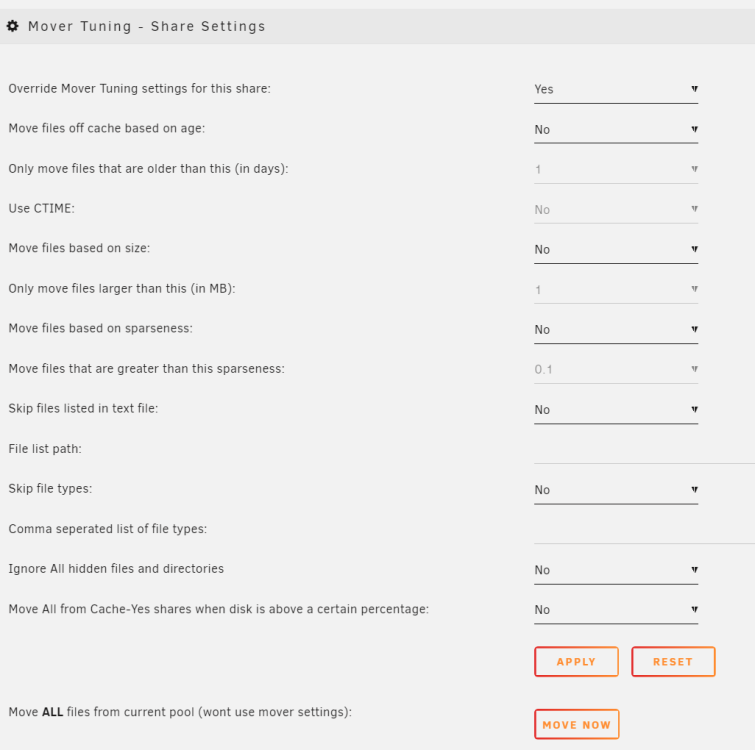
New Version 07-03-2023 HUGE thanks/Shout-out to @Swarles for the help with updating code fixes and adding a great new feature. You can now have some customization per share. It's great to have another forum member jump in with some good idea's and breathe some new life into the plug-in. - Add check and creation of link to new binary move location. (Allows the plugin to survive a reboot) - Fix first time save on scheduler page. (Swarles/Yamraid 6/21) - Change "move all" default setting to No to not confuse new installs/users. (Swarles) - Custom mover tuning settings for individual shares. Located at “Shares>[click share]>Mover Tuning”. Includes age, size, sparseness, file list, file types, hidden files/directories, move all override. (Swarles 6/2023)
-
The location moved on a recent release. A new install will create a softlink. But I need to add a check to add a softlink every time mover runs. As I believe it will be lost on reboot.
-
I figured it would help identify issues easier in the future. if we ever have to come sort through this 43 page thread.
-
nope! I just released yesterdays fixes. next next release... #6-21-2023 - Fix spaces in before script file path (Swarles 6-18-2023) - Fix spaces in after script file path (Swarles 6-18-2023) - Fix spaces in ignore file list path (Swarles 6-18-2023) - Add check before moving to make sure file or directory exists to avoid binary mover lstat error. (DontWorryScro 6-19-2023)
-
Usually this behavior is when you first install the plug-in. Generally you make some changes, save, then come back in and the settings should look and work correct. There is something going on with the disable javascript that I have not been able to track down.
-
Can you DM the latest list of log files under /tmp/Mover ? There should be about 6 files. (example below) The two important ones that I will mainly look at are Mover_Tuning_<DATETIME>.log and Custom_Mover_Tuning_<DATETIME>.list Example: -rw-r--r-- 1 root root 8742 Jun 19 10:09 Mover_Tuning_2023-06-19T100928.list -rw-r--r-- 1 root root 6777 Jun 19 10:09 Custom_Mover_Tuning_2023-06-19T100928.list -rw-r--r-- 1 root root 2861 Jun 19 10:09 Custom_Mover_Directory_2023-06-19T100928.list -rw-r--r-- 1 root root 0 Jun 19 10:09 Cache_Tuning_2023-06-19T100928.list -rw-r--r-- 1 root root 0 Jun 19 10:09 Custom_Cache_Tuning_2023-06-19T100928.list -rw-r--r-- 1 root root 42798 Jun 19 10:09 Mover_Tuning_2023-06-19T100928.log
-
Yes, since it's in tmp it will get destroyed on every reboot. I think I just need to create the directory and then sleep for 1 second before it moves on every Mover run. I'm not sure if I updated the age_mover file on github. I'll try and do that in the next few hours. (It is obviously updated in the tar package)
-
I would need to see log files from /tmp/Mover Also, has the name of the cache been renamed at any point? Sometimes the config file is not updated.
-
More details/additional logging info is now under /tmp/Mover
-
New release, sorry for the releases back to back. ###2023.06.16 - Fix no empty directories file - Fix missing echo statement on hardlinks area. (Foux 6-16-2023)
-
DM sent. Lets work this out there. Once fixed I can post the solution in the forum.
-
Was this second run working? I believe there is a bug on the first run of Mover after installing. Second and following times it should work.



