saddl
Members
-
Joined
-
Last visited
Everything posted by saddl
-
Hi all, Server has been running without issue for 4 years, but the last few days, my Unraid server (on 6.12.14) has been disconnecting from the network pretty much every day. I've tried a dirty restart, which worked for a couple of days, and swapping ethernet cables also seemed to work for a day, but it just lost connectivity again and I'd like to get to the source of the issue. Diagnostic and syslog around yesterday's disconnection are attached. Thanks in advance pinchserver-syslog-20250330-2004.zip pinchserver-diagnostics-20250330-1304.zip
-
Hi all, Container just updated and now it won't start. Here are the relevant log lines: [cont-init ] 55-filebot.sh: executing... [cont-init ] 55-filebot.sh: /etc/cont-init.d/55-filebot.sh: line 33: log: not found [cont-init ] 55-filebot.sh: terminated with error 127. I did some cursory research and it seems that java isn't found? I'm not sure why this is an issue now as I've had Filebot running smoothly since my initial installation. Could I get some help debugging please? Not super experienced with this. Thanks in advance!
-
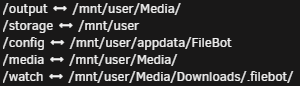
Hi all, I'm having trouble hardlinking files using the AMC script. I am able to hardlink manually in the WebUI so I think it has to do with my volume mappings? Here's the error: And here are my mappings: Movie output naming: Thanks in advance for your help!