





nmills3
Members
-
Joined
-
Last visited
Everything posted by nmills3
-
thanks, so now this thread seems to be done. what do i mark as the solution? because the solution is spread across about 2 pages and multiple posts
-
so i got my server working again and i've been moving the files back over to it. but i just noticed that my log is filling up with lots of errors like this one Dec 4 12:14:45 Tower smbd[21808]: [2022/12/04 12:14:45.456081, 0] ../../source3/smbd/files.c:1199(synthetic_pathref) Dec 4 12:14:45 Tower smbd[21808]: synthetic_pathref: opening [Clone Hero/songs/RB/Rock Band 1 DLC/Metallica - Blackened (2x Bass Pedal Expert+)/rhythm.ogg] failed would that be related to my current issue or should i make a new thread fir help with that tower-diagnostics-20221204-1216.zip
-
does anyone have suggestions for tools that can work out what i file type a file is meant to be? i have a few files that lost their names and i have no idea what they are. i know they're not images or pdf files and video players don't seem to work on them so i don't think it's that
-
Does anyone know if something like this exists
-
ok, UFS standard seems to be recovering either all or most of the files. so now that the lost data part is sorted, what do i need to get disk 3 in my array to a working state? should i just start the array and use the format unmountable drives button?
-
for now i'm going to run the standard version of the ufs software on the drive and see if that can find all the same files. if it can, i'll just buy a licence for that version
-
so I ran ufs and it seems to have found all the files. but the version i used won't let me copy files bigger than 768KB without getting a licence that costs over £500. should i be using a different version?
-
do you know of any good apps to keep a log of what is on each drive? because my other issue is that i don't even know what half the stuff on this drive is. I know what some of the folders/files i lost were, but i have no idea what most of the files on it were and probably won't know until i try and find something and it's missing. I need something that just writes a file that says what file paths are on each disk like once a week
-
for anyone that finds this post in the future. this issue was my transceivers. i was using direct attach 10m copper cables and my switch didn't like them. Swapping to optical transceivers fixed the problem
-
also for the future, is there anything (other than the obvious of having backups) to try and stop this kind of issue happening again?
-
well i'll update here with the results of my file recovery when that finishes in about 6 hours
-
the repair tool yielded the same result on a normal drive so i'm currently running UFS professional on it
-
tower-diagnostics-20221201-1059.zip
-
i think the notification was just wrong because in the rebuild history it shows this

-
so i just woke up and have a very confusing message
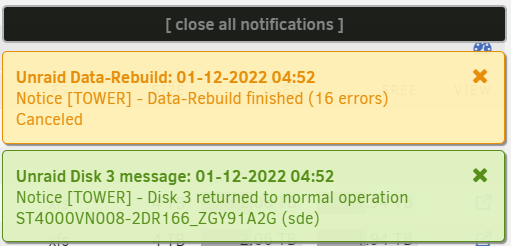
-
ok, the rebuild actually seems to be doing something. so after this is done should i stop the array and restart it in maintenance mode for the xfs repair or should i just do it in normal started mode?
-
Sorry, could not find valid secondary superblock
-
ok, i'll let xfs repair finish anyway (can't hurt to let it try) and if it doesn't work i'll put the existing drive into a different slot and do what you've said. i'm assuming i need to replace /dev/sdx1 with whatever the drive got assigned with a 1 on the end
-
ok, assuming it takes as long to scan the entire drive as a parity check, this should take about 8 hours to run
-
ok, so far the test is doing the same as last time. how long should i let it run for?
-
tower-diagnostics-20221130-1155.zipalso here's another diagnostics file
-
ok disk removed, so should i start in maintenance mode and run the xfs repair tool on disk 3 again?should i do that right now, or should i wait until after the repair thingy finishes trying to find a second superblock on the emulated drive?My mistake. I don't think i have a spare cable for that one to hand, it's a sas to 4x sata cable. If i leave the drive unassigned, should i be able to get the emulated disk working until i can get another cable?



