





desertfox_0815
Members
-
Joined
-
Last visited
Everything posted by desertfox_0815
-
Any idea how to find the problematic part? Rebooted Unraid, Switch and Client. changed Switchports and cables.
-
also changed cat7 cable and switchport. did not solve problem. server has been rebooted also. my client is able to get full gigabit speed with speedtests over WAN and downloading stuff from WAN
-
Thanks just installed and tested. iperf3 shows the same problem. Sending to unraid is fast, receiving from unraid is only 0.7x speed 192.168.178.9 is my unraid and .10 my client. root@Tower:~# iperf3 -s ----------------------------------------------------------- Server listening on 5201 ----------------------------------------------------------- Accepted connection from 192.168.178.10, port 58013 [ 5] local 192.168.178.9 port 5201 connected to 192.168.178.10 port 58014 [ ID] Interval Transfer Bitrate [ 5] 0.00-1.00 sec 108 MBytes 908 Mbits/sec [ 5] 1.00-2.00 sec 113 MBytes 947 Mbits/sec [ 5] 2.00-3.00 sec 113 MBytes 948 Mbits/sec [ 5] 3.00-4.00 sec 113 MBytes 948 Mbits/sec [ 5] 4.00-5.00 sec 112 MBytes 936 Mbits/sec [ 5] 5.00-6.00 sec 111 MBytes 930 Mbits/sec [ 5] 6.00-7.00 sec 113 MBytes 947 Mbits/sec [ 5] 7.00-8.00 sec 113 MBytes 949 Mbits/sec [ 5] 8.00-9.00 sec 112 MBytes 936 Mbits/sec [ 5] 9.00-10.00 sec 111 MBytes 932 Mbits/sec [ 5] 10.00-10.05 sec 5.51 MBytes 945 Mbits/sec - - - - - - - - - - - - - - - - - - - - - - - - - [ ID] Interval Transfer Bitrate [ 5] 0.00-10.05 sec 1.10 GBytes 938 Mbits/sec receiver ----------------------------------------------------------- Server listening on 5201 ----------------------------------------------------------- ^Ciperf3: interrupt - the server has terminated root@Tower:~# iperf3 -c 192.168.178.10 Connecting to host 192.168.178.10, port 5201 [ 5] local 192.168.178.9 port 50918 connected to 192.168.178.10 port 5201 [ ID] Interval Transfer Bitrate Retr Cwnd [ 5] 0.00-1.00 sec 82.0 MBytes 688 Mbits/sec 26 238 KBytes [ 5] 1.00-2.00 sec 80.6 MBytes 676 Mbits/sec 0 240 KBytes [ 5] 2.00-3.00 sec 79.8 MBytes 669 Mbits/sec 0 240 KBytes [ 5] 3.00-4.00 sec 79.8 MBytes 669 Mbits/sec 0 240 KBytes [ 5] 4.00-5.00 sec 81.1 MBytes 680 Mbits/sec 0 339 KBytes [ 5] 5.00-6.00 sec 80.0 MBytes 671 Mbits/sec 0 376 KBytes [ 5] 6.00-7.00 sec 80.0 MBytes 671 Mbits/sec 0 240 KBytes [ 5] 7.00-8.00 sec 78.8 MBytes 661 Mbits/sec 0 240 KBytes [ 5] 8.00-9.00 sec 80.0 MBytes 671 Mbits/sec 0 240 KBytes [ 5] 9.00-10.00 sec 80.0 MBytes 671 Mbits/sec 0 240 KBytes - - - - - - - - - - - - - - - - - - - - - - - - - [ ID] Interval Transfer Bitrate Retr [ 5] 0.00-10.00 sec 802 MBytes 673 Mbits/sec 26 sender [ 5] 0.00-10.00 sec 799 MBytes 670 Mbits/sec receiver iperf Done.
-
is there a iperf version for unraid?
-
Hey @ all. lately i've noticed that my read speeds are around 78,5mb/s and very constant. writing still runs arround 110-113mb/s no matter if i write to cache pool (2x 1Tb ssd) or directly into the array. parity checks are running extremly fast so no read problem with the discs or adapter itself i guess.. nothing changed besides newest stable build of Unraid 6.10.3 i've attached my diagnostics and hope someone is able to help me. thanks alot tower-diagnostics-20220701-0705.zip
-
Changed Powercables...Problem is gone. I was able to rebuild parity without errors. the "safety" parity check was also clean. Thanks alot
-
Ok thanks, cables are already ordered. Will arrive monday. could you tell me where you found these errors?
-
I've enabled the smart value "command time out" on both parity disks and parity disk2 gets errors. is this something to worry about!? should i change to single parity until the source error is found?!
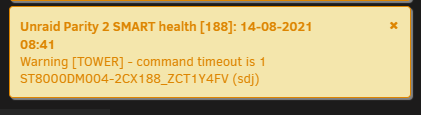

-
Hey guys, i do have a severe problem with my unraid server. my parity disk1 kept restarting on parity checks (Seagate Ironwolf 8Tb CMR). Smartchecks are clear and free of errors. Even though i've replaced the disk with a new disk same type. I've changed the sata cable and powercable and my new drive keeps doing this while rebuilding parity information. on every disk-restart parity checks slows down due to the spinup of the disk. with the new disk rebuild runs longer until paritydisk1 restarts. do you have any idea? Diagnostics log is attached. Thanks alot sideinfo: i've enabled encryption on my array so i have to rebuild parity. tower-diagnostics-20210814-0829.zip

