





mstrhakr
Members
-
Joined
-
Last visited
Everything posted by mstrhakr
-
This should be fixed in the beta already if you'd like to take a look. I should be merging dev into main tomorrow if I can finish fixing the CSS. I hate CSS.
-
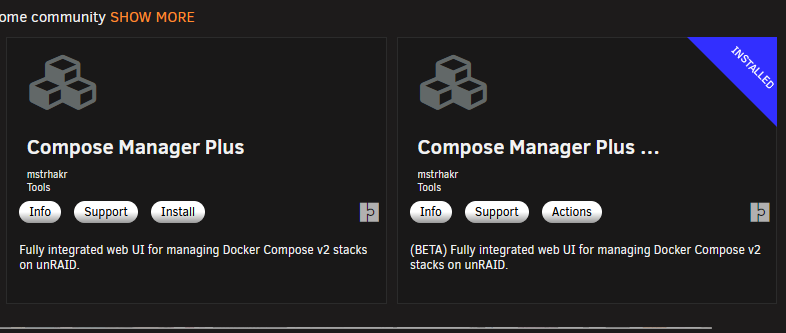
So this is interesting and the behavior may change in the future, but currently when you look up Compose Manager Plus in the CA app store when you already have Compose Manager installed you will get the option to reinstall instead of install. This plugin will slot in directly in place of the original. I kept the underlying name the same to prevent them from both being installed and to allow for the projects to be available to the Plus version by default. In short, you find it on the store and click reinstall and you are all set. There are many more options though so check out the settings page. Oh and be sure to try the beta if you want to try the bleeding edge.
-
I will NOT ignore you! lol but i wonder if I can have it float at the bottom instead of having to scroll all the way down. I'll investigate.
-
Great news! Compose Manager Plus is now listed in the CA App Store. Both the release version and the beta track. @primeval_god FYI
-
Thanks @primeval_god I can do a copy only migration pretty easily, but I'd rather keep this plugin as a replacement instead of another option if that makes sense. I don't see any way to prevent install if Compose Manager is installed already, so keeping the name actually works in my favor. It just depends (IMO) on how CA handles this, if having a different author is enough to allow using the same name. If it turns out I MUST rename the plugin internally I will, and like you said it shouldn't be terrible to implement a migration/copy for projects from the old one. Also while you are here, thanks for making Compose Manager in the first place. I used it for years before I ever got the idea to upgrade it.
-
Quick update; This is still not available on the app store. I haven't received any feedback as to a reason so I'm assuming I've slipped through the cracks. Its possible (although it has not been said) that having this overlap/overwrite the old Compose Manager is not allowed and having a duplicate plugin name (compose.manager) is the problem. This is intentional so I hope that not the case, this allows us to use the same project folder and keep all your existing stacks. In fact I've done some testing and you can install directly overtop the old plugin without removing it first (although I will still recommend removing it just to be safe). This has obviously only been tested with a manual install of the plugin via the GitHub link but I imagine it will be a similar process when coming from the app store. If I learn more or hear from the admins I will update here. Thanks for being patient.
-
YES! There are also beta (tagged with pre-release) releases in the GitHub releases section. Latest is here https://github.com/mstrhakr/compose_plugin/releases/tag/v2026.03.11-dev.1235. The link on the release to paste into the Install Plugin page in Unraid is https://raw.githubusercontent.com/mstrhakr/compose_plugin/dev/compose.manager.plg but from what I can tell your link will also work for installing.
-
Small note: This is still NOT available on the CA App Store, I have submitted the form and even reached out to Squid with no luck so far. I will update these posts with more information when I get it.
-
I now have a beta version available which will be where you can go for the bleeding edge updates. This was done because I am not the only user anymore and reliability is important, doing it this way means i can test the beta (and so can you) before pushing the changes to main for a stable release. The current beta has some back end changes that should help with maintainability but will need tested. There are also two new features in the current beta; Auto Updates and Background Command support. Please try it out and let me know how you like it. If there are any issues please make a new issue on GitHub.
-
If you are able, please report issues or feature requests via GitHub; support will still be provided here but GitHub is the preferred method. https://github.com/mstrhakr/compose_plugin Compose Manager Plus Compose Manager installs the Docker Compose CLI plugin on your unRAID server and provides a comprehensive web-based interface to create, run, update, back up, and restore Compose stacks directly from the unRAID dashboard. It includes per-stack autostart, scheduled automatic image updates, a rich context menu mirroring the native Docker tab experience, an integrated terminal for live command output, background command execution with notifications, optional UI integration to hide Compose-managed containers, and tooling for testing and CI. Screenshots FeaturesDocker Compose Integration - Installs the Docker Compose CLI plugin (v5 by default) and manages stacks on your unRAID server. Web UI Management - Create, edit, and manage Compose stacks directly from the unRAID dashboard. Stack Operations - Start, stop, restart, update, pull/build, and remove stacks with one click (supports profiles and override files). Context Menu - Rich context menu on every stack icon with state-aware actions (see Context Menu below). Container Context Menu - Right-click individual containers to open a WebUI, console, or logs; start, stop, pause, resume, or restart individual containers without touching the whole stack. Auto-Updates - Per-stack scheduled image update checks using SHA-256 digest comparison, with a configurable scheduler, bulk "Run Now", and toggle-all controls. Image Pinning - Images referenced with a @sha256: digest are automatically detected as pinned and will not trigger update alerts. Background Execution - Any stack action (up, down, update, pull, etc.) can be dispatched in the background; a notification is shown on completion and the UI polls for when the lock is released. Expandable Stack Details - Click a stack row to expand an inline Docker-tab-style container table showing update status, image source/tag, network, IP, and port mapping for each container. Autostart & Shutdown - Configurable per-stack autostart with optional force-recreate, wait-for-Docker, and configurable timeouts. Graceful shutdown handling. Visibility & Filtering - Optionally hide Compose-managed containers from the native Docker UI and Dashboard tile to avoid duplicate entries (behavior varies by unRAID version). Backup & Restore - Manual and scheduled backups with selective restore from the UI. Web Terminal - Integrated ttyd terminal for live, colorized compose command output; also supports a basic output mode. Profiles - Full support for Docker Compose profiles, including multi-profile selection per action. External Paths - Compose files and env files can live outside the default projects folder (external compose path and env path per stack). Override File Management - Centralized management of compose.override.yaml files, including service rename handling. Stack Editor - Full-screen modal editor with four tabs: Compose (YAML with live validation), ENV, Web UI Labels (icon/WebUI/shell per service via override file), and Settings (name, description, icon URL, WebUI URL, default profile, external paths). Ctrl+S to save, Esc to close. Basic / Advanced View Toggle - Toggle between a compact view and an advanced view exposing additional columns (SHA diffs, force-update links) — scoped to the Compose tab to avoid affecting the Docker tab. Compose File Discovery - Automatically detects all four standard compose file names (compose.yaml, docker-compose.yaml, compose.yml, docker-compose.yml). Build Stack Support - Stacks with a build: section in the compose file are detected automatically; context menu and update labels adapt ("Build", "Build & Up", "Update & Rebuild"). Indirect Stack Support - Register a stack pointing to a compose file stored anywhere on the array (outside the projects folder) using an "Indirect Path". Security Hardening - Path traversal prevention, shell injection hardening with safe argument arrays, XSS escaping throughout, and strict input validation. Developer & Testing Tools - Unit tests (PHPUnit), integration tests (BATS), static analysis (PHPStan), and CI workflows. InstallationCommunity ApplicationsInstall via the Community Applications plugin in unRAID by going to the 'Apps' tab and searching for 'Compose Manager Plus'. Once there you will see both the main release and the beta release available to be installed. See below if you have Compose Manager already. Manual InstallInstall manually by navigating to: Plugins → Install Plugin and entering the plugin URL: Main Release: https://raw.githubusercontent.com/mstrhakr/compose_plugin/main/compose.manager.plgBeta Release: https://raw.githubusercontent.com/mstrhakr/compose_plugin/dev/compose.manager.plgMigration from dcflachs Docker Compose Manager (Depreciated)When migrating from the original Compose Manager plugin, you can simply press reinstall on Compose Manager Plus to remove the old plugin and install the new one. The plugins both have the same name internally and cannot be installed at the same time. Compose Manager Plus also uses the exact same project folder structure so it will detect all your existing stacks automatically. Safe migration pathThis is usually overkill, but better safe than sorry. Compose down for all stacks Backup project directory Uninstall old plugin Install new plugin Start up stacks Standard migration pathThe standard way in upgrade. Go to App Tab (Community Applications/CA) Search for 'Compose Manager Plus' Press (re)install in Community Applications. Remove Compose Manager Plus and Re-Install dcflachs Docker Compose ManagerWith dcflachs Docker Compose Manager being depreciated, if you want to go back to it you will need to do the following: Disable 'Hide Depreciated Applications' in CAGo to Apps tab (Community Applications/CA) Go to Settings in the bottom of the left sidebar Set Hide Deprecated Applications to No. Remove 'Compose Manager Plus' and reinstall 'Docker Compose Manager'Go to Apps tab (Community Applications/CA) Search for Compose Manager at the top. Find currently installed version and press Actions->Uninstall to uninstall. Find Docker Compose Manager and press Actions->(Re)Install to install. RequirementsunRAID 6.9.0 or later Docker service enabled ORIGINAL MESSAGE BELOW: Hey everyone, I forked the original Compose Manager and upgraded it with a much nicer editor, an improved WebUI, and several UX improvements. It adds things like an improved Compose tab with expandable stacks, log viewing, and import/export of stack definitions. For now its available here: https://github.com/mstrhakr/compose_plugin I'm working on getting it added to the app store, this post is actually the first step to that end. Feedback is always welcome - report bugs or request features here: https://github.com/mstrhakr/compose_plugin/issues
-
Hey all, Started putting together a documentation site for plugin development. Info has always been pretty scattered across forum threads and GitHub repos, so I figured I'd try to consolidate it into something more organized. Site: https://plugin-docs.mstrhakr.com/ GitHub: https://github.com/mstrhakr/plugin-docs Covers PLG files, page files, events, settings, notifications, Docker integration, packaging, and more. Still adding to it but should be enough to get people started or serve as a reference. It's community-maintained so contributions are welcome - feel free to open PRs if you spot issues or want to add something. Edit: Removed "unraid" from docs site and repo name.


