




Skip to content
View in the app

A better way to browse. Learn more.

Unraid

A full-screen app on your home screen with push notifications, badges and more.

To install this app on iOS and iPadOS
  1. Tap the Share icon in Safari
  2. Scroll the menu and tap Add to Home Screen.
  3. Tap Add in the top-right corner.
To install this app on Android
  1. Tap the 3-dot menu (⋮) in the top-right corner of the browser.
  2. Tap Add to Home screen or Install app.
  3. Confirm by tapping Install.

CyberDuckie

Members
  • Joined

  • Last visited

  1. Collabra is expensive when you need to license it. ONLYOFFICE is $149 for 10 users ONE TIME PAYMENT. Where Collabra wants to charge monthly per user. Not worth it IMO. Nextcloud supports it! I will figure it out others have done it.
  2. Thank you for the prompt reply! Looks like it's time to re-isntall from scratch and try the ONLYOFFICE docker and link them. Thanks again
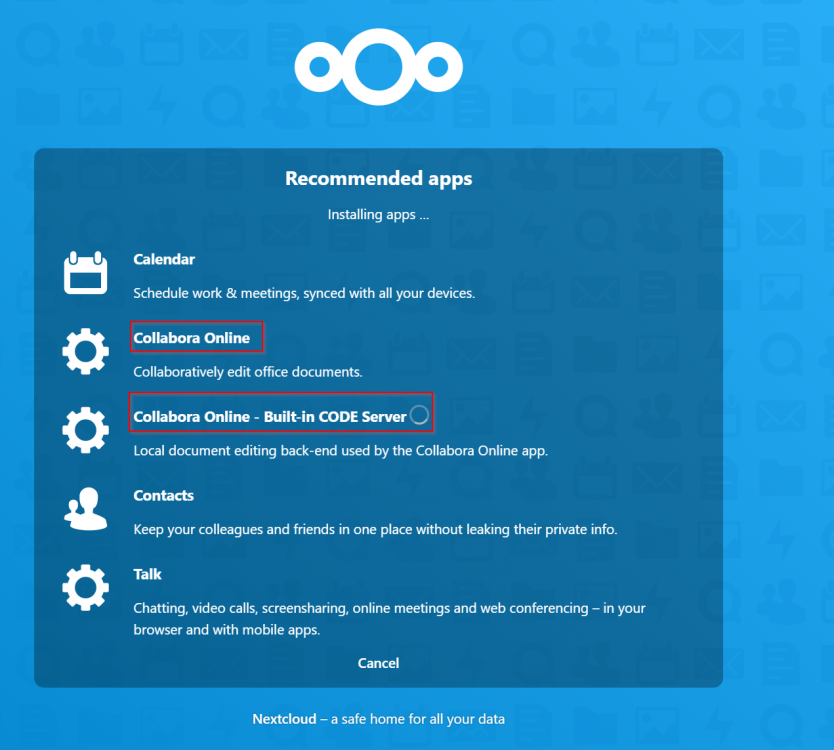
  3. Hi @knex666 Thank you so much for this docker app! Did something change recently with the template? I installed the docker for the first time and follow all the steps outlined. I need ONLYOFFICE and checked "Install recommended Apps" but it installs Collabra and not ONLYOFFICE. Did I do something wrong?

Account

Navigation

Search

Search

Configure browser push notifications

Chrome (Android)
  1. Tap the lock icon next to the address bar.
  2. Tap Permissions → Notifications.
  3. Adjust your preference.
Chrome (Desktop)
  1. Click the padlock icon in the address bar.
  2. Select Site settings.
  3. Find Notifications and adjust your preference.