





Dan S.
Members
-
Joined
-
Last visited
-
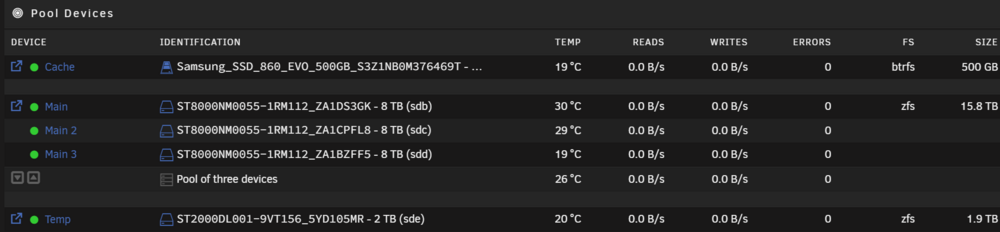
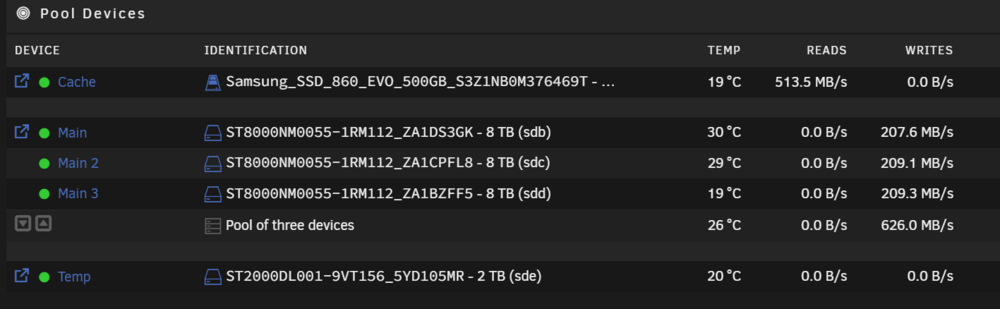
Well, that worked. Here is the result so far before I have started migrating the data back to the new raidz1 pool. And the write speed is great!:
-
Thanks again for your help, Jorge. I'll post up later today with my hopefully successful move to the new configuration.
-
And shares along with existing standalone disks too?
-
Thanks Jorge. I'll get to trying that as soon as I fix up one of the shares that got borked in the process of moving it off of the array to the standalone disks. Is it as simple as creating a new array and it doesn't do or remove any of the other config (users, docker, etc.)?
-
No, the array is now empty with the data moved to other drives mounted in the system. I do not have the drives to create a whole 3x8TB zfs raidz1 pool though and need to reuse the drives in the 3x8TB UnRAID array for that. To be clear, the 3x8TB drives are enterprise Seagate Exos drives and the others I have mounted are definitely not.
-
Hi, With 7.0 and zfs support, I would like to move my data from an array of 3 8TB drives to a zfs raidz zpool using those same 3 drives. I currently have enough extra drive space in standalone disks (including the SSD cache) to hold all of the data from my array and have the array currently empty using a mover and unbalanced. The configuration I want to have when I'm done is no unraid array (or zero drives), a 3 x 8TB raidz1 pool, and an SSD cache for an unraid write cache or whatever zfs cache makes sense if possible to do. I would like to have the read speed from zfs and 3 spinning rust drives over unraid's array as well as better protection against bitrot. I can of course achieve the bitrot protection with btrfs or zfs on each individual non-parity disk, but that doesn't get me the speed up I expect to have from a full zfs pool. After taking the array down, I removed the drives from the array and placed them in a new zfs raidz pool to be my main storage. However, I quite reasonably cannot start the array up due to missing disks after I removed them. Can I actually accomplish this w/o having to start with full external saved data and essentially rebuild it from scratch? I don't have a lot to rebuild as I only use it for NAS and running one docker with searxng that would be easy to recreate. But I would rather not have to deal with redoing all of the users and such. Thanks, and any help and advice from the community is appreciated! Dan
-
Hi, I installed the SearXNG docker container yesterday and made some mods to the settings.yml file to disable a few search sites I wasn't interested in ever using. I do not know if this error was there with the installed config because I didn't look until after I restarted it. In any case, I am getting this error when it starts up: 022-07-04 23:20:41,225 ERROR:searx.shared: uwsgi.ini configuration error, add this line to your uwsgi.ini cache2 = name=searxcache,items=2000,blocks=2000,blocksize=4096,bitmap=1 The thing is that there is an almost exact match to that line in the uwsgi.ini file except it is tagged (properly I think) as name=searxngcache. Do I need to change the uwsgi.ini file as it suggests or is it a bogus error? Thanks.


