




Skip to content
View in the app

A better way to browse. Learn more.

Unraid

A full-screen app on your home screen with push notifications, badges and more.

To install this app on iOS and iPadOS
  1. Tap the Share icon in Safari
  2. Scroll the menu and tap Add to Home Screen.
  3. Tap Add in the top-right corner.
To install this app on Android
  1. Tap the 3-dot menu (⋮) in the top-right corner of the browser.
  2. Tap Add to Home screen or Install app.
  3. Confirm by tapping Install.

AngusBrown

Members
  • Joined

  • Last visited

Everything posted by AngusBrown

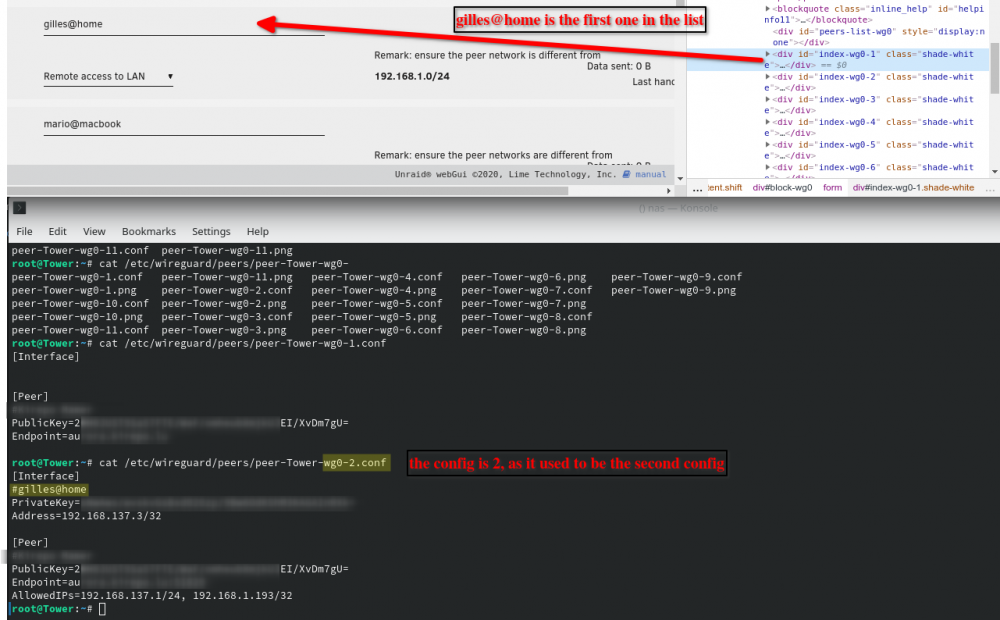
  1. Hey all, sorry if this has already been reported, don't know how to search for this. I have the issue that the wrong config is displayed for each peer. This happened when I deleted the peer before the one i am trying to view. The web page uses the list position in the web page to get the config. If you then delete the first one for example, the index of the second one becomes the first. And when I open this one, it shows the config for peer-Tower-wg0-1.conf when in reality it should be peer-Tower-wg0-2.conf. So, after deleting any one but the last peer, i can't use the gui any more as it's mismatched.
Account

Navigation

Search

Search

Configure browser push notifications

Chrome (Android)
  1. Tap the lock icon next to the address bar.
  2. Tap Permissions → Notifications.
  3. Adjust your preference.
Chrome (Desktop)
  1. Click the padlock icon in the address bar.
  2. Select Site settings.
  3. Find Notifications and adjust your preference.