






jonpetersathan
Members
-
Joined
-
Last visited
Everything posted by jonpetersathan
-
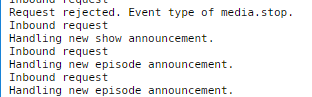
Hmm, looks alright at first glance. Stupid question, but are you able to communicate from the Plex container to the PlexAnnouncer container? Try running the following from inside you Plex container: curl -X POST 192.168.40.201:32500/PLEX_WEBHOOK_TOKEN Obviously replace PLEX_WEBHOOK_TOKEN with your token. You should see something like this in your PA logs:

-
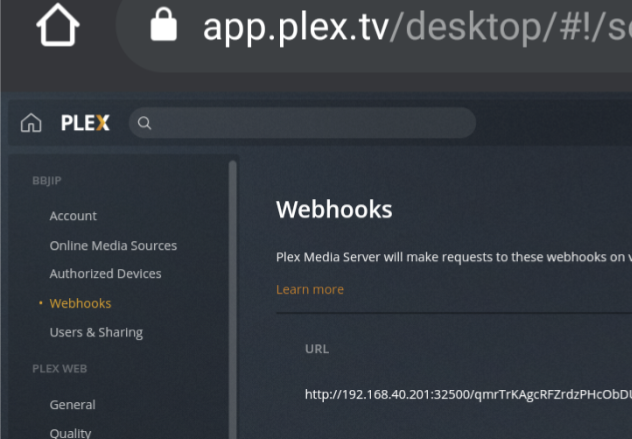
Ok, so the PLEX_WEBHOOK_TOKEN can literally be anything you want, just type some random value in here. This token is then used in the URL, where PlexAnnouncer is listening for incoming Webhooks from Plex. So in your case: http://localhost:32500/1fkD... You then need to put this URL in your Plex settings, where you added the Webhook. From the behavior of your issue I guess that you added the Discord Webhook URL instead here. That's how it looks in my config: Note: You may have to replace localhost with the IP address of PlexAnnouncer (like I did) if they aren't run on the same host.
-
Check your config again, you've probably inserted your Discord Webhook URL instead of the local PA URL (shown in the first line of your log) in your Plex settings.
-
@CGRFC1872Can you maybe share your full log file?
-
No his port is fine, it's the port PA is using (32500). What port Plex uses (32400 per default) doesn't matter here. I think everything is working here. PA is using Discord Webhooks which work fundamentally different then bots. You will for example never see a Webhook join your server, like a bot does. The message Plex send to your server will look like they were send by a bot called Plex (or however you configured your Webhook) but they were actually send using a web request to the Webhook URL you specified in your PA config. Hope this clarifies it
-
Yes you can try, but shouldn't make a difference and I'm using the official Plex image with the exact same config and it works fine. Really strange....
-
@Kibi Hm... Not much I can do here, the problem must be somewhere on the plex side, otherwise at least something would happen in PA logs... My settings are the same as yours.
-
I can't see your images, so I have to guess, but that "https://app.plex.tv/desktop#!/server/4bb62b1cd62b1591a2b........." is just used to link to the elements you added to your library, if you open that link directly it won't work. Can you PM me screenshots of your Plex & PA Config?
-
No that looks good, try adding something new to your library.
-
Then try: https://app.plex.tv/desktop#!/server/4bb62b1cd62b1591a2b.........
-
Ahhh, I hate that this URL looks different on every Plex installation... So this long alphanumeric string is your Server ID. Please try using the following: https://app.plex.tv/desktop/#!/4bb62b1cd62b1591a2b......... (obviously add your full id instead of the dots)
-
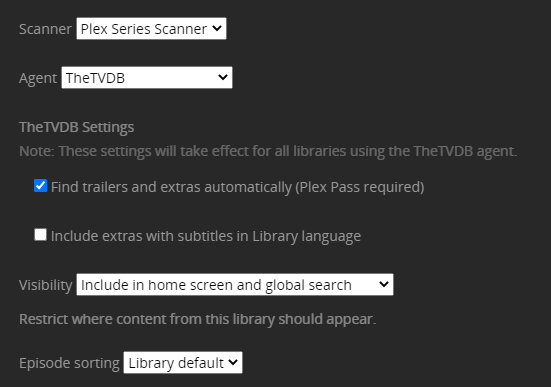
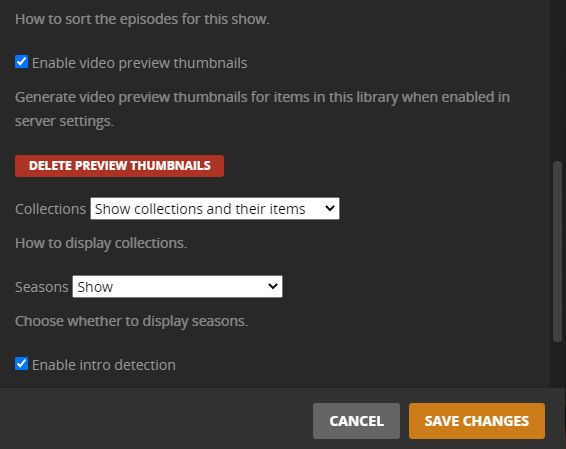
Hmm... If you are really running latest and no update is available ("Check for updates" in Docker-Tab), I'm absolutly clueless. If PA logs also not showing any activity (not even "Inbound request...") when you add a new episode, then the problem is probably on the plex side, but I'm not aware of any settings that might affect push notifications for individual episodes. I assume this affects all tv shows you are trying to add? Can you post a screenshot of your "tv show"-library settings? E.g.
-
@Kibi I've done a little testing on my end. If I add a single episode to an existing show, it gets an inbound request for a new episode and shows up correctly in Discord. Are you running the latest version of PA? Where is your Plex instance from? Are you using the official one or the one from binhex?
-
@brain:proxy @crattray Ok, not sure why this is happening, but update to the latest version (0.4.0) anyway. I've rewritten the part how PA handles episodes and tv show announcements with a little help of @Avalarion. Thanks again! Working on it, but it may take a while, since I'm currently quite busy.
-
@Avalarion Would you mind upgrading to tenasi/plexannouncer:0.3.8dev, then add a new episode and PM me the output of your log?
-
@brain:proxy Glad to hear it's working now. I've also updated PA to work with the slash included in the url (starting from 0.3.8)
-
Totally agree. Sadly Plex Webhooks are poorly documented and the behavior on my end is a little bit different, so I may need a bit of help, debugging this. I will take a look at this in the afternoon.
-
Does this happen only if you are trying to add new episodes of TV-Shows? So movie announcements are working? If yes, could try update to tenasi/plexannouncer:0.3.7dev?
-
@brain:proxy Your URL is supposed to look like https://app.plex.tv/desktop#!/ser... and not https://app.plex.tv/desktop/#!/ser.... That's why PA is throwing an error. But could you just confirm to me, if your url you provided (...desktop/#!/server...) is actually working for you? So can you access your Plex server with it? If you are indeed able to, I would implement a fix on the PA side. Thanks!
-
@Tergi Can you check the Plex Webhooks and Push Notification settings? (Last part of step 3 in my initial post)
-
mybad, forget to tag the latest version, try updating again.
-
yes
-
Gotya, now you can! Update to the latest version and add a new environment variable called UPDATED_LIBRARIES. Specify the libraries you wish to get updated as a comma separated list within the "Value" section.
-
Using CONFIG_PATH allows you to specify all settings within a config file, but if you're using Unraid, I would recommend using variables using the GUi instead.
-
I'm not quite sure what you mean, but if you add a new movie to any library of the server you specified, it will send updates to the webhook. Currently movie and tv show libraries are supported.


