






jonpetersathan
Members
-
Joined
-
Last visited
-
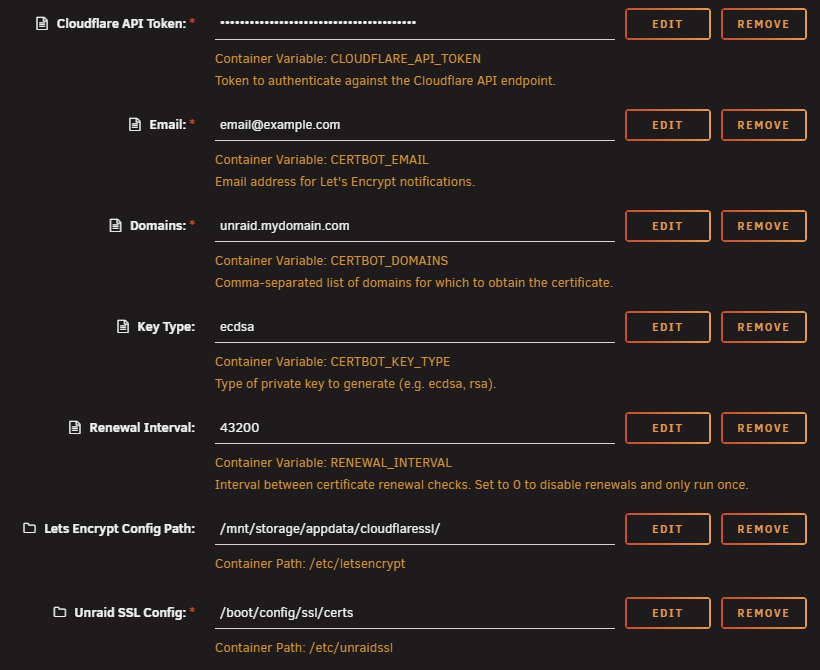
Summary: Support Thread for Tenasi - CloudflareSSL DockerHub: https://hub.docker.com/r/tenasi/cloudflaressl Project: https://github.com/tenasi/cloudflaressl What is CloudflareSSL? Are you always annoyed by the "this page is not secure" warning, but don't want to configure a custom CA? Then this is for you. CloudflareSSL is a simple docker container that generates SSL certificates for Unraid using Let's Encrypt without the need to expose any ports. CloudflareSSL uses certbot with DNS challenge to authenticate the domain. Getting Started / Configuration First obtain a Cloudflare API token: Go to the Cloudflare API Tokens page. Click on "Create Token". Click "Use template" for the "Edit Zone DNS" template. Change the token name (optional) Set a specific zone under "Zone Resources" (optional) Click on "Continue to summary". Click on "Create Token". Example configuration: Make sure Unraid SSL Config points to /boot/config/ssl/certs! Otherwise the container wont be able to update your Unraid SSL certificate. About Us GitHub Profile: https://github.com/tenasi DockerHub Profile: https://hub.docker.com/u/tenasi
-
@darkwolf ah okay, I see what's going on. So first of all, the IP of your Plex server doesn't matter at all. However the IP of PA does. This is because the webhook you configured in Plex directly points to the IP of PA. So if this happens, you need to open webhook configuration in Plex and change and update the URL. (Just copy whatever is in the PA logs at the beginning and replace localhost with the IP of your PA container. This likely happened because you are not using custom networks and restber works and a static IP for your containers.
-
Does this match the URL you have in Plex? In Plex you should have replaced localhost in the URL with the IP or hostname of the Plex Announcer container. Maybe the IP of your container has changed or something. Try doing a curl URL from the Plex container and check if anything pops up in the logs.
-
@ph.neutral: Do still have this issue? If yes, may I ask what version you are on?
-
jonpetersathan changed their profile photo
-
+1
-
And btw, for everyone stumbling across this, who might need the functionality already, here is how I solved it for now: Disable the NFS export for all shares you want to be exclusive and create a new user script that runs on every array start and looks like this: KUBE_STORAGE="\"/mnt/storage/KubeStorage\" -fsid=103,async,no_subtree_check 192.168.100.200(sec=sys,rw,sync,no_subtree_check,no_root_squash)" EXPORTS="/etc/exports" grep -qF -- "$KUBE_STORAGE" "$EXPORTS" || echo "$KUBE_STORAGE" >> "$EXPORTS" exportfs -ra Ofc, modify the path to point directly to the folder in your pool and you might want to change or remove the NFS options (everything after and including 192.168... - in particular no_subtree_check,no_root_squash) unless you know what you are doing. Repeat line 1 and 4 for each share you want to export.
-
Hey everyone, I just updated from 6.12.0-rc6 to 6.12.3 and noticed that exclusive shares don't work together with NFS exports (as it´s stated very clearly in the patch notes). However, the strange thing is, that this worked perfectly in 6.12.0-rc6. Maybe this is because of some last minute change that got introduced in 6.12 or I tinkered around manually with /etc/exports and just can´t remember that I did so.... I understand that this doesn't work with the symlinks, as they are not resolved by the NFS server, so here is my proposal: When a share fulfills all conditions to be exclusive, but is exported via NFS. Instead of using FUSE and exporting the share via /mnt/user/myshare, what about using a symlink and exposing the share directly via e.g. /mnt/mypool/myshare? This might be a little inconvenient when mounting the share, but nothing good documentation couldn't fix. Any thoughts?
-
I have the same issue, but for me it is my Plex container i believe, which indeed uses the gpu. But this issue is new. Anyone of you running on rc6? And do you have the nvidia driver plugin installed by any chance?
-
Migration went smooth for me so far! I really like the new account page and having a direct link to the OTP Auth url, instead of having to decode the QR code manually, is really awesome, thanks! Just a minor remark (it's more of convenience thing): When generating the OTP Auth URL (and the respective QR code), IMO the label shouldn't include the Amazon Cognito user id, but rather the account name. So instead of: otpauth://totp/AWSCognito:UUID?secret=BLABLABLA&issuer=Unraid The URL with the (URL encoded) account name could look like this: otpauth://totp/jonpetersathan?secret=BLABLABLA&issuer=Unraid Or if you want to include the issuer prefix in the label: otpauth://totp/Unraid:jonpetersathan?secret=BLABLABLA&issuer=Unraid I think this Is a bit more convenient and user-friendly when importing into other apps/services. But that's just my humble opinion...
-
@Mstrlink1 Can you check your Push notification settings? Plex Server Settings / General / Push Notifications (Advanced View) This needs to be enabled in order for "library.new" events to be send to all web hooks.
-
Awesome thanks! Didn't saw this...
-
Hi, I saw some guys requesting a username change in this section. Any chance I can get my username changed to jonpetersathan. Want to align with my GitHub and Twitter username. Thanks!
-
Really exited about the ZFS groundwork here and looking forward to the upcoming official ZFS support. I actually switched to TrueNAS Scale for my new server because of ZFS. And although I enjoy TrueNAS Scale quite much, it just can not compete with Unraid in the HomeLab space. So thanks for all the great work!
-
@Hawkins12 Can you send me your logs and config? I mainly added documentation and automated the GitHub pipeline, so no idea what caused that
-
Yeah, adding an additional variable won't help, since it will overwrite the other. Are you sure you changed the correct setting? So DISCORD_WEBHOOK_URL should look something like this: "https://discord.com/api/webhooks/XXX/XXX,https://discord.com/api/webhooks/XXX/XXX" I didn't test this feature extensively, but it still works for me. How many webhooks did you add?



