





Nafekhbot
Members
-
Joined
-
Last visited
-
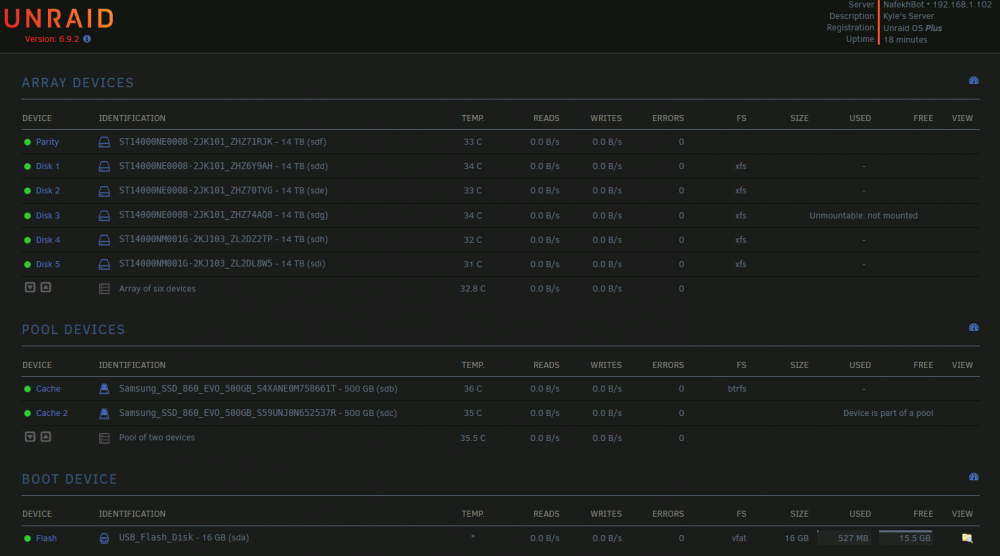
Hi all, My setup is running on Unraid 6.9.2, and uses 6x14tb drives with one of those as a single parity, as well as 2x500gb SSD cache drives. I have been running a parity check these last few days, and errors were nothing out of the ordinary - I don't remember the exact output, but it corrected < 100 errors. Today one of my disks started showing as unmountable. I have followed the guide here and checked the file system in check-only mode. The output from that check is here : xfs_repair_output.txt I'm not familiar with how to read the check output, or if it will be safe to proceed with the full repair. Can anyone advise if I should proceed with the repair, or should be going down a different path based on these logs? Thanks in advance!
-
@alex0407 Thanks! I ultimately ended up switching to SABnzbd after trying a few more avenues to no avail... I should have realized I could just roll back the container, the timing definitely coincided with the weekly automatic update. Hopefully with the recent news that NZBget development has returned, we'll see issues like this fixed!
-
I've run into the same issue as elcapitano above. Everything was working well a few days ago, and now Sonarr and Radarr are unable to connect to nzbget. [v3.0.6.1196] NzbDrone.Core.Download.Clients.DownloadClientUnavailableException: Unable to connect to NzbGet. Error getting response stream (ReadDoneAsync2): ReceiveFailure: 'http://192.168.1.102:6789/jsonrpc' ---> System.Net.WebException: Error getting response stream (ReadDoneAsync2): ReceiveFailure: 'http://192.168.1.102:6789/jsonrpc' ---> System.Net.WebException: Error getting response stream (ReadDoneAsync2): ReceiveFailure Ive been trying various fixes without any progress - reinstalling nzbget, deleting appdata, changing the port, etc. nzbGet download client connection in sonarr and radarr test fine, but they're unable to add content for download. I can use the nzbget webui just fine, and docker allocations all match. I can still add nzb downloads manually.

