Wanty
Members
-
Joined
-
Last visited
Everything posted by Wanty
-
So I've tried on different ports and with other clients (on my tablet, my desktop and another phone) and none of them worked. In the logs from my desktop it says "Handshake did not complete after 5 seconds, retrying..."
-
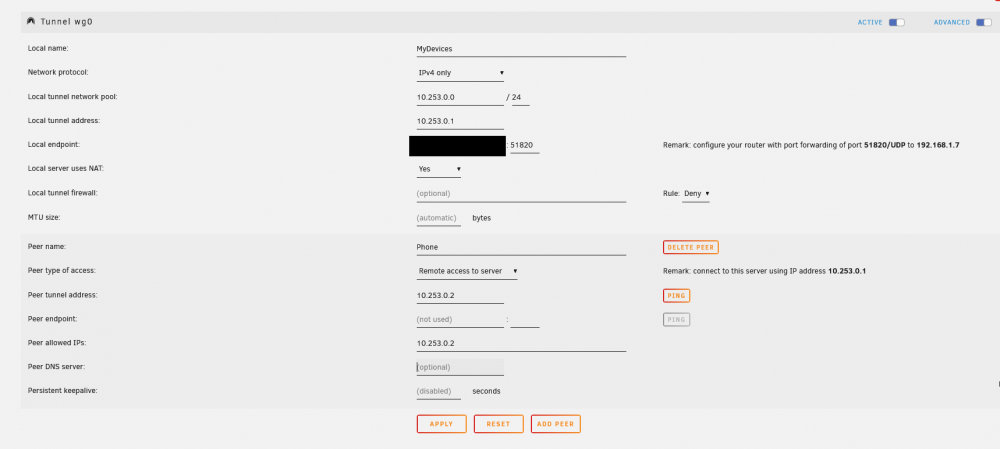
Hi, so tbh I am really lost about Wireguard. I've spent a day (more actually) on that trying different methods: remote access to server remote access to LAN remote tunnelled access I did setup my port forwarding correctly on port 51820 (internal and external) to my server (192.168.1.7) as UDP. In Unraid my network interface (eth0 and eth1) have bridging enabled I've tried with and without my dynDNS (duckdns) as a local endpoint I also noticed that the local tunnel network pool is using /24 for subnet where my Wireguard client (my phone) was using /32. So I've tried /32 server & client side and also /24 server & client side. I've tried with and without preshared key I've tried with and without peer DNS server. And for the different DNS servers address used: 1.1.1.1 / 8.8.8.8 / 192.168.1.254 (my router) As on client side, I did make sure that I was able to access my Unraid web interface and different services around (different ports) from my local network connected via WiFi. As soon as I turn off WiFi and enable Wireguard I am not able to have a handshake nor I can access anything. I've tried my local network local tunnel network on my phone none of them worked. Here is more or less what I've used in my Wireguard settings I did disable battery saving abilities on my phone, background data & unrestricted data usage. Someone would be able to help me ? Thanks in advance