





Kameleon83
Members
-
Joined
Everything posted by Kameleon83
-
The change was a personal need. I have just changed it back to a configuration as before.
-
It allows you to choose between a local link for LAN (Local Area Network). Example: 192.168.10:1234. But you can also put an application on the web via a server. In this case, you can configure the WAN(Wide Area Network). Example: jellyfin.example.com. For example I use NginxProxyManager to give access to some containers with SSL access. I hope I've been clear enough.
-
Sorry for the wait. 🥺
-
Indeed, I saw that there was a problem. I just corrected it.
-
There is already a favicon on the web page.

-
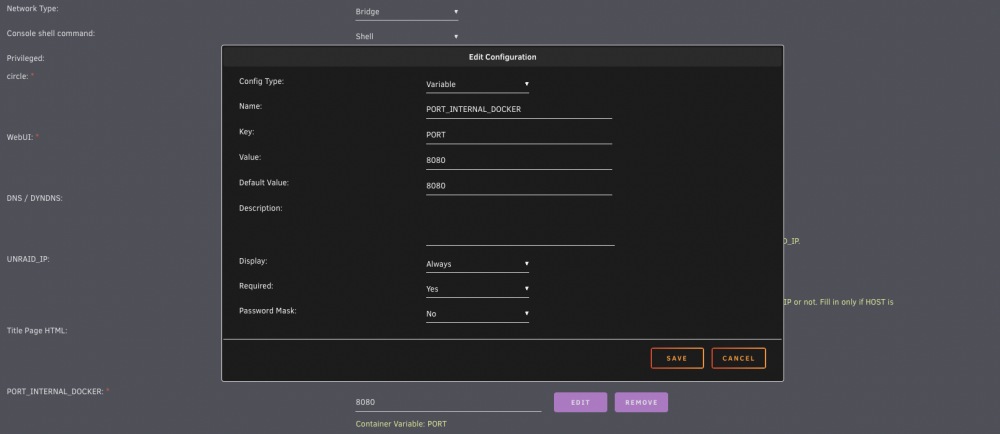
I have added a PORT Variable that allows you to change the port of the application. Tell me if this works and is it ok?
-
By default the internal port is 8080. I'll change it right away. You should have an update of the container in a few minutes.
-
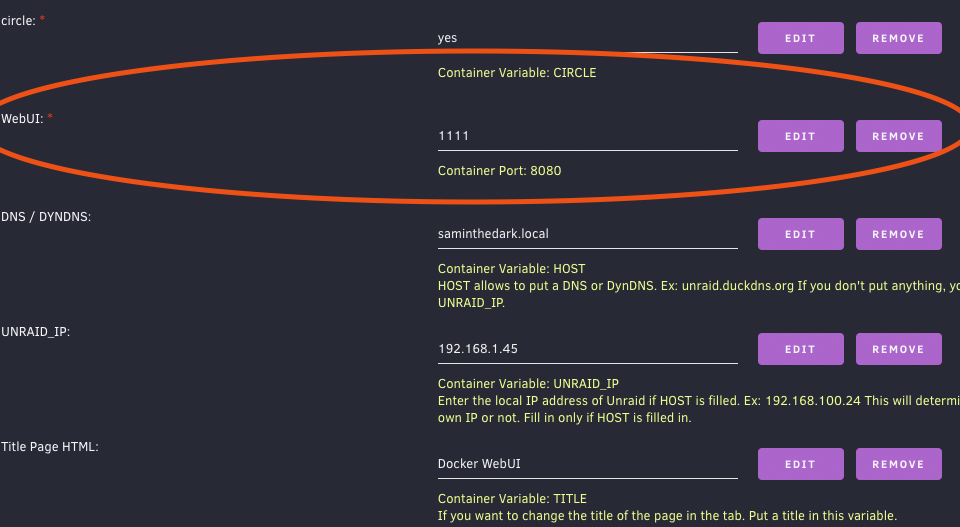
Hello, You normally have a parameter that allows you to change this.
-
You're welcome. If you have a proposal for an explanation, then I'd be happy to have some help. I'm French and it's not always easy to translate from technical French to natural English. A very good day to you too. Cheers
-
Hello, could you please explain more?
-
I added a TITLE variable to change the title of the page. By default, I left Docker WebUI. I also changed the description on page 1. I hope it will be newer understandable on how to use the variables. If you want to see newer, go to the BitBucket
-
I'm watching this this weekend. I'll explain it a bit better and put another environment variable for the page title.
-
Hello, I have added a UNRAID_IP variable. It will allow to set the IP address of the server by default. So if a container does not have the same IP then it will not replace it with HOST. The template has changed.

-
Hello Davide95, Indeed, you have to put the HOST of your Unraid or a remote Host with a DynDNS. My software retrieves the file /var/local/emhttp/plugins/dynamix.docker.manager/docker.json. Can you send me this file, privately? Also tell me the container, so I can try to find a solution if it is possible. Have a nice day.
-
Hello, This is a good idea. I just put an autofocus on the input #filter. 😎
-
tmpmail A temporary email right from your terminal written in POSIX sh. tmpmail is a command line utility written in POSIX sh that allows you to create a temporary email address and receive emails to the temporary email address. It uses 1secmail's APIto receive emails. Dependencies - w3m - curl - jq
-
Thanks for the feedback. Thanks to your mistake, I put a security in case the problem comes back. I don't know why you got a 'null' instead of 'true' or 'false'.
-
Do you have the line with the error? Can you also send me your file, located in: /var/local/emhttp/plugins/dynamix.docker.manager/docker.json I work with this file. And according to your error, it tries to transform an information into a boolean when it should only be true or false. No sensitive data exists in this file but just in case, check it. Thanks for your feedback.
-
It’s normal. A new input on config (HOST). Change value and it will fine.
-
- Adding zoom in/out - Adding a filter - Add a HOST environment variable to set your HOSTNAME or dns (if ports are open)
-
I open my bitbucket. https://[email protected]/kameleon83/unraid-docker-webui.git
-
Thanks for your feedback. Being a small mistake, I took 2 minutes to correct it. Update and try again.
-
Hello and thank you, Yes, that's a good idea. I will try to integrate that later. I am quite busy in the coming days. --------------------- Bonjour et merci, Oui, c'est une bonne idée. Je vais essayer d'intégrer cela par la suite. Je suis assez occupé dans les jours à venir.
-
Hello, I will try to put a scale on this page with the Ctrl(+/-) keys. As for the domain address instead of the IP lan, it is possible. However, the improvements will only be made in the next ten days or so. I'm quite busy these days.
-
Yes, it's true.




