





adamgwaps
Members
-
Joined
-
Last visited
-
Nah i am serious, if ever i am going to hand it unsealed and just to be sure the recipient can test if its a real deal HDD.
-
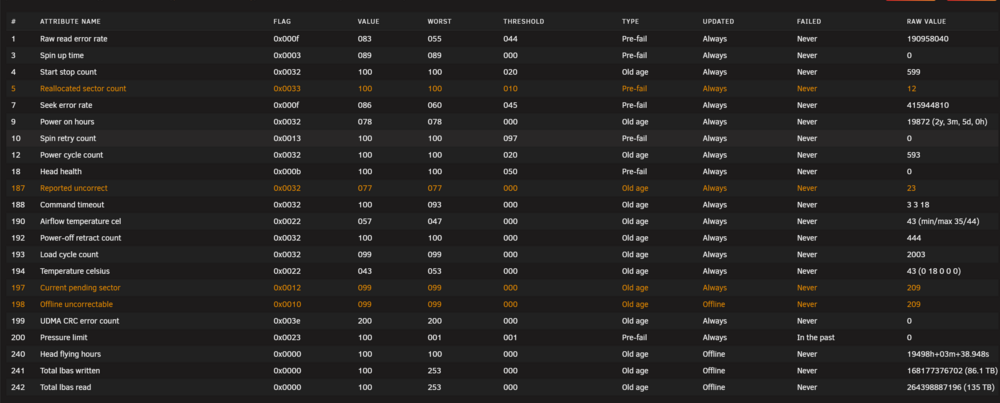
Hi fellow unraiders, I’m hoping someone can help me out here. A while ago, a friend gifted me a Seagate HDD, but I’ve run into an issue with the RMA process. Seagate has agreed to honor the RMA, but only if the drive is shipped from a US address. The problem is, I’m based in Metro Manila, Philippines, and none of my friends are traveling to the US anytime soon. To make things even more complicated, shipping the drive from the Philippines to the US is tough because of corrupt customs practices here, and they require a lot of paperwork, which is nearly impossible to get. So, I’m reaching out to see if anyone here in the US is planning a trip to the Philippines soon and would be willing to help me with this? The plan would be for you to bring the drive back to the US, and Seagate will cover the shipping costs for the RMA. I’d be more than happy to make any arrangements to cover any fees and make it as easy as possible. Thanks so much in advance! I really appreciate any help you can offer! Best, Adam
-
Thank you so much for being with me in this journey Got it!
-
Thanks @JorgeB you are the best! any maintenance i should do? or can i proceed using my server normaly?
.thumb.jpg.9756967ce5d4293e7f3ea85cdb4bb2c3.jpg)
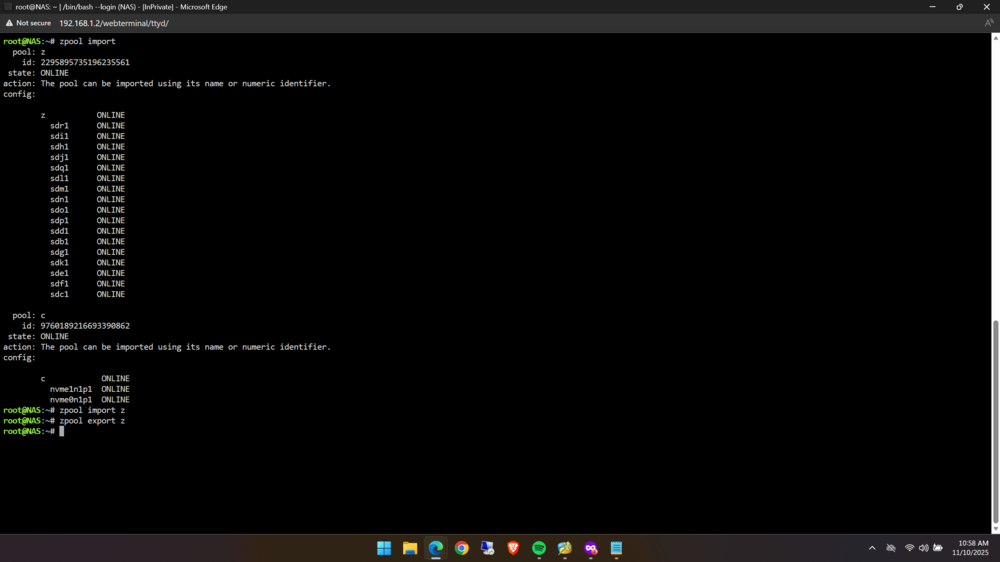
-
YAY! Is this real? what to do next can i just remove the damaged disk and replace with the rescued disk then import the zfs? Thanks in advance @JorgeB
.thumb.jpg.6030576eabd6cde4a000d224fac7f019.jpg)
-
HI guys, is this real? or will it eventually get faster as it gets to other part of the platter?
.thumb.jpg.4bc18d5705ea149d272d46b829f5d835.jpg)
-
Just another update
.thumb.jpg.eb9967c8b48b579dc287a628116bf58e.jpg)
-
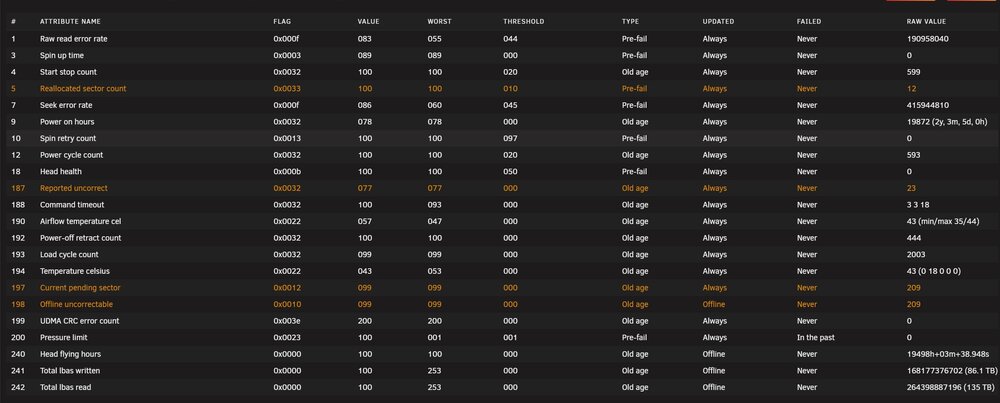
Yup here is the smart of the failed drive.
-
Hi @JorgeB it restarted again and changed drive letter and again i resumed. (Just another Update)
.thumb.jpg.b54326a31d12c6eecad5548ac45cb420.jpg)
-
Hi @JorgeB it did it again i think the drive is the culprit it seems it reset by itself i think it is safe to resume now.(Just an Update)
.thumb.jpg.f27b4a797708ae20ee269fd989628f77.jpg)
.thumb.jpg.07794e39244b29995f1f36e58fa95f4c.jpg)
-
@JorgeB Perfect! I will redo it now then again i will update this thread if anything happens and again thanks for the fast reply!
-
@JorgeB asside from changing the ddrescue log file location is there anything else i should do?, do i need to format the destination drive or can i just start over just change the log file directory?
-
@JorgeB I meant i think while running ddrescue the disk identifier changed and it my have copied from another drive thus tainting the data and now that i reboot and it returned it may resume but the data cloned may be from another drive when the id changed and it resumed now to the correct drive thus the rescue data may not be reliable anymore(sorry if i cant explain it clearly)
-
Hi again @JorgeB i did and it resume to this is this correct? or should i start over? is this is normal?
.thumb.jpg.9afae1dfef906e7f395c9d0bab9381a8.jpg)
-
Got it i read online that i should use -D if i encounter this error should i or should i proceed with your recommended command? Thanks again for the fast reply @JorgeB


.jpg.0a5ce660c68577ab00d08375ff69879a.jpg)

.jpg.ce84803f6ba208d269963a7a0cf488d7.jpg)
.jpg.218886b501344306344803998eedbaae.jpg)
.jpg.556b1d03725c74a045bdffdbfc50c48e.jpg)

.jpg.e7f6e8a4c07442d3a189376c1e6ea17c.jpg)
.jpg.75819d97c0ec4f4d1638779f5f8fcc68.jpg)
.jpg.962a1b756cc5c5aa72ad7f507aa22961.jpg)
.jpg.96e903448d724f5f729291b633ca4d7b.jpg)