



Skip to content
View in the app

A better way to browse. Learn more.

Unraid

A full-screen app on your home screen with push notifications, badges and more.

To install this app on iOS and iPadOS
  1. Tap the Share icon in Safari
  2. Scroll the menu and tap Add to Home Screen.
  3. Tap Add in the top-right corner.
To install this app on Android
  1. Tap the 3-dot menu (⋮) in the top-right corner of the browser.
  2. Tap Add to Home screen or Install app.
  3. Confirm by tapping Install.

YvesJK

Members
  • Joined

  • Last visited

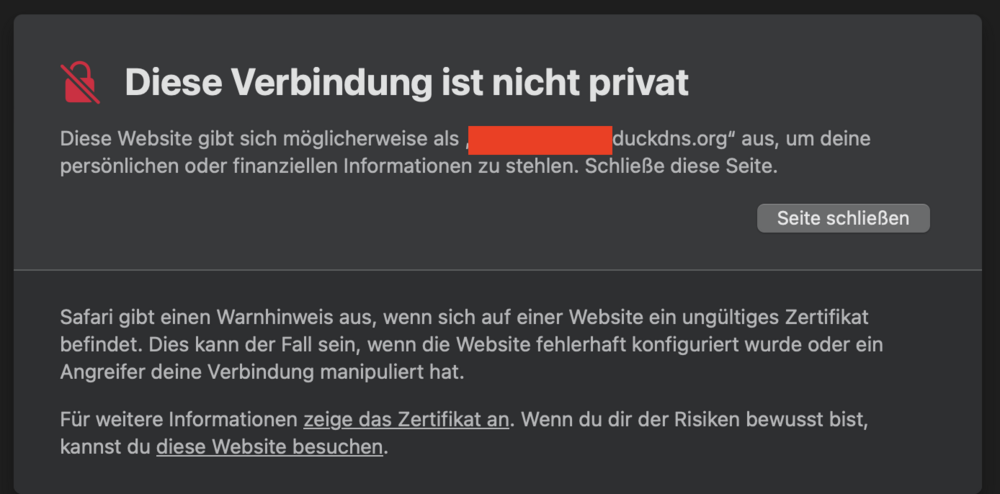
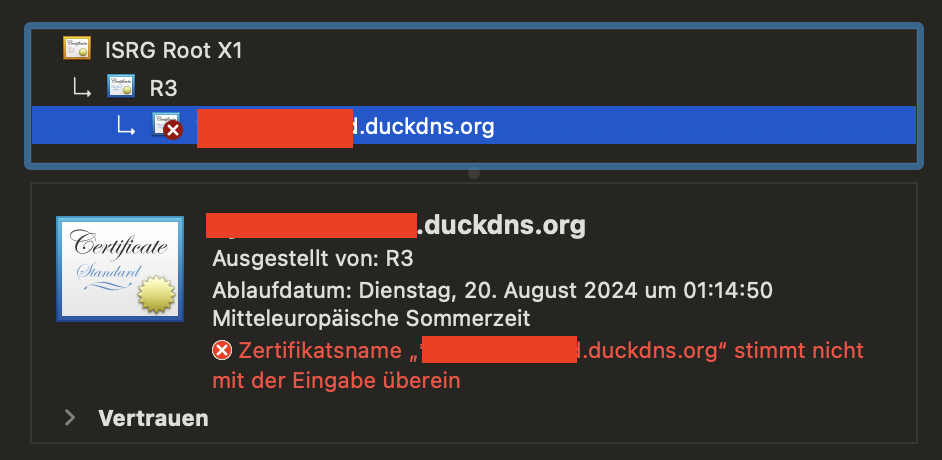
  1. Hi everybody I am not sure if this is the correct forum to post my issue. Since a couple of years i am having trouble with my certificate to access nextcloud. As i am very unexperienced, i followed the guide of Spaceinvador One on youtube: I was able to set it up but since two years (after migrating from Let's Encrypt to Swag) i get the following error message: What do i need to do to not have this error anymore? I am sure there are already many entries in the forum that decsribe this error but i was not able to find a solution for it. Can you help me? What infos do you need to do so?
Account

Navigation

Search

Search

Configure browser push notifications

Chrome (Android)
  1. Tap the lock icon next to the address bar.
  2. Tap Permissions → Notifications.
  3. Adjust your preference.
Chrome (Desktop)
  1. Click the padlock icon in the address bar.
  2. Select Site settings.
  3. Find Notifications and adjust your preference.